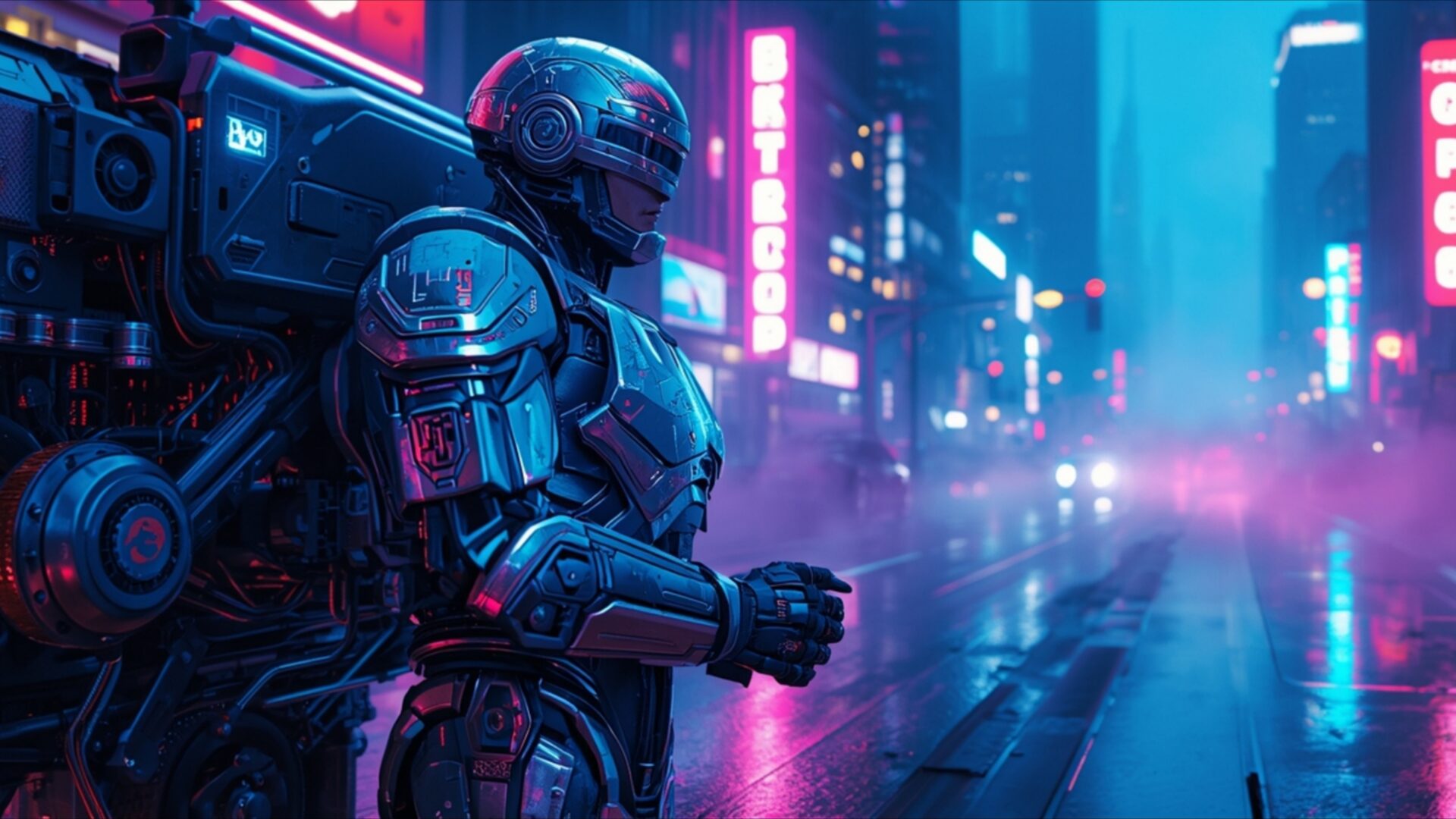
👽️ RoboCop Patrolling Cyberpunk Detroit Streets 4K UHD (3840x2160) Wallpaper
 Xenomorph Crawling Through Industrial Metal Corridor
 Ripley Walking Through Atmospheric Alien Hangar
❤ Share this wallpaper:
WhatsApp Facebook Twitter / X Pinterest LinkedIn Copy Link for Instagram Telegram Reddit Email





💡 Below is relevant information on how to install wallpapers on different devices 👇






This 4K wallpaper is the best choice for testing your OLED professional display resolution. Compared to others, our high-performance tool provides a premium look for any high-end smartphone or desktop setup.





"Personalize this wallpaper or upload your own image to create the perfect mobile background 👇"
Customize RoboCop Patrolling Cyberpunk Detroit Streets for Mobile Wallpapers
iPhone • Samsung • Xiaomi • Google Pixel • Android • Huawei • (Others)
720×1600 • 1080×1920 • 1080×2340 • 1080×2400 • 1284×2778 • 1440×3088Please use Portrait Mode for a better experience (Optional)
Overview – RoboCop Patrolling Cyberpunk Detroit Streets
RoboCop Patrolling Cyberpunk Detroit Streets captures the essence of the Science Fiction category with its gritty depiction of a futuristic cityscape and its iconic cyborg law enforcer. The scene composition immediately draws you into a world of armored heroics and neon-lit dystopia. The image presents a powerful visual theme, showcasing RoboCop amidst the urban decay and technological advancements of a crime-ridden future. The cool blue reflections bounce off his metallic form, highlighting the stark contrast between his robotic enhancements and the decaying environment around him.
The artist has skillfully used lighting to create depth and atmosphere. Notice how the neon signs cast long shadows, emphasizing the sense of unease and danger that permeates the streets of Cyberpunk Detroit. The high-resolution details bring out the textures of the environment, from the grimy pavements to the sleek surfaces of the futuristic vehicles. It’s a compelling visual narrative, hinting at a larger story of justice and survival in a world on the brink. This 4k wallpaper is more than just a picture; it’s a window into a complex and thought-provoking world.
The cyborg police officer, RoboCop, stands as a symbol of order in this chaotic landscape. His presence is both reassuring and unsettling, a reminder of the sacrifices made in the name of law enforcement. The armored hero’s design is faithfully rendered, capturing the iconic character’s imposing stature and unwavering determination. The overall aesthetic layout is carefully balanced, creating a visually arresting and emotionally resonant experience. This desktop background offers a glimpse into a world where technology and humanity collide, raising questions about the nature of justice and the future of society.
Personalize your desktop with this stylish HD artwork, a testament to the enduring appeal of the robocop mythos. The blue reflections and neon glow create a visually stunning effect, making it a captivating addition to any computer screen background. This is a great way to get it now, and transform your monitor wallpaper into a portal to a world of sci-fi dystopia. The detailed rendering and vibrant colors will bring your screen to life, offering a daily dose of futuristic intrigue.
This stunning visual is available as a PC wallpaper, perfect for fans of the genre. The 3840×2160 resolution ensures that every detail is crisp and clear, even on large displays. You can download wallpaper to use as a laptop wallpaper, notebook wallpaper, mobile background, smartphone wallpaper, or tablet background. The high-resolution image is optimized for a variety of devices, ensuring a seamless and immersive experience. This RoboCop Patrolling Cyberpunk Detroit Streets is also available in 2K and Full HD versions, ensuring optimal display quality across a range of devices.
Wallpaper license: CC BY-NC-ND 4.0 · Credit: HDPeek.com
Remove Black Bars | Fit to Any Screen Size | CSS Fixer & Minifier | Compress Image Online | Image Converter Online | What Is My Screen Resolution? | Wallpaper Upscaler Online
Explore Categories
💡 How to Install Wallpaper on Different Devices
Windows PC:
Right-click on the wallpaper image. Select "Set as desktop background" or "Set as wallpaper". Adjust the fit (Fill, Fit, Stretch, Tile, Center) in Settings > Personalization > Background.Mac:
Right-click on the wallpaper image. Select "Set Desktop Picture". Alternatively, go to System Preferences > Desktop & Screen Saver and choose your image.iPhone / iPad (iOS):
Open the wallpaper image in Photos. Tap the Share button and select "Use as Wallpaper". Move and scale the image, then tap "Set" > Choose "Set Lock Screen", "Set Home Screen", or "Set Both".Android:
Open the wallpaper image in your Gallery app. Tap the Menu or Options button, then select "Set as wallpaper". Choose Home screen, Lock screen, or Both. Adjust the crop if needed and confirm.Linux (Ubuntu / others):
Right-click on the wallpaper image. Select "Set as Desktop Background" or "Set as Wallpaper". Adjust settings if your desktop environment allows multiple monitors.
Tips:
- For best quality, download the image in the resolution that matches your screen.
- Use 16:9 for widescreens, 1:1 for square displays.
- On mobile devices, choose "Set Both" for a consistent look on Home and Lock screens.
