🌃️ Warsaw Old Town Market Square 4K UHD (3840x2160) Wallpaper
❤ Share this wallpaper:
WhatsApp Facebook Twitter / X Pinterest LinkedIn Copy Link for Instagram Telegram Reddit Email



💡 Below is relevant information on how to install wallpapers on different devices 👇
This 4K wallpaper is the best choice for testing your OLED professional display resolution. Compared to others, our high-performance tool provides a premium look for any high-end smartphone or desktop setup.


"Personalize this wallpaper or upload your own image to create the perfect mobile background 👇"
Customize Warsaw Old Town Market Square for Mobile Wallpapers
iPhone • Samsung • Xiaomi • Google Pixel • Android • Huawei • (Others)
720×1600 • 1080×1920 • 1080×2340 • 1080×2400 • 1284×2778 • 1440×3088Please use Portrait Mode for a better experience (Optional)
Overview – Warsaw Old Town Market Square
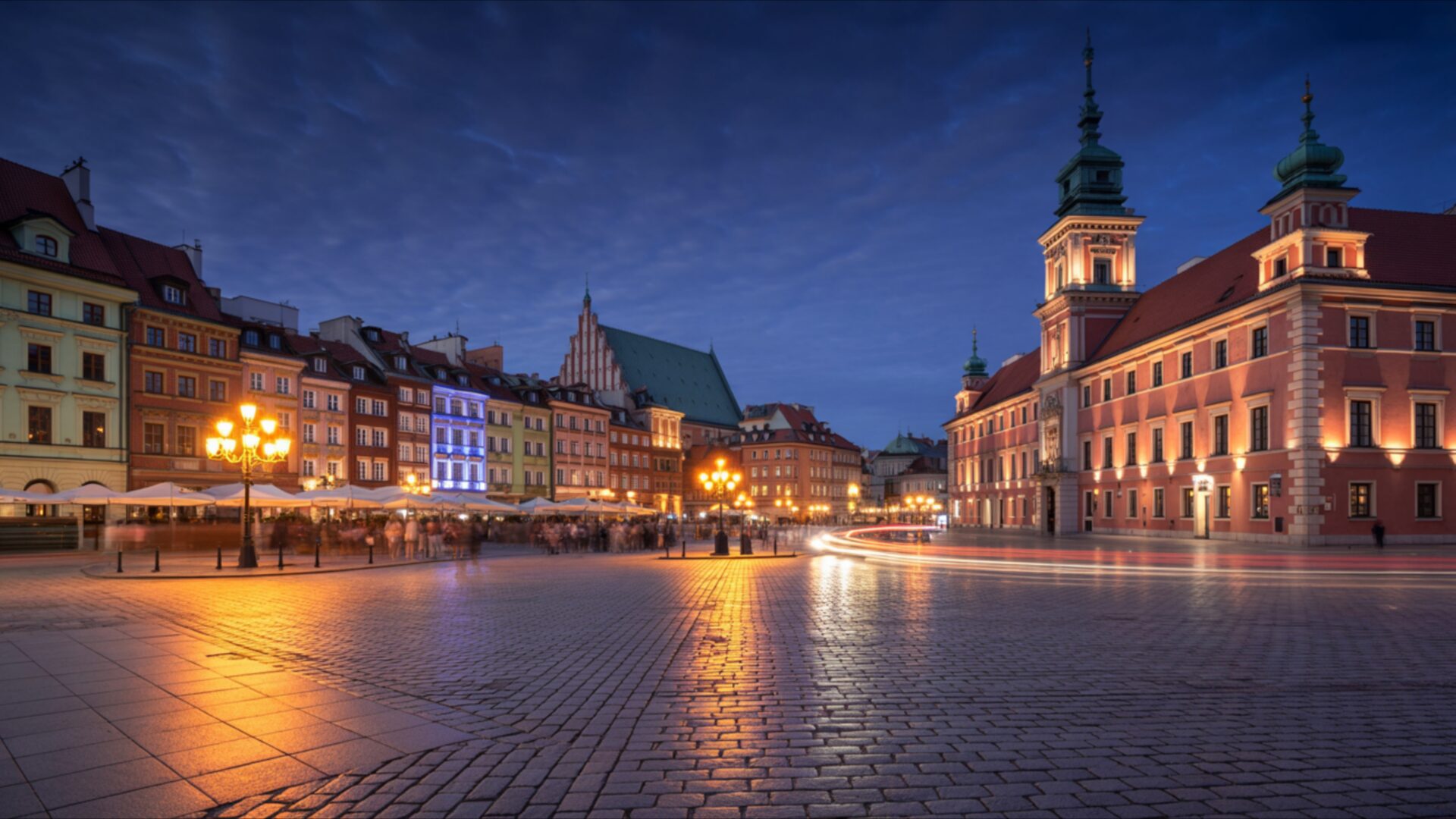
Warsaw Old Town Market Square captures the essence of the Cities & Architecture category, presenting a meticulously reconstructed historical landmark in stunning detail. The image showcases the heart of Warsaw’s Old Town, focusing on the vibrant Market Square. The composition emphasizes the architectural details of the surrounding buildings, each rendered with clarity in this 4k wallpaper. The lighting suggests either early morning or late afternoon, casting long, soft shadows that accentuate the textures of the cobblestone streets and the facades of the buildings.
The color palette is dominated by warm, earthy tones – ochre, sienna, and terracotta – reflecting the traditional building materials used in the reconstruction. These hues are complemented by the cooler tones of the sky, creating a balanced and visually appealing scene composition. The high-resolution detail allows viewers to appreciate the intricate craftsmanship evident in the building designs, from the ornate window frames to the decorative molding. This desktop background offers a glimpse into Poland’s rich history and architectural heritage.
The perspective chosen for this visual theme places the viewer within the square, creating a sense of immersion. It’s as if you are standing there, taking in the sights and sounds of this bustling hub. The arrangement of buildings around the square creates a natural frame, drawing the eye towards the center and emphasizing the open space. The sky, visible above the rooftops, adds depth and dimension to the image. This stylish HD artwork is perfect to personalize your desktop.
The overall effect is one of timeless beauty and historical significance. The careful reconstruction of the Warsaw Old Town Market Square is a testament to the city’s resilience and its commitment to preserving its cultural heritage. As a PC wallpaper, this image brings a touch of European charm and historical depth to your computer screen background. It serves as a reminder of the importance of preserving our past and celebrating the beauty of architectural design. You can download wallpaper and use it as a mobile background or tablet background.
This high-resolution image, available as a 3840×2160 4k wallpaper, ensures that every detail is rendered with exceptional clarity. It is also available in 2K and Full HD (FHD) versions, ensuring compatibility with a wide range of devices. Get it now and enjoy this Warsaw Old Town Market Square on your devices.
Wallpaper license: CC BY-NC-ND 4.0 · Credit: HDPeek.com
Remove Black Bars | Fit to Any Screen Size | CSS Fixer & Minifier | Compress Image Online | Image Converter Online | What Is My Screen Resolution? | Wallpaper Upscaler Online
Explore Categories
💡 How to Install Wallpaper on Different Devices
Windows PC:
Right-click on the wallpaper image. Select "Set as desktop background" or "Set as wallpaper". Adjust the fit (Fill, Fit, Stretch, Tile, Center) in Settings > Personalization > Background.Mac:
Right-click on the wallpaper image. Select "Set Desktop Picture". Alternatively, go to System Preferences > Desktop & Screen Saver and choose your image.iPhone / iPad (iOS):
Open the wallpaper image in Photos. Tap the Share button and select "Use as Wallpaper". Move and scale the image, then tap "Set" > Choose "Set Lock Screen", "Set Home Screen", or "Set Both".Android:
Open the wallpaper image in your Gallery app. Tap the Menu or Options button, then select "Set as wallpaper". Choose Home screen, Lock screen, or Both. Adjust the crop if needed and confirm.Linux (Ubuntu / others):
Right-click on the wallpaper image. Select "Set as Desktop Background" or "Set as Wallpaper". Adjust settings if your desktop environment allows multiple monitors.
Tips:
- For best quality, download the image in the resolution that matches your screen.
- Use 16:9 for widescreens, 1:1 for square displays.
- On mobile devices, choose "Set Both" for a consistent look on Home and Lock screens.
