🌃️ Sunset Over Kyoto Traditional Street 4K UHD (3840x2160) Wallpaper


❤ Share this wallpaper:
WhatsApp Facebook Twitter / X Pinterest LinkedIn Copy Link for Instagram Telegram Reddit Email





💡 Below is relevant information on how to install wallpapers on different devices 👇



This 4K wallpaper is the best choice for testing your OLED professional display resolution. Compared to others, our high-performance tool provides a premium look for any high-end smartphone or desktop setup.



"Personalize this wallpaper or upload your own image to create the perfect mobile background 👇"
Customize Sunset Over Kyoto Traditional Street for Mobile Wallpapers
iPhone • Samsung • Xiaomi • Google Pixel • Android • Huawei • (Others)
720×1600 • 1080×1920 • 1080×2340 • 1080×2400 • 1284×2778 • 1440×3088Please use Portrait Mode for a better experience (Optional)
Overview – Sunset Over Kyoto Traditional Street
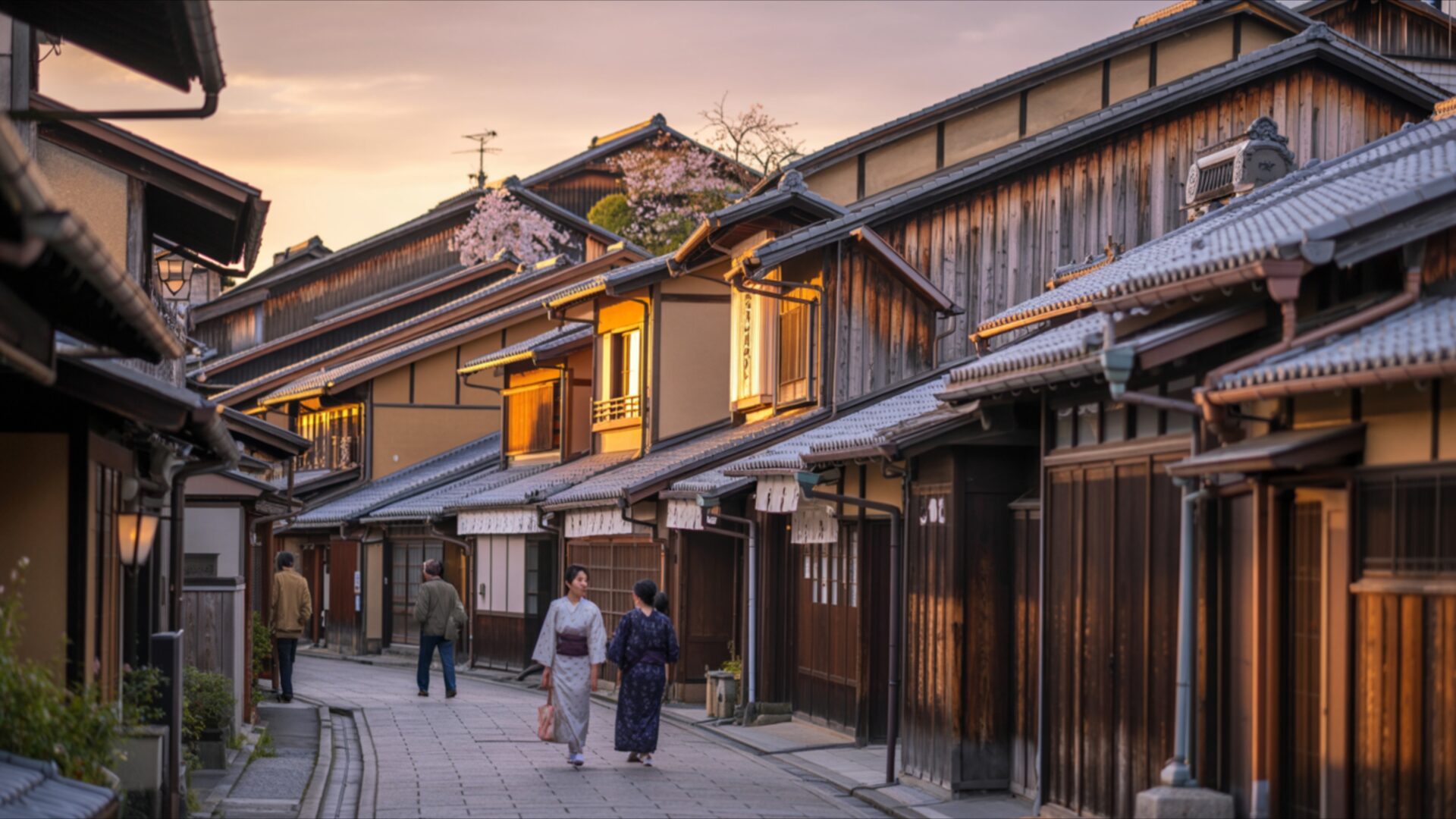
Sunset Over Kyoto Traditional Street invites you into a serene Cities & Architecture scene, capturing the essence of a Japanese evening. The image presents a narrow, winding street lined with traditional wooden buildings, their dark timber facades contrasting with the warm, inviting glow emanating from within. The setting sun casts a soft, golden light across the cobblestone path and the architectural details, creating a gentle, almost nostalgic atmosphere. Notice how the light catches the eaves of the roofs and highlights the textures of the aged wood, suggesting a rich history. The sky above transitions from a pale orange near the horizon to a soft, diffused yellow, hinting at the day’s end without dramatic flair.
Two figures, dressed in what appear to be kimonos, walk away from the viewer down the street, their forms silhouetted slightly against the ambient light. Their presence adds a sense of scale and human element to the scene, grounding the viewer in the experience of being there. The composition draws the eye deeper into the street, with the buildings creating a natural framing effect. The overall mood is one of tranquility and quiet beauty, a peaceful moment captured in time. This visual theme is perfect for anyone appreciating Japanese culture and the subtle artistry of traditional urban landscapes. The careful arrangement of elements within the frame contributes to a balanced and pleasing aesthetic layout.
The warm tones of the sunset are reflected subtly on the wet-looking cobblestones, adding depth and a touch of realism to the scene. The details in the architecture, from the tiled roofs to the small windows, are rendered with clarity, making this a compelling visual theme. The gentle illumination avoids harsh shadows, contributing to the overall sense of calm. This particular image is a wonderful example of how light can transform an ordinary street into something quite special. It’s a scene that speaks of tradition and enduring beauty, a quiet corner of Kyoto bathed in the soft light of dusk.
This high-resolution image, presented in 3840×2160, offers exceptional detail for your display. You can download this wallpaper to enhance your PC wallpaper or laptop wallpaper. We also provide 4K, 2K, and Full HD versions for your convenience, ensuring a perfect fit for various devices. Sunset Over Kyoto Traditional Street is available for instant download.
Wallpaper license: CC BY-NC-ND 4.0 · Credit: HDPeek.com
Remove Black Bars | Fit to Any Screen Size | CSS Fixer & Minifier | Compress Image Online | Image Converter Online | What Is My Screen Resolution? | Wallpaper Upscaler Online
Explore Categories
💡 How to Install Wallpaper on Different Devices
Windows PC:
Right-click on the wallpaper image. Select "Set as desktop background" or "Set as wallpaper". Adjust the fit (Fill, Fit, Stretch, Tile, Center) in Settings > Personalization > Background.Mac:
Right-click on the wallpaper image. Select "Set Desktop Picture". Alternatively, go to System Preferences > Desktop & Screen Saver and choose your image.iPhone / iPad (iOS):
Open the wallpaper image in Photos. Tap the Share button and select "Use as Wallpaper". Move and scale the image, then tap "Set" > Choose "Set Lock Screen", "Set Home Screen", or "Set Both".Android:
Open the wallpaper image in your Gallery app. Tap the Menu or Options button, then select "Set as wallpaper". Choose Home screen, Lock screen, or Both. Adjust the crop if needed and confirm.Linux (Ubuntu / others):
Right-click on the wallpaper image. Select "Set as Desktop Background" or "Set as Wallpaper". Adjust settings if your desktop environment allows multiple monitors.
Tips:
- For best quality, download the image in the resolution that matches your screen.
- Use 16:9 for widescreens, 1:1 for square displays.
- On mobile devices, choose "Set Both" for a consistent look on Home and Lock screens.
