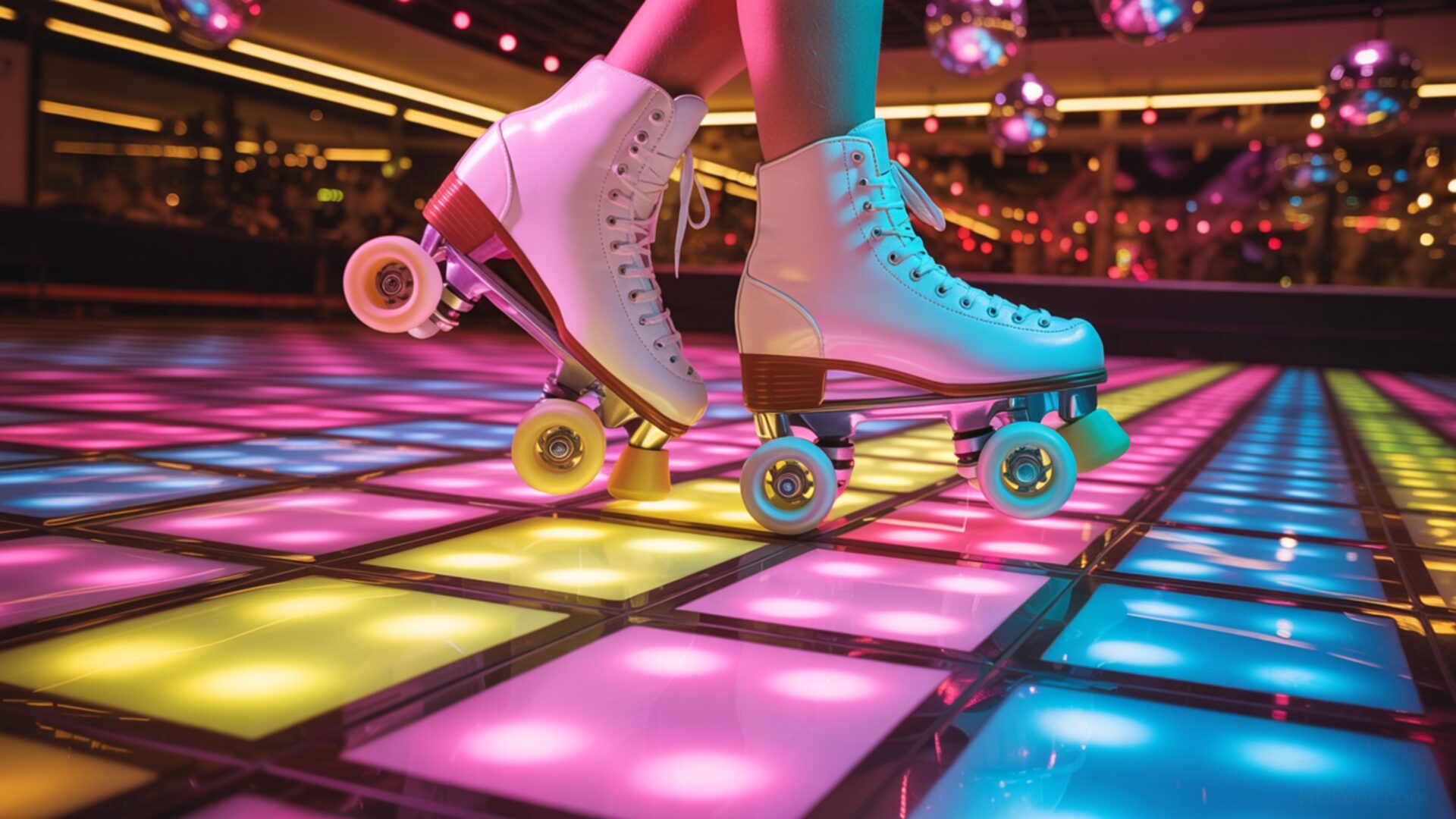
📼 Roller Skates Disco Vibe Floor Lighting Pattern 4K UHD (3840x2160) Wallpaper


❤ Share this wallpaper:
WhatsApp Facebook Twitter / X Pinterest LinkedIn Copy Link for Instagram Telegram Reddit Email





💡 Below is relevant information on how to install wallpapers on different devices 👇


This 4K wallpaper is the best choice for testing your OLED professional display resolution. Compared to others, our high-performance tool provides a premium look for any high-end smartphone or desktop setup.




"Personalize this wallpaper or upload your own image to create the perfect mobile background 👇"
Customize Roller Skates Disco Vibe Floor Lighting Pattern for Mobile Wallpapers
iPhone • Samsung • Xiaomi • Google Pixel • Android • Huawei • (Others)
720×1600 • 1080×1920 • 1080×2340 • 1080×2400 • 1284×2778 • 1440×3088Please use Portrait Mode for a better experience (Optional)
Overview – Roller Skates Disco Vibe Floor Lighting Pattern
“Roller Skates Disco Vibe Floor Lighting Pattern” captures the essence of the Retro category, bringing a burst of vibrant energy to your screen. This captivating desktop background transports you to a 70s party, complete with the exhilarating motion of roller skates gliding across a dazzling floor lighting pattern. The composition focuses on the interplay of light and movement, creating a dynamic visual experience.
The design features a mesmerizing array of colors, reflecting off the glossy surface of the roller skates and the polished floor. Notice how the light catches the curves and edges, enhancing the sense of depth and dimension. The floor lighting pattern itself is a symphony of geometric shapes and radiant hues, reminiscent of classic disco aesthetics. It’s a stylish HD artwork that can personalize your desktop. The high-resolution image ensures that every detail is crisp and clear, from the intricate patterns on the skates to the subtle gradations of light across the floor.
Consider the way the artist uses perspective to draw the viewer into the scene. The vanishing point creates a sense of infinite space, while the strategic placement of the roller skates adds a focal point that anchors the composition. The overall effect is both nostalgic and modern, blending retro sensibilities with contemporary digital artistry. This computer screen background is more than just a pretty picture; it’s a portal to a bygone era of music, dance, and uninhibited self-expression.
It is a dynamic visual that will transform your monitor wallpaper into a vibrant display of retro cool. The rhythmic arrangement of the lighting pattern evokes the pulse of disco music, making it an ideal choice for anyone who appreciates the energy and excitement of the 70s. This PC wallpaper is designed to add a touch of personality to your digital space, reflecting your unique taste and style. The high-resolution detail ensures that the image looks stunning on any display, bringing a touch of vintage glamour to your everyday life. It is available for instant download.
This notebook wallpaper is perfect for those seeking to infuse their digital world with a touch of retro flair. The “Roller Skates Disco Vibe Floor Lighting Pattern” is available as a 4k wallpaper, ensuring the highest possible visual fidelity. You can get it now as a free of charge download. Furthermore, for users with different display requirements, this captivating image is also available in 2K and Full HD versions, ensuring optimal clarity and performance across a wide range of devices.
Wallpaper license: CC BY-NC-ND 4.0 · Credit: HDPeek.com
Remove Black Bars | Fit to Any Screen Size | CSS Fixer & Minifier | Compress Image Online | Image Converter Online | What Is My Screen Resolution? | Wallpaper Upscaler Online
Explore Categories
💡 How to Install Wallpaper on Different Devices
Windows PC:
Right-click on the wallpaper image. Select "Set as desktop background" or "Set as wallpaper". Adjust the fit (Fill, Fit, Stretch, Tile, Center) in Settings > Personalization > Background.Mac:
Right-click on the wallpaper image. Select "Set Desktop Picture". Alternatively, go to System Preferences > Desktop & Screen Saver and choose your image.iPhone / iPad (iOS):
Open the wallpaper image in Photos. Tap the Share button and select "Use as Wallpaper". Move and scale the image, then tap "Set" > Choose "Set Lock Screen", "Set Home Screen", or "Set Both".Android:
Open the wallpaper image in your Gallery app. Tap the Menu or Options button, then select "Set as wallpaper". Choose Home screen, Lock screen, or Both. Adjust the crop if needed and confirm.Linux (Ubuntu / others):
Right-click on the wallpaper image. Select "Set as Desktop Background" or "Set as Wallpaper". Adjust settings if your desktop environment allows multiple monitors.
Tips:
- For best quality, download the image in the resolution that matches your screen.
- Use 16:9 for widescreens, 1:1 for square displays.
- On mobile devices, choose "Set Both" for a consistent look on Home and Lock screens.
