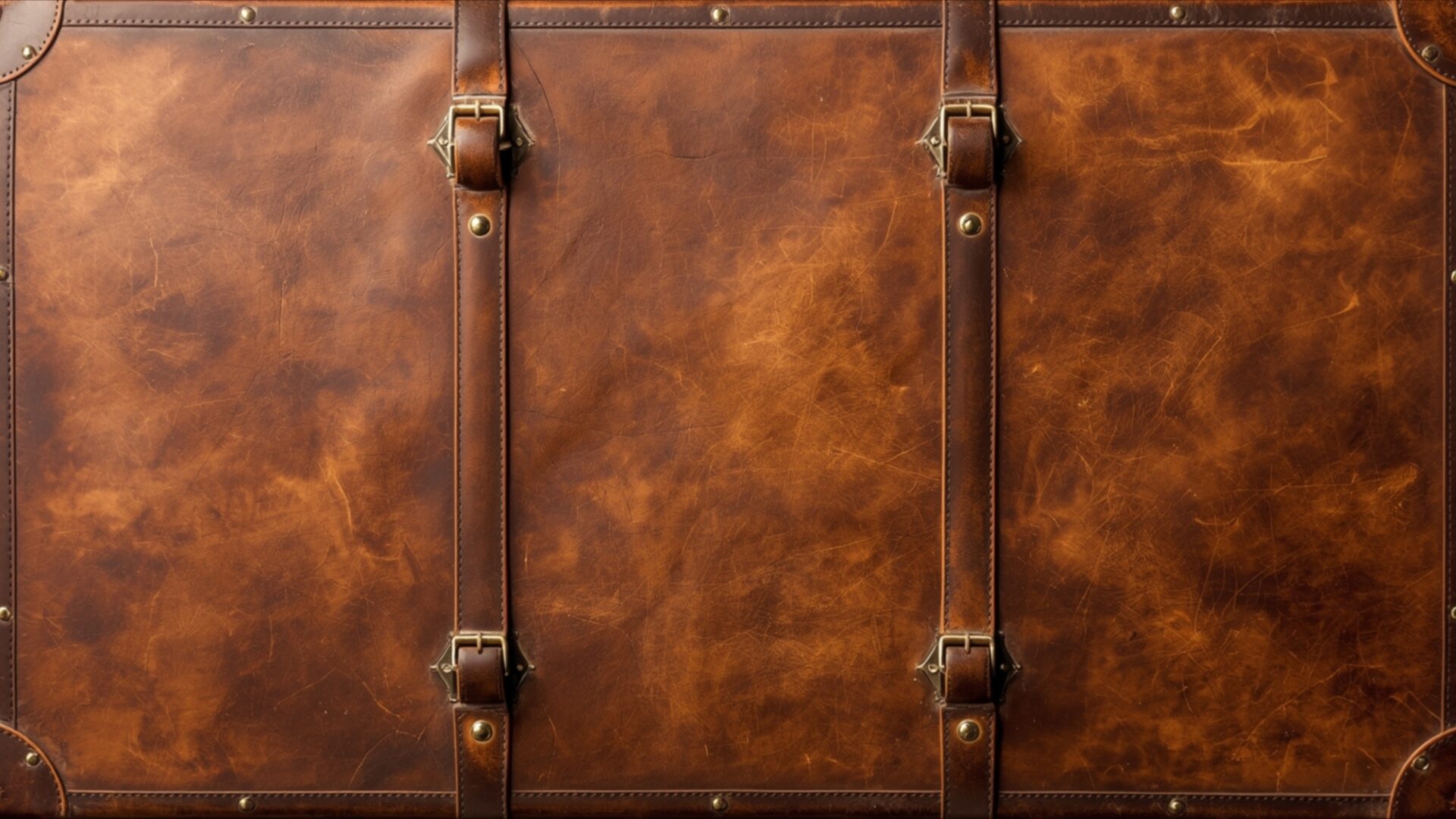
📼 Worn Leather Texture Suitcase Retro Travel Luggage 4K UHD (3840x2160) Wallpaper


❤ Share this wallpaper:
WhatsApp Facebook Twitter / X Pinterest LinkedIn Copy Link for Instagram Telegram Reddit Email





💡 Below is relevant information on how to install wallpapers on different devices 👇



This 4K wallpaper is the best choice for testing your OLED professional display resolution. Compared to others, our high-performance tool provides a premium look for any high-end smartphone or desktop setup.






"Personalize this wallpaper or upload your own image to create the perfect mobile background 👇"
Customize Worn Leather Texture Suitcase Retro Travel Luggage for Mobile Wallpapers
iPhone • Samsung • Xiaomi • Google Pixel • Android • Huawei • (Others)
720×1600 • 1080×1920 • 1080×2340 • 1080×2400 • 1284×2778 • 1440×3088Please use Portrait Mode for a better experience (Optional)
Overview – Worn Leather Texture Suitcase Retro Travel Luggage
Worn Leather Texture Suitcase Retro Travel Luggage offers a rich visual experience, perfect for anyone appreciating the aesthetic of the Retro category. This image focuses on the intricate details of aged leather, presenting a tactile and visually engaging scene composition. The dominant color palette consists of warm, earthy browns, ranging from deep mahogany to lighter, sun-kissed tan hues. These shades are not uniform; they exhibit a natural variation, suggesting the passage of time and countless journeys. The lighting appears to be soft and diffused, highlighting the subtle imperfections and the natural grain of the leather without harsh shadows.
The texture is paramount here, with every crease, scuff, and subtle discoloration contributing to its character. Darker leather straps, secured with brass-colored buckles and rivets, crisscross the surface, adding structural definition and a touch of classic hardware. These straps are also visibly aged, mirroring the condition of the main body of the suitcase. The overall mood evoked is one of nostalgia and adventure, hinting at stories of past travels and the enduring appeal of vintage luggage. This visual theme is ideal for adding a touch of timeless elegance to any digital space.
The craftsmanship evident in the stitching and the reinforced corners speaks to a bygone era of durable, well-made travel goods. The image captures a close-up perspective, allowing the viewer to almost feel the worn surface and imagine the history it holds. It’s a study in material and patina, a testament to the beauty found in objects that have been used and cherished. This particular visual theme is a compelling choice for those seeking a desktop background that is both sophisticated and evocative of a classic travel era.
The detailed rendering of the leather, with its subtle variations in tone and texture, makes this a standout piece. It’s a design that invites contemplation, evoking a sense of wanderlust and appreciation for vintage aesthetics. This is a wonderful option for a PC wallpaper, bringing a sense of history and refined style to your computer screen. You can download this wallpaper for free, enjoying its high-resolution detail. The original image is presented in 3840×2160 resolution, with 4K, 2K, and Full HD versions also available for your convenience. Worn Leather Texture Suitcase Retro Travel Luggage is ready for instant download.
Wallpaper license: CC BY-NC-ND 4.0 · Credit: HDPeek.com
Remove Black Bars | Fit to Any Screen Size | CSS Fixer & Minifier | Compress Image Online | Image Converter Online | What Is My Screen Resolution? | Wallpaper Upscaler Online
Explore Categories
💡 How to Install Wallpaper on Different Devices
Windows PC:
Right-click on the wallpaper image. Select "Set as desktop background" or "Set as wallpaper". Adjust the fit (Fill, Fit, Stretch, Tile, Center) in Settings > Personalization > Background.Mac:
Right-click on the wallpaper image. Select "Set Desktop Picture". Alternatively, go to System Preferences > Desktop & Screen Saver and choose your image.iPhone / iPad (iOS):
Open the wallpaper image in Photos. Tap the Share button and select "Use as Wallpaper". Move and scale the image, then tap "Set" > Choose "Set Lock Screen", "Set Home Screen", or "Set Both".Android:
Open the wallpaper image in your Gallery app. Tap the Menu or Options button, then select "Set as wallpaper". Choose Home screen, Lock screen, or Both. Adjust the crop if needed and confirm.Linux (Ubuntu / others):
Right-click on the wallpaper image. Select "Set as Desktop Background" or "Set as Wallpaper". Adjust settings if your desktop environment allows multiple monitors.
Tips:
- For best quality, download the image in the resolution that matches your screen.
- Use 16:9 for widescreens, 1:1 for square displays.
- On mobile devices, choose "Set Both" for a consistent look on Home and Lock screens.
