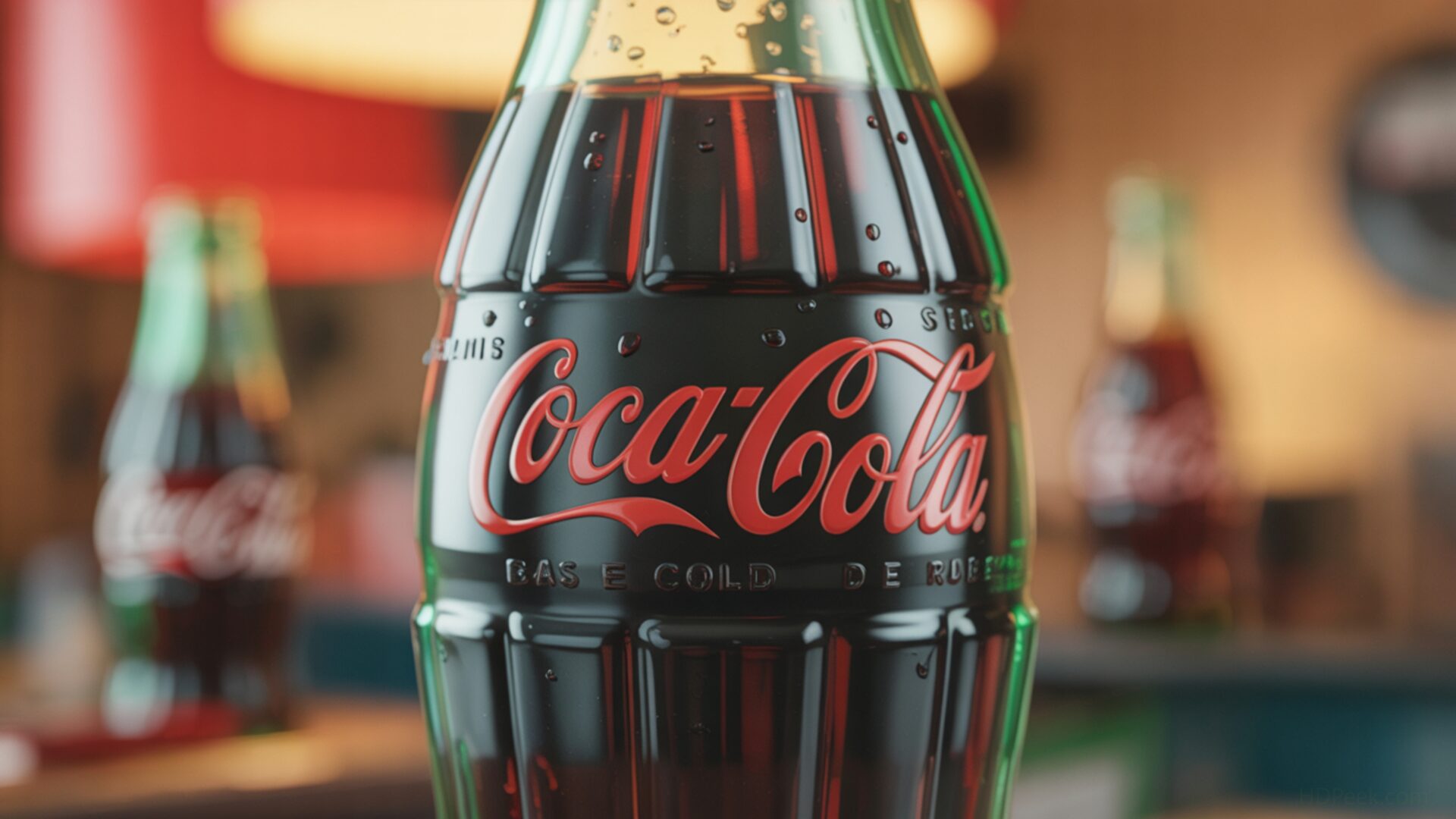
📼 Classic Coca-Cola Bottle Retro Branding Close Up 4K UHD (3840x2160) Wallpaper
 Roller Skates Disco Vibe Floor Lighting Pattern
 Old Radio Receiver Dial Glowing Warm Light Static
❤ Share this wallpaper:
WhatsApp Facebook Twitter / X Pinterest LinkedIn Copy Link for Instagram Telegram Reddit Email





💡 Below is relevant information on how to install wallpapers on different devices 👇




This 4K wallpaper is the best choice for testing your OLED professional display resolution. Compared to others, our high-performance tool provides a premium look for any high-end smartphone or desktop setup.




"Personalize this wallpaper or upload your own image to create the perfect mobile background 👇"
Customize Classic Coca-Cola Bottle Retro Branding Close Up for Mobile Wallpapers
iPhone • Samsung • Xiaomi • Google Pixel • Android • Huawei • (Others)
720×1600 • 1080×1920 • 1080×2340 • 1080×2400 • 1284×2778 • 1440×3088Please use Portrait Mode for a better experience (Optional)
Overview – Classic Coca-Cola Bottle Retro Branding Close Up
“Classic Coca-Cola Bottle Retro Branding Close Up” evokes a sense of nostalgia, fitting perfectly within the Retro category through its focus on vintage design elements and familiar branding. This PC wallpaper presents a detailed view of an iconic Coca-Cola bottle, emphasizing its classic shape and the timeless appeal of its branding. The composition draws the eye to the subtle textures of the glass and the condensation droplets, creating a sense of depth and realism.
The lighting in the image plays a crucial role, highlighting the contours of the bottle and accentuating the red and white color scheme. It is a stylish HD artwork. The close-up perspective allows viewers to appreciate the intricate details of the label, from the cursive script of the Coca-Cola logo to the subtle imperfections that add to its vintage charm. The overall effect is a visually engaging desktop background that captures the essence of a bygone era.
The choice of focusing on a single object, the Coca-Cola bottle, creates a sense of intimacy and allows for a deeper appreciation of its design. The retro branding is not just a label; it’s a symbol of a cultural phenomenon, and this wallpaper captures that essence beautifully. The composition is carefully balanced, ensuring that the bottle remains the focal point without feeling overwhelming. The subtle background elements complement the main subject, adding context without distracting from its inherent appeal.
This digital background is ideal for those who appreciate classic design and want to personalize your desktop with a touch of vintage charm. The high-resolution detail ensures that the image looks crisp and clear on any screen, making it a perfect choice for a laptop wallpaper or even a mobile background. The careful attention to detail and the thoughtful composition make this more than just a simple image; it’s a piece of art that celebrates the enduring appeal of retro aesthetics.
The 3840×2160 resolution ensures that every detail is rendered with clarity, making it a stunning addition to any computer screen background. You can get it now and transform your digital space with this timeless piece. For those seeking alternative resolutions, this image is also available in 2K and Full HD versions, ensuring compatibility with a wide range of devices and screen sizes. The “Classic Coca-Cola Bottle Retro Branding Close Up” is a great wallpaper.
Wallpaper license: CC BY-NC-ND 4.0 · Credit: HDPeek.com
Remove Black Bars | Fit to Any Screen Size | CSS Fixer & Minifier | Compress Image Online | Image Converter Online | What Is My Screen Resolution? | Wallpaper Upscaler Online
Explore Categories
💡 How to Install Wallpaper on Different Devices
Windows PC:
Right-click on the wallpaper image. Select "Set as desktop background" or "Set as wallpaper". Adjust the fit (Fill, Fit, Stretch, Tile, Center) in Settings > Personalization > Background.Mac:
Right-click on the wallpaper image. Select "Set Desktop Picture". Alternatively, go to System Preferences > Desktop & Screen Saver and choose your image.iPhone / iPad (iOS):
Open the wallpaper image in Photos. Tap the Share button and select "Use as Wallpaper". Move and scale the image, then tap "Set" > Choose "Set Lock Screen", "Set Home Screen", or "Set Both".Android:
Open the wallpaper image in your Gallery app. Tap the Menu or Options button, then select "Set as wallpaper". Choose Home screen, Lock screen, or Both. Adjust the crop if needed and confirm.Linux (Ubuntu / others):
Right-click on the wallpaper image. Select "Set as Desktop Background" or "Set as Wallpaper". Adjust settings if your desktop environment allows multiple monitors.
Tips:
- For best quality, download the image in the resolution that matches your screen.
- Use 16:9 for widescreens, 1:1 for square displays.
- On mobile devices, choose "Set Both" for a consistent look on Home and Lock screens.
