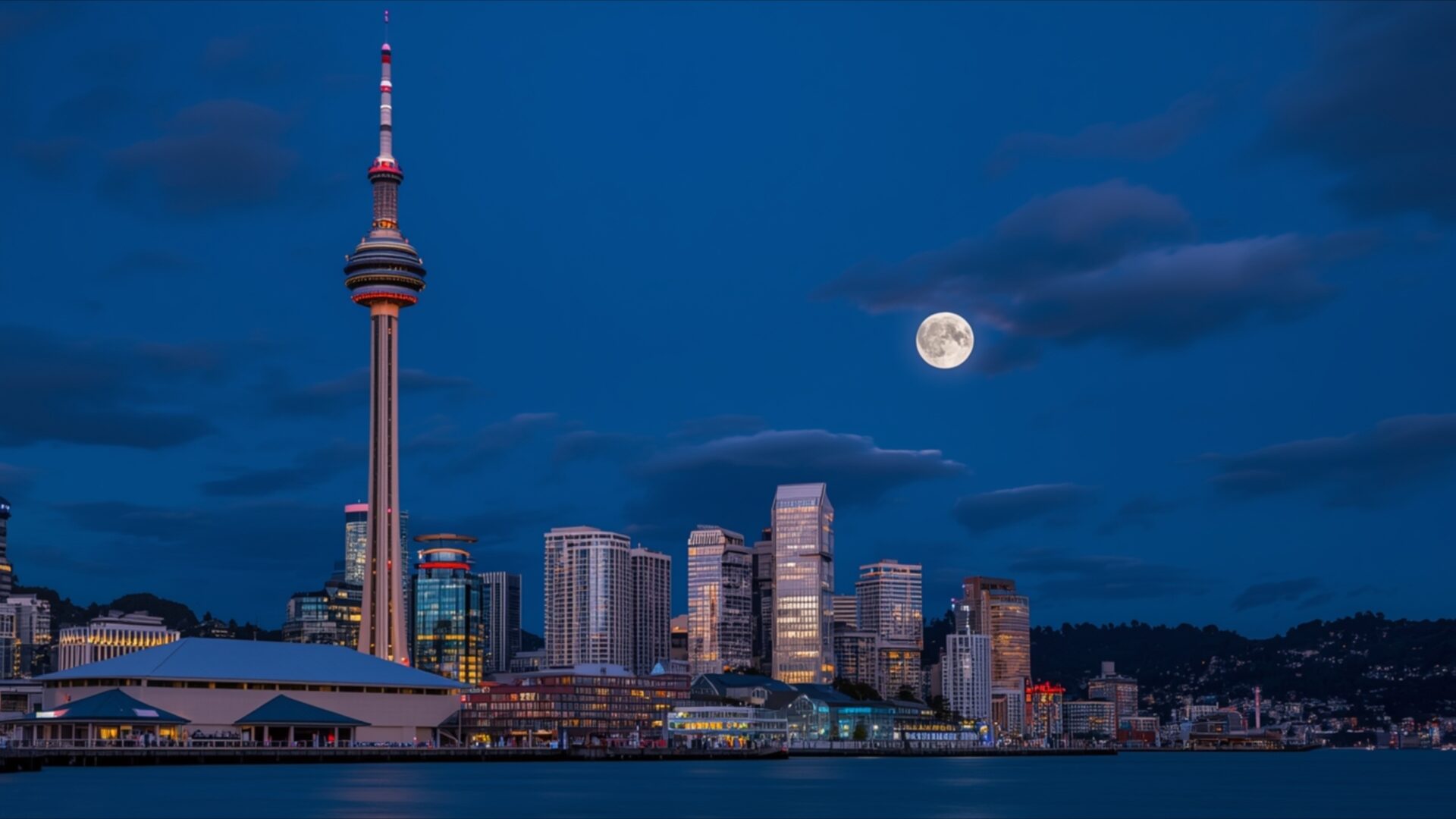
🌃️ Auckland Sky Tower New Zealand 4K UHD (3840x2160) Wallpaper


❤ Share this wallpaper:
WhatsApp Facebook Twitter / X Pinterest LinkedIn Copy Link for Instagram Telegram Reddit Email





💡 Below is relevant information on how to install wallpapers on different devices 👇



This 4K wallpaper is the best choice for testing your OLED professional display resolution. Compared to others, our high-performance tool provides a premium look for any high-end smartphone or desktop setup.




"Personalize this wallpaper or upload your own image to create the perfect mobile background 👇"
Customize Auckland Sky Tower New Zealand for Mobile Wallpapers
iPhone • Samsung • Xiaomi • Google Pixel • Android • Huawei • (Others)
720×1600 • 1080×1920 • 1080×2340 • 1080×2400 • 1284×2778 • 1440×3088Please use Portrait Mode for a better experience (Optional)
Overview – Auckland Sky Tower New Zealand
Auckland Sky Tower New Zealand captures the essence of the Cities & Architecture category with a stunning visual theme showcasing one of New Zealand’s most iconic landmarks. The image presents the Sky Tower in Auckland, not merely as a structure, but as a focal point that interacts dynamically with its surrounding environment. The composition emphasizes the tower’s height, contrasting it against the expansive sky and the bustling harbor below. Light plays a crucial role, casting subtle gradients across the tower’s surface and creating a sense of depth.
The stylish HD artwork focuses on the interplay between urban development and natural beauty. The harbor, with its shimmering water and array of boats, adds a layer of complexity to the scene. The photographer has skillfully used perspective to draw the viewer’s eye upwards, accentuating the tower’s impressive stature. The overall effect is a balanced and visually appealing representation of Auckland’s unique character. This desktop background offers a glimpse into a vibrant cityscape, rendered with clarity and precision.
Consider the subtle textures within the image. The smooth, reflective surfaces of the Sky Tower contrast with the more organic textures of the surrounding buildings and the water’s surface. This juxtaposition adds visual interest and prevents the image from appearing flat or monotonous. The color palette is restrained, dominated by blues, grays, and whites, which contribute to a sense of calm and serenity. However, carefully placed accents of color, such as the flags fluttering atop buildings, prevent the scene from becoming too muted. Personalize your desktop with this stunning view.
This 4k wallpaper is designed to enhance your computer screen background with its detailed rendering and balanced composition. It’s more than just a picture; it’s a window into a different world, offering a momentary escape from the everyday. The high-resolution detail ensures that every element of the scene, from the intricate details of the tower’s architecture to the distant horizon, is rendered with exceptional clarity. The Auckland Sky Tower, set against the backdrop of the city and harbor, creates a captivating scene composition that is both visually stimulating and calming.
This Auckland scene is available for instant download, allowing you to quickly transform your laptop wallpaper into a breathtaking vista. The 3840×2160 resolution ensures that the image will look crisp and clear on even the largest displays. Whether you’re looking to add a touch of sophistication to your workspace or simply want to enjoy a beautiful view, this image is an excellent choice. Furthermore, for those seeking alternative resolutions, this Auckland Sky Tower New Zealand image is also available in 2K and Full HD, ensuring compatibility with a wide range of devices.
Wallpaper license: CC BY-NC-ND 4.0 · Credit: HDPeek.com
Remove Black Bars | Fit to Any Screen Size | CSS Fixer & Minifier | Compress Image Online | Image Converter Online | What Is My Screen Resolution? | Wallpaper Upscaler Online
Explore Categories
💡 How to Install Wallpaper on Different Devices
Windows PC:
Right-click on the wallpaper image. Select "Set as desktop background" or "Set as wallpaper". Adjust the fit (Fill, Fit, Stretch, Tile, Center) in Settings > Personalization > Background.Mac:
Right-click on the wallpaper image. Select "Set Desktop Picture". Alternatively, go to System Preferences > Desktop & Screen Saver and choose your image.iPhone / iPad (iOS):
Open the wallpaper image in Photos. Tap the Share button and select "Use as Wallpaper". Move and scale the image, then tap "Set" > Choose "Set Lock Screen", "Set Home Screen", or "Set Both".Android:
Open the wallpaper image in your Gallery app. Tap the Menu or Options button, then select "Set as wallpaper". Choose Home screen, Lock screen, or Both. Adjust the crop if needed and confirm.Linux (Ubuntu / others):
Right-click on the wallpaper image. Select "Set as Desktop Background" or "Set as Wallpaper". Adjust settings if your desktop environment allows multiple monitors.
Tips:
- For best quality, download the image in the resolution that matches your screen.
- Use 16:9 for widescreens, 1:1 for square displays.
- On mobile devices, choose "Set Both" for a consistent look on Home and Lock screens.
