📼 Vintage Pinball Backglass Art Illustration Bright Colors 4K UHD (3840x2160) Wallpaper


❤ Share this wallpaper:
WhatsApp Facebook Twitter / X Pinterest LinkedIn Copy Link for Instagram Telegram Reddit Email





💡 Below is relevant information on how to install wallpapers on different devices 👇


This 4K wallpaper is the best choice for testing your OLED professional display resolution. Compared to others, our high-performance tool provides a premium look for any high-end smartphone or desktop setup.



"Personalize this wallpaper or upload your own image to create the perfect mobile background 👇"
Customize Vintage Pinball Backglass Art Illustration Bright Colors for Mobile Wallpapers
iPhone • Samsung • Xiaomi • Google Pixel • Android • Huawei • (Others)
720×1600 • 1080×1920 • 1080×2340 • 1080×2400 • 1284×2778 • 1440×3088Please use Portrait Mode for a better experience (Optional)
Overview – Vintage Pinball Backglass Art Illustration Bright Colors
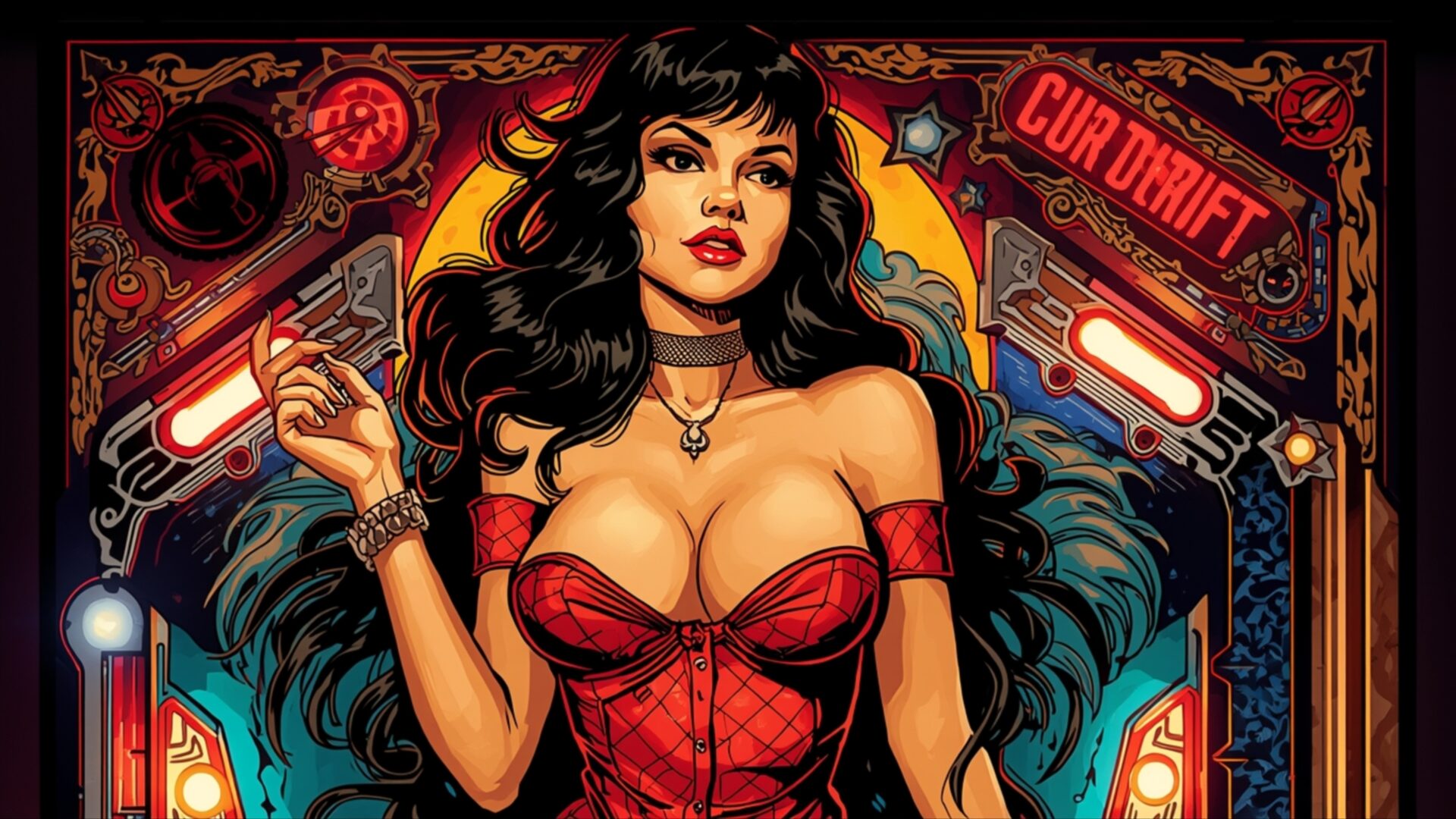
Vintage Pinball Backglass Art Illustration Bright Colors invites you into a vibrant Retro scene, a true visual feast for enthusiasts of classic arcade aesthetics. This particular image showcases a striking illustration reminiscent of vintage pinball backglass art, characterized by its rich, saturated colors and dramatic lighting. The central figure, a woman with dark, flowing hair and a confident gaze, is rendered in a style that evokes a sense of nostalgic glamour. Her attire, a deep red dress, complements the overall fiery palette of the artwork.
The lighting in this piece is dynamic, with strong highlights and shadows that give the illustration a three-dimensional quality. Light sources appear to emanate from within the depicted pinball machine elements, illuminating the subject and the surrounding details. Notice the intricate patterns and decorative elements that frame the central figure, all rendered with a sharp, illustrative technique. The color palette is dominated by reds, yellows, and blues, creating a lively and energetic atmosphere. This visual theme is a perfect example of how retro art can still captivate with its bold design choices and detailed execution.
The composition is carefully balanced, drawing the viewer’s eye towards the main subject while still allowing appreciation for the surrounding artwork. The overall mood is one of playful allure and classic entertainment. This high-resolution artwork captures the essence of a bygone era of gaming, where art and technology converged to create immersive experiences. The detailed rendering of the pinball machine components, including lights and signage, adds layers of visual interest. It’s a scene that speaks to the artistry involved in creating these iconic pieces of arcade history.
This 3840×2160 resolution image is ideal for anyone looking to bring a touch of retro flair to their digital space. Whether you’re seeking a new desktop background or simply appreciate detailed illustration, this piece offers a compelling visual. You can download wallpaper versions of this artwork, with 4K, 2K, and Full HD options available, ensuring a crisp display on any screen.
Wallpaper license: CC BY-NC-ND 4.0 · Credit: HDPeek.com
Remove Black Bars | Fit to Any Screen Size | CSS Fixer & Minifier | Compress Image Online | Image Converter Online | What Is My Screen Resolution? | Wallpaper Upscaler Online
Explore Categories
💡 How to Install Wallpaper on Different Devices
Windows PC:
Right-click on the wallpaper image. Select "Set as desktop background" or "Set as wallpaper". Adjust the fit (Fill, Fit, Stretch, Tile, Center) in Settings > Personalization > Background.Mac:
Right-click on the wallpaper image. Select "Set Desktop Picture". Alternatively, go to System Preferences > Desktop & Screen Saver and choose your image.iPhone / iPad (iOS):
Open the wallpaper image in Photos. Tap the Share button and select "Use as Wallpaper". Move and scale the image, then tap "Set" > Choose "Set Lock Screen", "Set Home Screen", or "Set Both".Android:
Open the wallpaper image in your Gallery app. Tap the Menu or Options button, then select "Set as wallpaper". Choose Home screen, Lock screen, or Both. Adjust the crop if needed and confirm.Linux (Ubuntu / others):
Right-click on the wallpaper image. Select "Set as Desktop Background" or "Set as Wallpaper". Adjust settings if your desktop environment allows multiple monitors.
Tips:
- For best quality, download the image in the resolution that matches your screen.
- Use 16:9 for widescreens, 1:1 for square displays.
- On mobile devices, choose "Set Both" for a consistent look on Home and Lock screens.
