🐉 Epic Valkyrie on Winged Horse Under Full Moon 4K UHD (3840x2160) Wallpaper

❤ Share this wallpaper:
WhatsApp Facebook Twitter / X Pinterest LinkedIn Copy Link for Instagram Telegram Reddit Email





💡 Below is relevant information on how to install wallpapers on different devices 👇





This 4K wallpaper is the best choice for testing your OLED professional display resolution. Compared to others, our high-performance tool provides a premium look for any high-end smartphone or desktop setup.






"Personalize this wallpaper or upload your own image to create the perfect mobile background 👇"
Customize Epic Valkyrie on Winged Horse Under Full Moon for Mobile Wallpapers
iPhone • Samsung • Xiaomi • Google Pixel • Android • Huawei • (Others)
720×1600 • 1080×1920 • 1080×2340 • 1080×2400 • 1284×2778 • 1440×3088Please use Portrait Mode for a better experience (Optional)
Overview – Epic Valkyrie on Winged Horse Under Full Moon
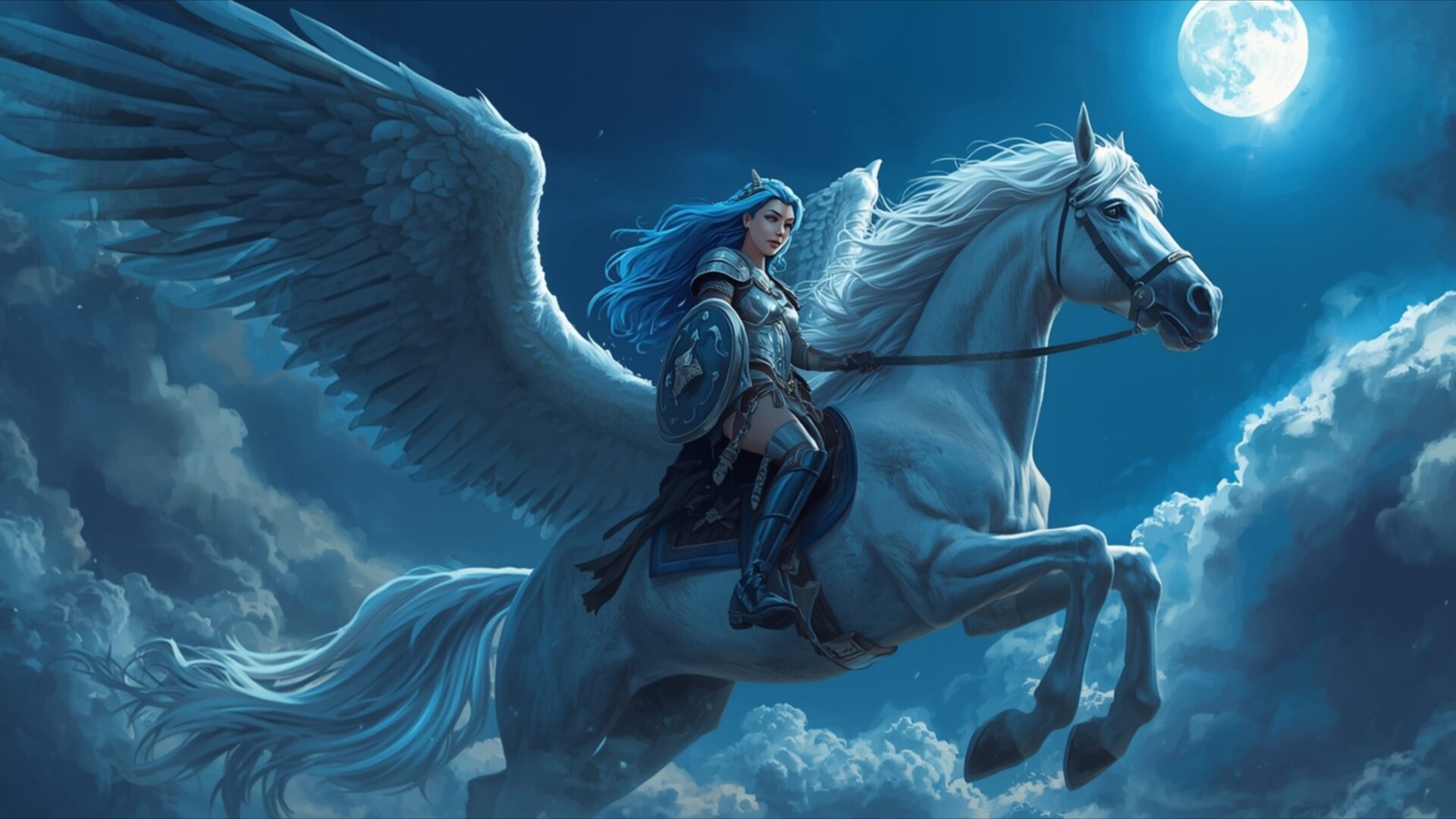
Epic Valkyrie on Winged Horse Under Full Moon captures the essence of the Fantasy category, presenting a dramatic scene bathed in the cool light of a full moon. The composition immediately draws the eye to the central figure, a powerful valkyrie mounted upon a magnificent winged horse, both silhouetted against the luminous orb. Celestial clouds swirl around them, adding depth and a sense of ethereal movement to the night sky. The overall visual theme evokes a sense of epic fantasy, reminiscent of Norse mythology and legendary shieldmaidens.
The color palette is dominated by shades of blue, creating a serene yet powerful atmosphere. Subtle gradations of blue paint the night, from the deep indigo of the upper sky to the lighter, almost silvery tones near the moon. This creates a captivating contrast that highlights the figures in the foreground. The moon itself casts a soft, diffused glow, illuminating the edges of the clouds and the contours of the valkyrie and her steed. The image possesses a painterly quality, with textures that suggest brushstrokes and layering, enhancing the artistic feel.
The mythical scene is rich with detail. The valkyrie is depicted as a strong, determined warrior, her armor gleaming faintly in the moonlight. She holds her shield high, a symbol of protection and courage. Her winged horse is equally impressive, its powerful wings outstretched as it soars through the air. The celestial clouds add a touch of magic and mystery, hinting at the presence of otherworldly forces. This stylish HD artwork is perfect to personalize your desktop.
This 4k wallpaper is ideally suited as a desktop background, transforming your computer screen background into a portal to a realm of myth and legend. The high-resolution image ensures that every detail is crisp and clear, even on large monitors. It’s a striking choice for anyone who appreciates epic fantasy art and Norse mythology. It’s a great way to personalize your desktop with a unique and visually stunning image. The scene composition is carefully balanced, creating a sense of harmony and visual appeal.
If you are looking to download wallpaper to enhance your visual experience, this image is a great option. The availability of this wallpaper extends to various resolutions, ensuring compatibility with a wide range of devices. Whether you need a wallpaper for pc, a laptop wallpaper, or a mobile background, you can get it now in the perfect size. Beyond the stunning 3840×2160 resolution, this Epic Valkyrie on Winged Horse Under Full Moon is also available in 2K and Full HD versions, ensuring a crisp, clear image on any screen.
Wallpaper license: CC BY-NC-ND 4.0 · Credit: HDPeek.com
Remove Black Bars | Fit to Any Screen Size | CSS Fixer & Minifier | Compress Image Online | Image Converter Online | What Is My Screen Resolution? | Wallpaper Upscaler Online
Explore Categories
💡 How to Install Wallpaper on Different Devices
Windows PC:
Right-click on the wallpaper image. Select "Set as desktop background" or "Set as wallpaper". Adjust the fit (Fill, Fit, Stretch, Tile, Center) in Settings > Personalization > Background.Mac:
Right-click on the wallpaper image. Select "Set Desktop Picture". Alternatively, go to System Preferences > Desktop & Screen Saver and choose your image.iPhone / iPad (iOS):
Open the wallpaper image in Photos. Tap the Share button and select "Use as Wallpaper". Move and scale the image, then tap "Set" > Choose "Set Lock Screen", "Set Home Screen", or "Set Both".Android:
Open the wallpaper image in your Gallery app. Tap the Menu or Options button, then select "Set as wallpaper". Choose Home screen, Lock screen, or Both. Adjust the crop if needed and confirm.Linux (Ubuntu / others):
Right-click on the wallpaper image. Select "Set as Desktop Background" or "Set as Wallpaper". Adjust settings if your desktop environment allows multiple monitors.
Tips:
- For best quality, download the image in the resolution that matches your screen.
- Use 16:9 for widescreens, 1:1 for square displays.
- On mobile devices, choose "Set Both" for a consistent look on Home and Lock screens.
