🐉 Epic Battle Angels vs Demons Sky 4K UHD (3840x2160) Wallpaper

❤ Share this wallpaper:
WhatsApp Facebook Twitter / X Pinterest LinkedIn Copy Link for Instagram Telegram Reddit Email




💡 Below is relevant information on how to install wallpapers on different devices 👇




This 4K wallpaper is the best choice for testing your OLED professional display resolution. Compared to others, our high-performance tool provides a premium look for any high-end smartphone or desktop setup.




"Personalize this wallpaper or upload your own image to create the perfect mobile background 👇"
Customize Epic Battle Angels vs Demons Sky for Mobile Wallpapers
iPhone • Samsung • Xiaomi • Google Pixel • Android • Huawei • (Others)
720×1600 • 1080×1920 • 1080×2340 • 1080×2400 • 1284×2778 • 1440×3088Please use Portrait Mode for a better experience (Optional)
Overview – Epic Battle Angels vs Demons Sky
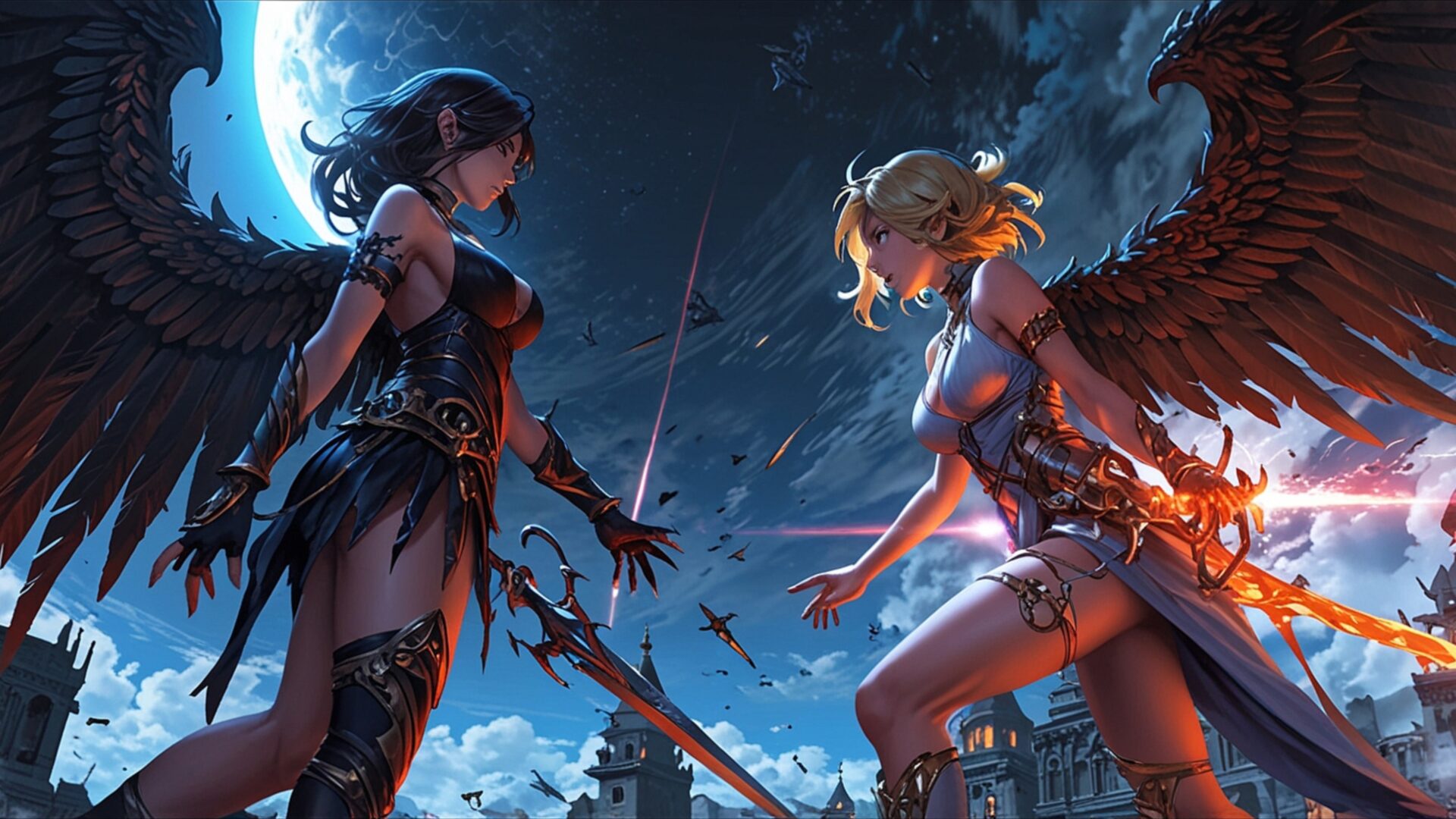
Epic Battle Angels vs Demons Sky presents a dramatic fantasy scene, capturing a pivotal moment of conflict. The image depicts two winged figures, one with dark, feathered wings and the other with lighter, more ethereal ones, poised for combat against a backdrop of a twilight sky. The lighting is key here, with a strong, almost theatrical illumination highlighting the central figures and their ornate armor. A large, luminous celestial body, possibly a moon or distant planet, hangs in the upper left, casting a cool, blueish glow that contrasts with the warmer, fiery tones emanating from the weapons and accents of the combatants.
The composition places the angel and demon in direct opposition, their gazes locked, creating an immediate sense of tension. The darker figure, presumably the demon, wears attire that suggests a more primal, perhaps gothic aesthetic, with sharp edges and dark hues. Her wings are broad and imposing, their texture detailed and almost tangible. Opposite her, the angel embodies a brighter, more celestial presence, her armor gleaming and her wings appearing lighter and more delicate, though no less powerful. The sky itself is a canvas of deep blues and purples, with streaks of light suggesting cosmic events or magical energies at play.
Below the figures, the silhouette of a city or fortress can be discerned, adding a sense of scale and suggesting that the battle has far-reaching implications. The overall mood is one of intense anticipation, a moment frozen just before the clash. The artistic style leans towards a detailed, illustrative fantasy, with a focus on character design and atmospheric lighting. This visual theme is perfect for anyone seeking a powerful and evocative scene for their desktop background. The intricate details in the armor, wings, and celestial elements make this a compelling piece.
The image is rendered in stunning 3840×2160 resolution, offering incredible clarity and depth. This high-resolution visual theme ensures that every detail, from the individual feathers on the wings to the subtle textures of the armor, is presented with exceptional sharpness. For those looking to enhance their digital space, this download wallpaper provides a captivating scene. We offer this 4k wallpaper, along with 2K and Full HD versions, ensuring compatibility and optimal viewing across various devices.
Wallpaper license: CC BY-NC-ND 4.0 · Credit: HDPeek.com
Remove Black Bars | Fit to Any Screen Size | CSS Fixer & Minifier | Compress Image Online | Image Converter Online | What Is My Screen Resolution? | Wallpaper Upscaler Online
Explore Categories
💡 How to Install Wallpaper on Different Devices
Windows PC:
Right-click on the wallpaper image. Select "Set as desktop background" or "Set as wallpaper". Adjust the fit (Fill, Fit, Stretch, Tile, Center) in Settings > Personalization > Background.Mac:
Right-click on the wallpaper image. Select "Set Desktop Picture". Alternatively, go to System Preferences > Desktop & Screen Saver and choose your image.iPhone / iPad (iOS):
Open the wallpaper image in Photos. Tap the Share button and select "Use as Wallpaper". Move and scale the image, then tap "Set" > Choose "Set Lock Screen", "Set Home Screen", or "Set Both".Android:
Open the wallpaper image in your Gallery app. Tap the Menu or Options button, then select "Set as wallpaper". Choose Home screen, Lock screen, or Both. Adjust the crop if needed and confirm.Linux (Ubuntu / others):
Right-click on the wallpaper image. Select "Set as Desktop Background" or "Set as Wallpaper". Adjust settings if your desktop environment allows multiple monitors.
Tips:
- For best quality, download the image in the resolution that matches your screen.
- Use 16:9 for widescreens, 1:1 for square displays.
- On mobile devices, choose "Set Both" for a consistent look on Home and Lock screens.
