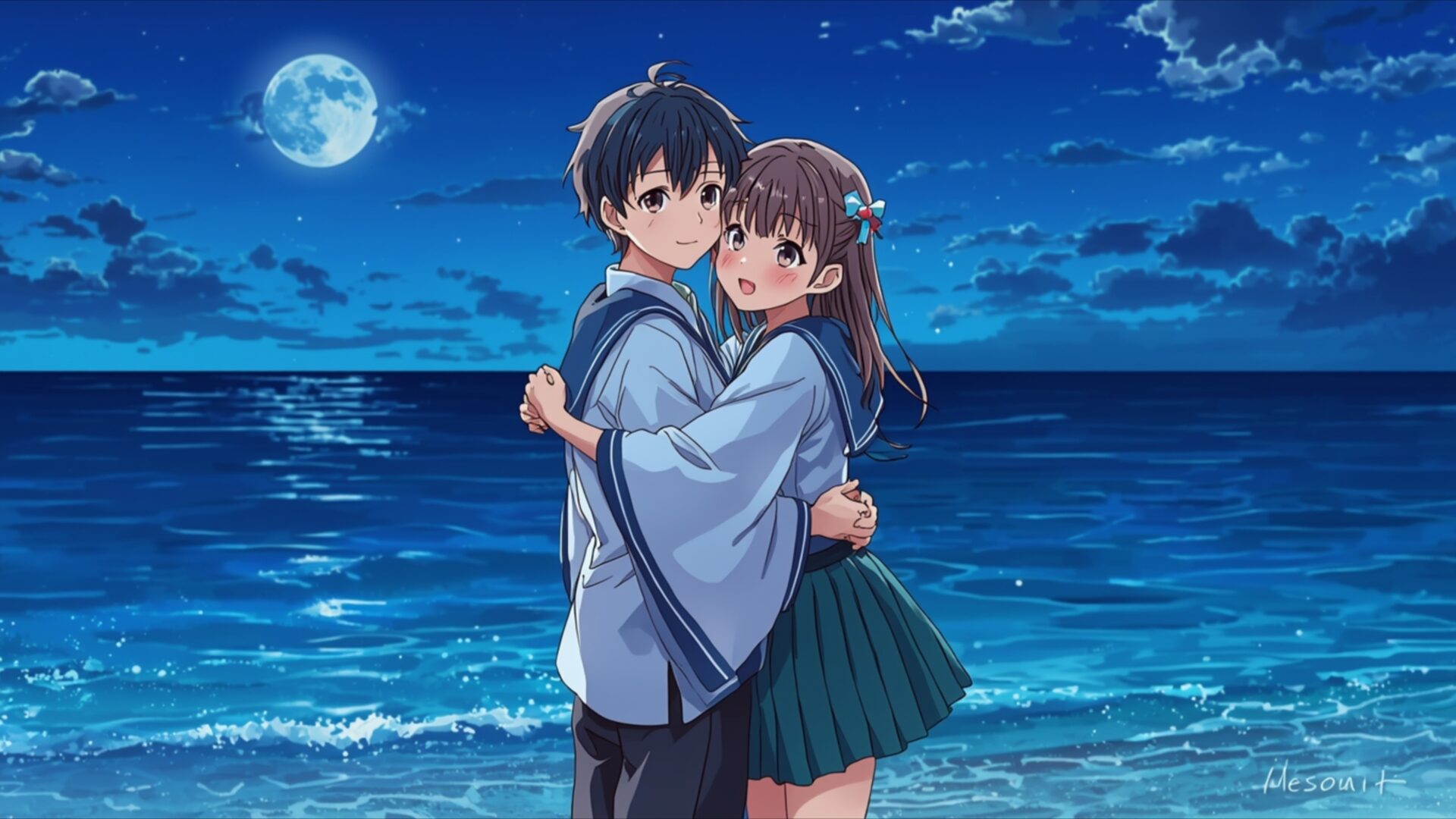
💕 Anime Moonlit Ocean Embrace 4K UHD (3840x2160) Wallpaper


❤ Share this wallpaper:
WhatsApp Facebook Twitter / X Pinterest LinkedIn Copy Link for Instagram Telegram Reddit Email





💡 Below is relevant information on how to install wallpapers on different devices 👇




This 4K wallpaper is the best choice for testing your OLED professional display resolution. Compared to others, our high-performance tool provides a premium look for any high-end smartphone or desktop setup.






"Personalize this wallpaper or upload your own image to create the perfect mobile background 👇"
Customize Anime Moonlit Ocean Embrace for Mobile Wallpapers
iPhone • Samsung • Xiaomi • Google Pixel • Android • Huawei • (Others)
720×1600 • 1080×1920 • 1080×2340 • 1080×2400 • 1284×2778 • 1440×3088Please use Portrait Mode for a better experience (Optional)
Overview – Anime Moonlit Ocean Embrace
Anime Moonlit Ocean Embrace captures a tender moment within the Love & Couples category, presenting a beautiful visual theme. The scene unfolds on a tranquil beach under a luminous full moon, casting a soft, ethereal glow across the water and sand. The dominant color palette is a deep, calming blue, punctuated by the silvery shimmer of moonlight reflecting on the gentle waves. This cool, serene atmosphere is further enhanced by the subtle highlights on the water’s surface, suggesting a peaceful, quiet night. The artistic style is distinctly anime, with characters rendered in a charming, expressive manner.
The composition focuses on a young couple embracing by the ocean’s edge. The male character, dressed in traditional Japanese attire with blue accents, holds the female character close. She, in a school uniform with a dark green skirt, leans into his embrace, her expression one of contentment. Their proximity and intertwined arms convey a strong sense of connection and affection. The lighting is soft and diffused, originating from the moon high in the sky, creating gentle shadows and illuminating their faces with a subtle radiance. The ocean stretches out behind them, its surface rippling with reflected moonlight, adding depth and a sense of vastness to the romantic setting.
This 4k wallpaper is perfect for anyone seeking to bring a touch of serene romance to their digital space. The detailed rendering of the water and the subtle play of light and shadow contribute to the overall peaceful mood. The image evokes feelings of warmth and intimacy, set against the backdrop of a breathtaking natural landscape. It’s a scene that speaks of quiet companionship and shared moments under the night sky. You can download this beautiful image to enhance your desktop background.
The Anime Moonlit Ocean Embrace is available in 3840×2160 resolution, offering exceptional clarity and detail. For those who prefer different display options, high-quality 4K, 2K, and Full HD versions are also ready for instant download, ensuring this romantic scene looks stunning on any screen.
Wallpaper license: CC BY-NC-ND 4.0 · Credit: HDPeek.com
Remove Black Bars | Fit to Any Screen Size | CSS Fixer & Minifier | Compress Image Online | Image Converter Online | What Is My Screen Resolution? | Wallpaper Upscaler Online
Explore Categories
💡 How to Install Wallpaper on Different Devices
Windows PC:
Right-click on the wallpaper image. Select "Set as desktop background" or "Set as wallpaper". Adjust the fit (Fill, Fit, Stretch, Tile, Center) in Settings > Personalization > Background.Mac:
Right-click on the wallpaper image. Select "Set Desktop Picture". Alternatively, go to System Preferences > Desktop & Screen Saver and choose your image.iPhone / iPad (iOS):
Open the wallpaper image in Photos. Tap the Share button and select "Use as Wallpaper". Move and scale the image, then tap "Set" > Choose "Set Lock Screen", "Set Home Screen", or "Set Both".Android:
Open the wallpaper image in your Gallery app. Tap the Menu or Options button, then select "Set as wallpaper". Choose Home screen, Lock screen, or Both. Adjust the crop if needed and confirm.Linux (Ubuntu / others):
Right-click on the wallpaper image. Select "Set as Desktop Background" or "Set as Wallpaper". Adjust settings if your desktop environment allows multiple monitors.
Tips:
- For best quality, download the image in the resolution that matches your screen.
- Use 16:9 for widescreens, 1:1 for square displays.
- On mobile devices, choose "Set Both" for a consistent look on Home and Lock screens.
