🦁 Akita Inu Puppy Sitting Peacefully 4K UHD (3840x2160) Wallpaper


❤ Share this wallpaper:
WhatsApp Facebook Twitter / X Pinterest LinkedIn Copy Link for Instagram Telegram Reddit Email




💡 Below is relevant information on how to install wallpapers on different devices 👇






This 4K wallpaper is the best choice for testing your OLED professional display resolution. Compared to others, our high-performance tool provides a premium look for any high-end smartphone or desktop setup.






"Personalize this wallpaper or upload your own image to create the perfect mobile background 👇"
Customize Akita Inu Puppy Sitting Peacefully for Mobile Wallpapers
iPhone • Samsung • Xiaomi • Google Pixel • Android • Huawei • (Others)
720×1600 • 1080×1920 • 1080×2340 • 1080×2400 • 1284×2778 • 1440×3088Please use Portrait Mode for a better experience (Optional)
Overview – Akita Inu Puppy Sitting Peacefully
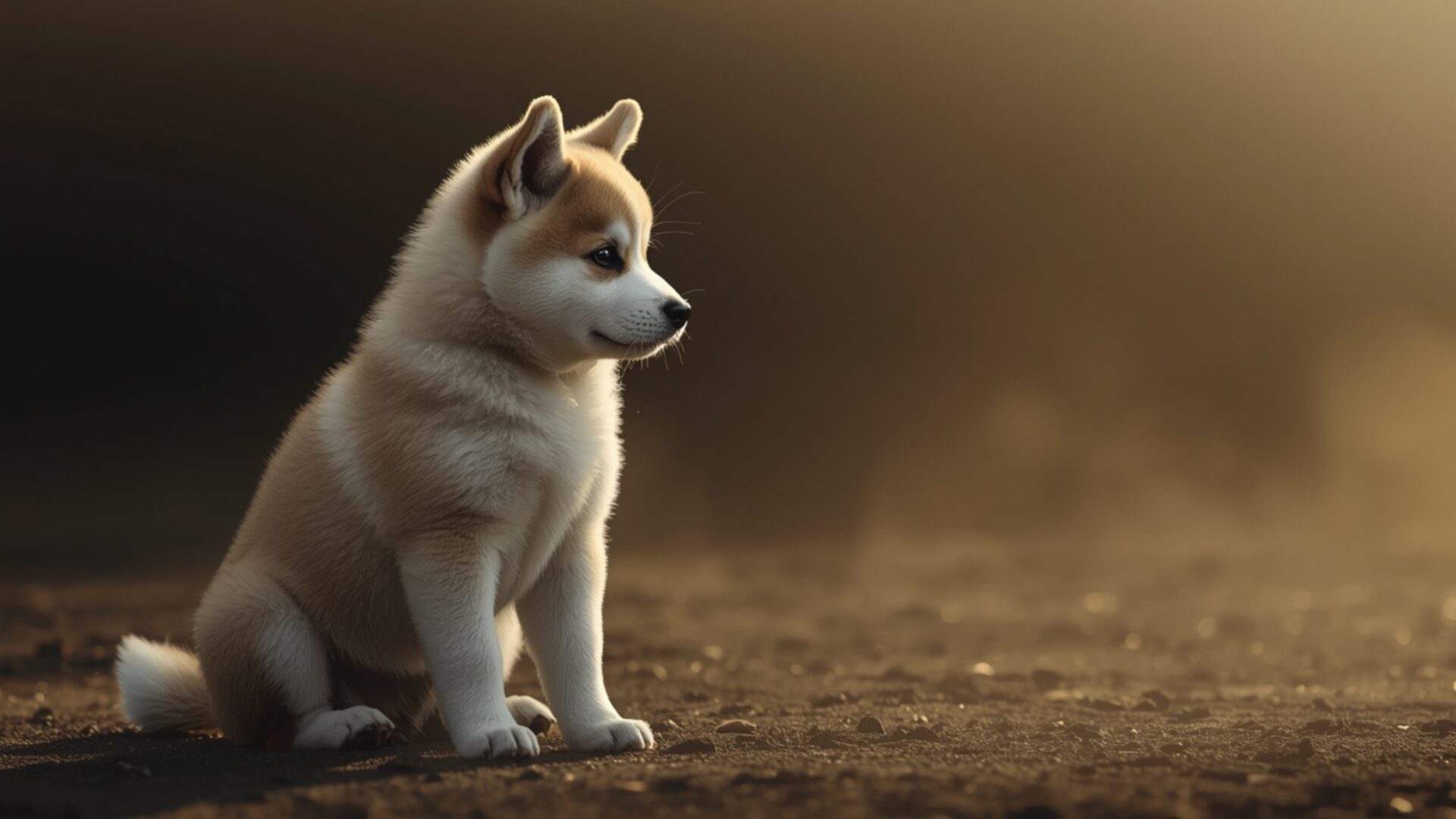
Akita Inu Puppy Sitting Peacefully introduces a captivating animal scene, perfect for anyone seeking a serene visual theme. This image captures a young Akita Inu, its fur a soft blend of cream and light brown, sitting attentively on a textured, earthy ground. The lighting is particularly striking, with a warm, diffused glow emanating from the right side, casting gentle shadows and highlighting the puppy’s delicate features. This soft illumination creates an intimate and tranquil atmosphere, drawing the viewer into the quiet moment. The composition places the puppy slightly off-center, allowing the soft, out-of-focus background to enhance the subject without distraction. The overall mood is one of calm contemplation, a snapshot of youthful innocence in a peaceful setting.
The detail in the puppy’s fur is rendered with a softness that suggests its fluffy texture, inviting a sense of warmth and comfort. Its ears are perked, and its gaze is directed slightly away, hinting at a moment of quiet observation. The ground beneath it appears to be a mix of soil and perhaps fine gravel, adding a naturalistic element to the scene. The artistic style leans towards realism, with a touch of painterly quality in the soft focus of the background elements. This visual theme is ideal for transforming your digital space into a haven of calm. The image is a beautiful representation of a loyal pet aesthetic, embodying a sense of quiet strength and gentle spirit.
This particular visual theme is designed to bring a touch of natural serenity to your desktop background. The gentle play of light and shadow, combined with the endearing subject matter, makes this a truly special piece. It’s a perfect addition for those who appreciate the quiet beauty of animals and wish to incorporate that into their daily view. The image is presented in its native 3840×2160 resolution, ensuring exceptional clarity and detail. You can download wallpaper of this charming Akita Inu puppy for your PC wallpaper. We also offer this beautiful scene in 4K, 2K, and Full HD versions, ensuring it looks stunning on any screen.
Wallpaper license: CC BY-NC-ND 4.0 · Credit: HDPeek.com
Remove Black Bars | Fit to Any Screen Size | CSS Fixer & Minifier | Compress Image Online | Image Converter Online | What Is My Screen Resolution? | Wallpaper Upscaler Online
Explore Categories
💡 How to Install Wallpaper on Different Devices
Windows PC:
Right-click on the wallpaper image. Select "Set as desktop background" or "Set as wallpaper". Adjust the fit (Fill, Fit, Stretch, Tile, Center) in Settings > Personalization > Background.Mac:
Right-click on the wallpaper image. Select "Set Desktop Picture". Alternatively, go to System Preferences > Desktop & Screen Saver and choose your image.iPhone / iPad (iOS):
Open the wallpaper image in Photos. Tap the Share button and select "Use as Wallpaper". Move and scale the image, then tap "Set" > Choose "Set Lock Screen", "Set Home Screen", or "Set Both".Android:
Open the wallpaper image in your Gallery app. Tap the Menu or Options button, then select "Set as wallpaper". Choose Home screen, Lock screen, or Both. Adjust the crop if needed and confirm.Linux (Ubuntu / others):
Right-click on the wallpaper image. Select "Set as Desktop Background" or "Set as Wallpaper". Adjust settings if your desktop environment allows multiple monitors.
Tips:
- For best quality, download the image in the resolution that matches your screen.
- Use 16:9 for widescreens, 1:1 for square displays.
- On mobile devices, choose "Set Both" for a consistent look on Home and Lock screens.
