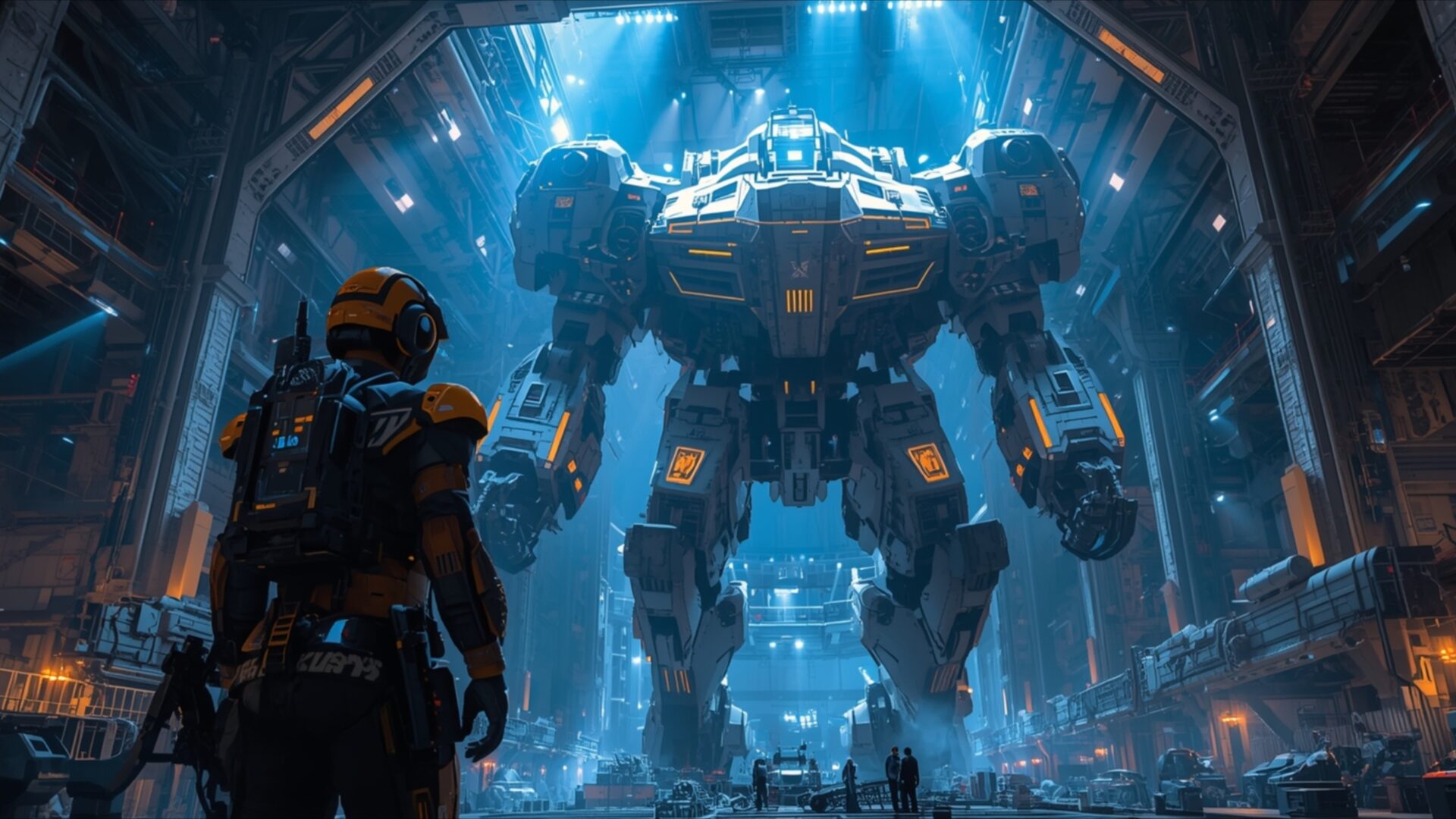
👽️ Mecha Commander Overseeing Starship Assembly 4K UHD (3840x2160) Wallpaper


❤ Share this wallpaper:
WhatsApp Facebook Twitter / X Pinterest LinkedIn Copy Link for Instagram Telegram Reddit Email





💡 Below is relevant information on how to install wallpapers on different devices 👇






This 4K wallpaper is the best choice for testing your OLED professional display resolution. Compared to others, our high-performance tool provides a premium look for any high-end smartphone or desktop setup.




"Personalize this wallpaper or upload your own image to create the perfect mobile background 👇"
Customize Mecha Commander Overseeing Starship Assembly for Mobile Wallpapers
iPhone • Samsung • Xiaomi • Google Pixel • Android • Huawei • (Others)
720×1600 • 1080×1920 • 1080×2340 • 1080×2400 • 1284×2778 • 1440×3088Please use Portrait Mode for a better experience (Optional)
Overview – Mecha Commander Overseeing Starship Assembly
Mecha Commander Overseeing Starship Assembly invites you into a grand science fiction scene, depicting a colossal mecha standing at the heart of a futuristic industrial complex. The image is dominated by a cool, electric blue light that emanates from above and around the massive robotic figure, casting long shadows and highlighting the metallic textures of the environment. This dramatic lighting creates a sense of awe and scale, emphasizing the sheer size of the mecha and the intricate details of its construction. The color palette leans heavily on blues and grays, with warm orange accents on the mecha itself providing a striking contrast and drawing the viewer’s eye to the central subject.
The composition places a lone figure, presumably the mecha commander, in the foreground, looking up at the imposing machine. This perspective emphasizes the human element against the backdrop of advanced technology, suggesting a narrative of command and control within this vast engineering space. The surrounding structures appear to be part of a starship hangar, with scaffolding, gantries, and other industrial elements visible, all rendered with a high level of detail. The overall mood is one of focused activity and immense industrial power, a snapshot of a future where giant robots are integral to large-scale construction projects. This visual theme is perfect for anyone who appreciates detailed sci-fi art.
The scene’s atmosphere is palpable, with the cool, artificial light suggesting a controlled, perhaps even sterile, environment where precision engineering takes place. The metallic shine across various surfaces reflects the light, adding depth and realism to the digital artwork. The intricate design of the mecha, with its segmented limbs and powerful build, speaks to a sophisticated level of future engineering. This desktop background captures a moment of quiet intensity before or during a major operation, offering a glimpse into a world of advanced robotics and ambitious spacefaring endeavors. The image is a testament to the possibilities of future technology.
For those seeking to enhance their digital space, this particular scene offers a compelling visual experience. The intricate details and dramatic lighting make it an excellent choice for a high-resolution display. You can download this wallpaper in 3840×2160 resolution, with 4K, 2K, and Full HD versions also available for your convenience. This free wallpaper provides a stunning visual theme for your PC wallpaper.
Wallpaper license: CC BY-NC-ND 4.0 · Credit: HDPeek.com
Remove Black Bars | Fit to Any Screen Size | CSS Fixer & Minifier | Compress Image Online | Image Converter Online | What Is My Screen Resolution? | Wallpaper Upscaler Online
Explore Categories
💡 How to Install Wallpaper on Different Devices
Windows PC:
Right-click on the wallpaper image. Select "Set as desktop background" or "Set as wallpaper". Adjust the fit (Fill, Fit, Stretch, Tile, Center) in Settings > Personalization > Background.Mac:
Right-click on the wallpaper image. Select "Set Desktop Picture". Alternatively, go to System Preferences > Desktop & Screen Saver and choose your image.iPhone / iPad (iOS):
Open the wallpaper image in Photos. Tap the Share button and select "Use as Wallpaper". Move and scale the image, then tap "Set" > Choose "Set Lock Screen", "Set Home Screen", or "Set Both".Android:
Open the wallpaper image in your Gallery app. Tap the Menu or Options button, then select "Set as wallpaper". Choose Home screen, Lock screen, or Both. Adjust the crop if needed and confirm.Linux (Ubuntu / others):
Right-click on the wallpaper image. Select "Set as Desktop Background" or "Set as Wallpaper". Adjust settings if your desktop environment allows multiple monitors.
Tips:
- For best quality, download the image in the resolution that matches your screen.
- Use 16:9 for widescreens, 1:1 for square displays.
- On mobile devices, choose "Set Both" for a consistent look on Home and Lock screens.
