🐉 Ancient Golem Awakening 4K UHD (3840x2160) Wallpaper

❤ Share this wallpaper:
WhatsApp Facebook Twitter / X Pinterest LinkedIn Copy Link for Instagram Telegram Reddit Email


💡 Below is relevant information on how to install wallpapers on different devices 👇


This 4K wallpaper is the best choice for testing your OLED professional display resolution. Compared to others, our high-performance tool provides a premium look for any high-end smartphone or desktop setup.


"Personalize this wallpaper or upload your own image to create the perfect mobile background 👇"
Customize Ancient Golem Awakening for Mobile Wallpapers
iPhone • Samsung • Xiaomi • Google Pixel • Android • Huawei • (Others)
720×1600 • 1080×1920 • 1080×2340 • 1080×2400 • 1284×2778 • 1440×3088Please use Portrait Mode for a better experience (Optional)
Overview – Ancient Golem Awakening
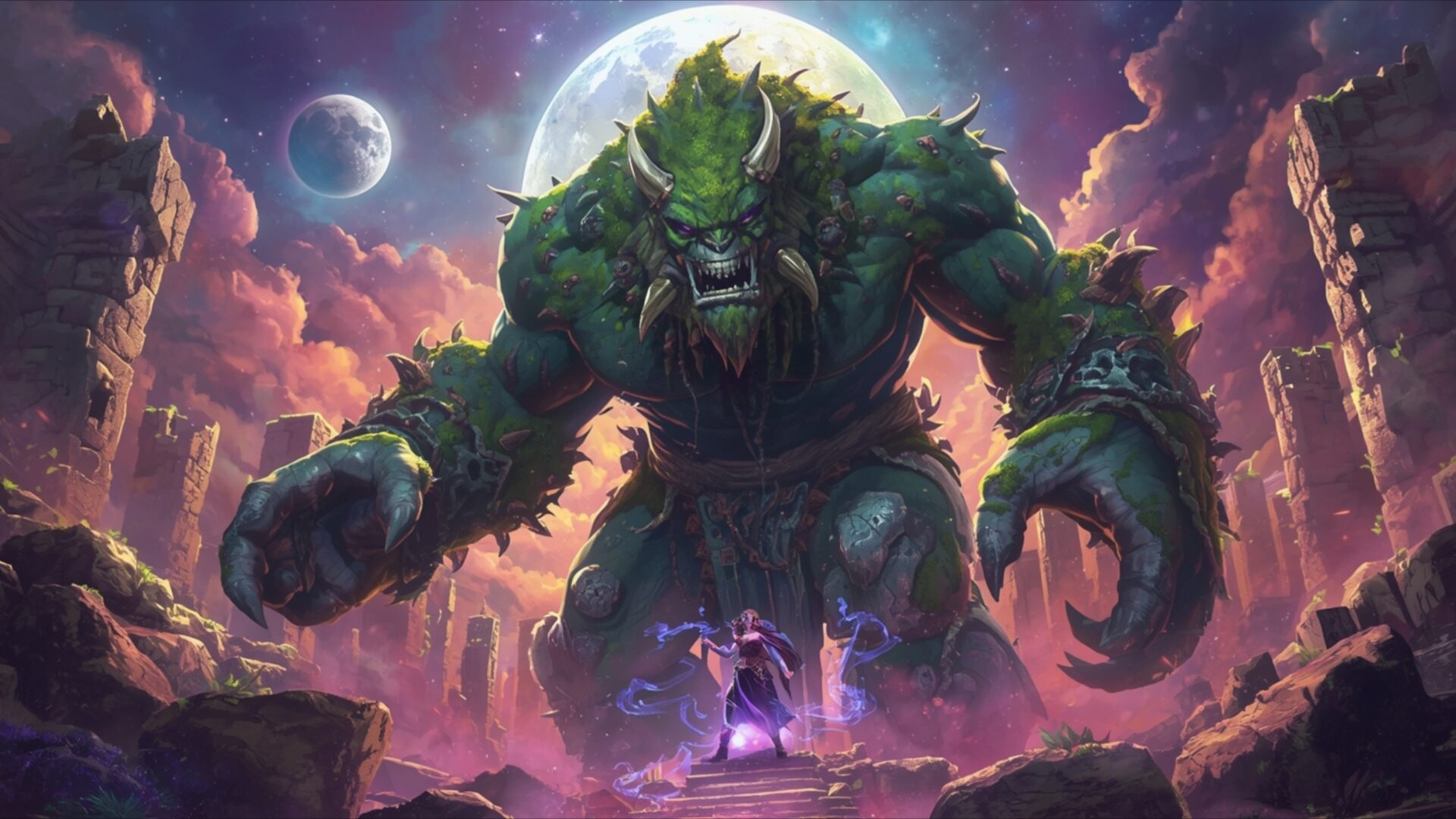
Ancient Golem Awakening captures a pivotal moment in a fantasy narrative, presenting a colossal, moss-covered golem emerging from ancient ruins under a luminous full moon. The scene’s primary color palette is dominated by deep purples and vibrant pinks in the sky, contrasting with the earthy greens and browns of the golem and the muted grays of the crumbling stone structures. Light emanates from the moon and a small, glowing orb held by a lone figure at the golem’s feet, casting dramatic shadows and highlighting the immense scale of the creature. This visual theme suggests a confrontation between a powerful, primal force and a determined, perhaps magical, protagonist. The composition draws the viewer’s eye upwards towards the imposing golem, emphasizing its raw power and ancient origins.
The golem itself appears to be awakening, with moss and foliage clinging to its massive form, suggesting it has been dormant for ages. Its eyes glow with an inner light, and its posture is one of slow, deliberate movement. The surrounding environment is a testament to a forgotten civilization, with broken pillars and weathered stones scattered across the landscape. The sky is not empty; a smaller, distant planet or moon adds to the otherworldly atmosphere, hinting at a vast, magical realm. The lighting is soft yet impactful, with the moonlight providing a cool, ethereal glow that bathes the scene. This creates a sense of awe and perhaps trepidation, as the sheer size and presence of the golem are undeniable. The image is rendered with a painterly quality, giving it a rich texture and depth.
The small figure at the base of the golem, wielding a magical staff, provides a crucial sense of scale and narrative tension. Their stance suggests defiance or perhaps an attempt to understand or control the ancient entity. The vibrant magical energy emanating from the staff contrasts with the natural, earthy power of the golem. This juxtaposition is central to the visual storytelling, inviting contemplation about the nature of power and the clash between the natural and the arcane. The overall mood is one of epic fantasy, a moment poised on the brink of a significant event. This high-resolution visual is perfect for a desktop background, offering a detailed and immersive experience.
The scene is a compelling visual theme, ideal for anyone who appreciates dark fantasy art or the grandeur of mythical creatures. The intricate details in the golem’s mossy hide and the crumbling ruins are rendered with exceptional clarity. The interplay of light and shadow across the vast expanse of the golem’s body and the surrounding landscape adds a dynamic quality to the image. This is a scene that draws you in, making you wonder about the story behind this awakening. The 3840×2160 resolution ensures every detail is sharp and clear, making it a truly immersive experience for your monitor wallpaper. You can download this stunning wallpaper in 4K, 2K, and Full HD versions.
Wallpaper license: CC BY-NC-ND 4.0 · Credit: HDPeek.com
Remove Black Bars | Fit to Any Screen Size | CSS Fixer & Minifier | Compress Image Online | Image Converter Online | What Is My Screen Resolution? | Wallpaper Upscaler Online
Explore Categories
💡 How to Install Wallpaper on Different Devices
Windows PC:
Right-click on the wallpaper image. Select "Set as desktop background" or "Set as wallpaper". Adjust the fit (Fill, Fit, Stretch, Tile, Center) in Settings > Personalization > Background.Mac:
Right-click on the wallpaper image. Select "Set Desktop Picture". Alternatively, go to System Preferences > Desktop & Screen Saver and choose your image.iPhone / iPad (iOS):
Open the wallpaper image in Photos. Tap the Share button and select "Use as Wallpaper". Move and scale the image, then tap "Set" > Choose "Set Lock Screen", "Set Home Screen", or "Set Both".Android:
Open the wallpaper image in your Gallery app. Tap the Menu or Options button, then select "Set as wallpaper". Choose Home screen, Lock screen, or Both. Adjust the crop if needed and confirm.Linux (Ubuntu / others):
Right-click on the wallpaper image. Select "Set as Desktop Background" or "Set as Wallpaper". Adjust settings if your desktop environment allows multiple monitors.
Tips:
- For best quality, download the image in the resolution that matches your screen.
- Use 16:9 for widescreens, 1:1 for square displays.
- On mobile devices, choose "Set Both" for a consistent look on Home and Lock screens.
