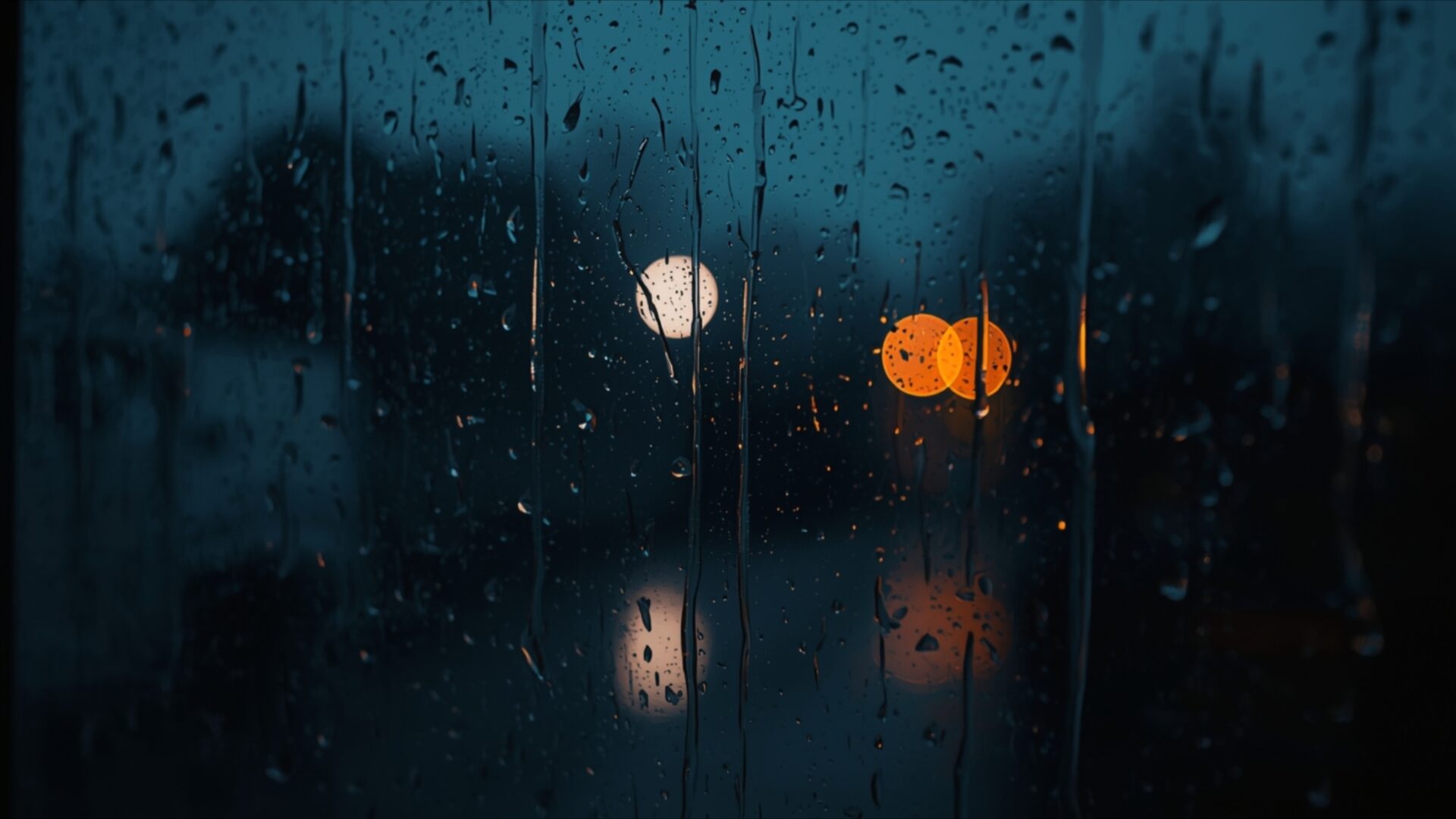
💔 Water Drops Sliding Down Window Pane 4K UHD (3840x2160) Wallpaper


❤ Share this wallpaper:
WhatsApp Facebook Twitter / X Pinterest LinkedIn Copy Link for Instagram Telegram Reddit Email





💡 Below is relevant information on how to install wallpapers on different devices 👇



This 4K wallpaper is the best choice for testing your OLED professional display resolution. Compared to others, our high-performance tool provides a premium look for any high-end smartphone or desktop setup.




"Personalize this wallpaper or upload your own image to create the perfect mobile background 👇"
Customize Water Drops Sliding Down Window Pane for Mobile Wallpapers
iPhone • Samsung • Xiaomi • Google Pixel • Android • Huawei • (Others)
720×1600 • 1080×1920 • 1080×2340 • 1080×2400 • 1284×2778 • 1440×3088Please use Portrait Mode for a better experience (Optional)
Overview – Water Drops Sliding Down Window Pane
Water Drops Sliding Down Window Pane captures a poignant moment, a visual theme that speaks to the quiet introspection often associated with heartbreak. The scene unfolds through a rain-streaked window, where individual droplets trace paths down the glass, distorting the muted lights of the outside world into soft, diffused orbs. The color palette is dominated by deep blues and teals, creating a cool, somber atmosphere, punctuated by the warm, hazy glow of distant streetlights or car headlights. This interplay of cool and warm tones evokes a sense of longing and isolation, as if observing a world that continues to move while one remains still, lost in thought.
The lighting is gentle and diffused, with the primary light sources appearing as blurred circles of yellow and orange. These bokeh effects add a dreamlike quality to the image, softening the edges of reality and enhancing the emotional resonance of the scene. The texture of the water on the glass is palpable, with each droplet appearing distinct yet part of a larger, flowing pattern. This visual texture contributes to the overall moody vibe, suggesting a quiet night where the sound of rain is the only companion. The composition focuses on the immediate foreground of the window pane, drawing the viewer into the intimate perspective of someone looking out from within.
This particular image, rendered in stunning 3840×2160 resolution, offers a deeply immersive experience for your PC wallpaper. The clarity allows for appreciation of the subtle details in the water’s surface and the soft diffusion of light. It’s a visual representation of a solitary mood, perfect for moments of reflection or when seeking a calming yet emotionally resonant aesthetic for your computer screen background. The overall impression is one of quiet contemplation, a visual narrative that unfolds with each passing raindrop.
For those looking to enhance their digital space, this Water Drops Sliding Down Window Pane visual theme is available for download. You can get it now to bring this evocative scene to your desktop. We also provide this image in 4K, 2K, and Full HD resolutions, ensuring a crisp and clear display on a variety of devices.
Wallpaper license: CC BY-NC-ND 4.0 · Credit: HDPeek.com
Remove Black Bars | Fit to Any Screen Size | CSS Fixer & Minifier | Compress Image Online | Image Converter Online | What Is My Screen Resolution? | Wallpaper Upscaler Online
Explore Categories
💡 How to Install Wallpaper on Different Devices
Windows PC:
Right-click on the wallpaper image. Select "Set as desktop background" or "Set as wallpaper". Adjust the fit (Fill, Fit, Stretch, Tile, Center) in Settings > Personalization > Background.Mac:
Right-click on the wallpaper image. Select "Set Desktop Picture". Alternatively, go to System Preferences > Desktop & Screen Saver and choose your image.iPhone / iPad (iOS):
Open the wallpaper image in Photos. Tap the Share button and select "Use as Wallpaper". Move and scale the image, then tap "Set" > Choose "Set Lock Screen", "Set Home Screen", or "Set Both".Android:
Open the wallpaper image in your Gallery app. Tap the Menu or Options button, then select "Set as wallpaper". Choose Home screen, Lock screen, or Both. Adjust the crop if needed and confirm.Linux (Ubuntu / others):
Right-click on the wallpaper image. Select "Set as Desktop Background" or "Set as Wallpaper". Adjust settings if your desktop environment allows multiple monitors.
Tips:
- For best quality, download the image in the resolution that matches your screen.
- Use 16:9 for widescreens, 1:1 for square displays.
- On mobile devices, choose "Set Both" for a consistent look on Home and Lock screens.
