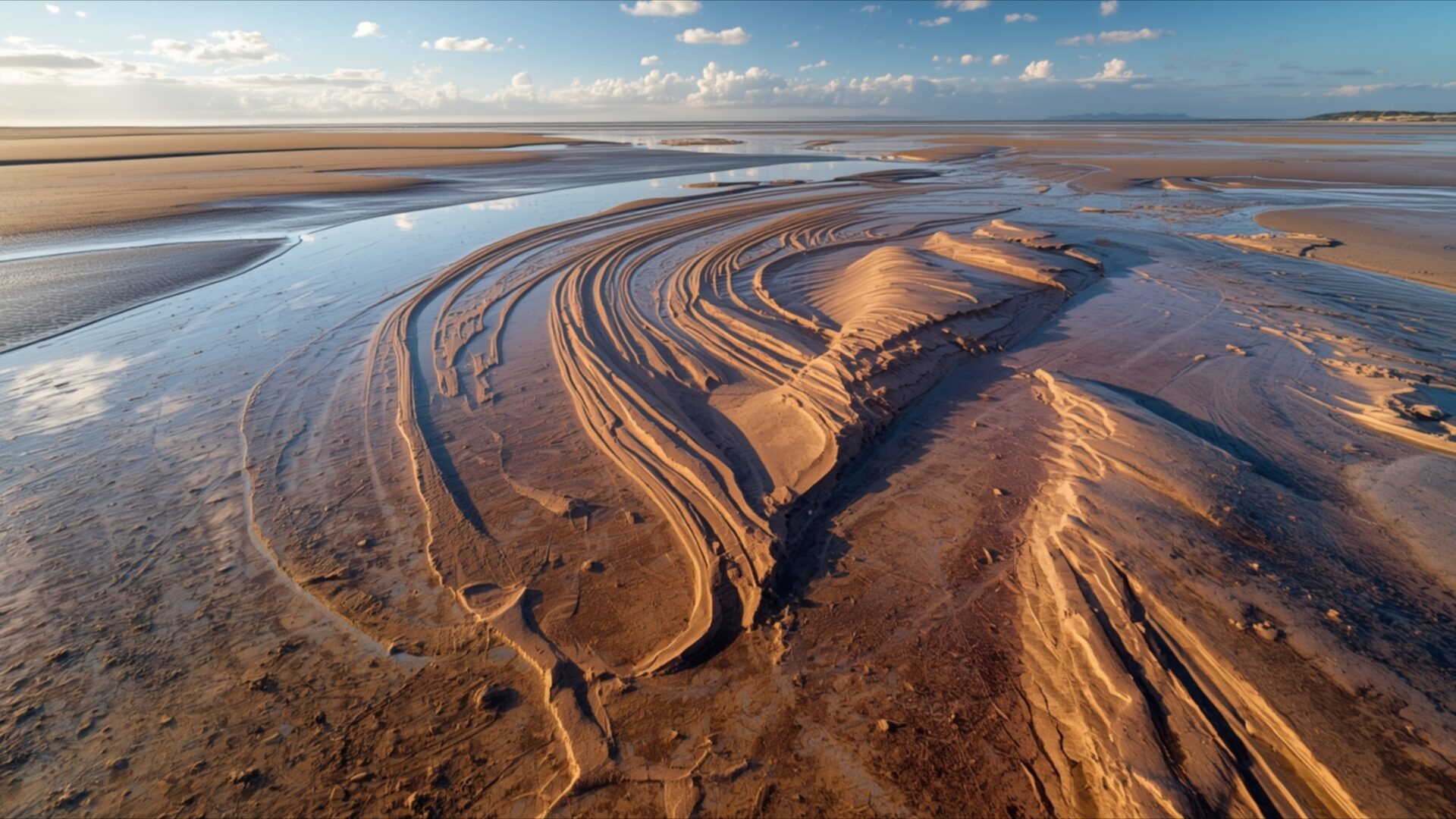
🌿 Tidal Flats Low Tide Sand Patterns Unique Abstract 4K UHD (3840x2160) Wallpaper
 Desert Road Lone Car Driving Perspective Freedom
 Bamboo Stalks Close Up Texture Detail Green Abstract
❤ Share this wallpaper:
WhatsApp Facebook Twitter / X Pinterest LinkedIn Copy Link for Instagram Telegram Reddit Email





💡 Below is relevant information on how to install wallpapers on different devices 👇


This 4K wallpaper is the best choice for testing your OLED professional display resolution. Compared to others, our high-performance tool provides a premium look for any high-end smartphone or desktop setup.
"Personalize this wallpaper or upload your own image to create the perfect mobile background 👇"
Customize Tidal Flats Low Tide Sand Patterns Unique Abstract for Mobile Wallpapers
iPhone • Samsung • Xiaomi • Google Pixel • Android • Huawei • (Others)
720×1600 • 1080×1920 • 1080×2340 • 1080×2400 • 1284×2778 • 1440×3088Please use Portrait Mode for a better experience (Optional)
Overview – Tidal Flats Low Tide Sand Patterns Unique Abstract
Tidal Flats Low Tide Sand Patterns Unique Abstract offers a captivating glimpse into the natural world, a stunning piece of nature art for your screen. This visual theme captures the intricate beauty of a tidal flat during low tide, showcasing the ephemeral artistry left by receding waters. The composition draws the eye across a landscape sculpted by the ebb and flow of the ocean, revealing delicate channels and rippling textures etched into the wet sand. The light plays a crucial role, casting long shadows that accentuate the three-dimensional quality of the sand formations, giving them a sculpted, almost architectural feel.
The color palette is dominated by warm earth tones, ranging from deep ochres and browns in the sand to the muted blues and grays of the sky and the shallow water. These colors blend harmoniously, creating a serene yet dynamic scene. The sky, with its scattered clouds, suggests a vast, open expanse, contrasting with the detailed, intricate patterns on the ground. The overall mood is one of tranquility and natural wonder, inviting contemplation of the subtle forces that shape our planet. This image is a testament to the abstract beauty found in everyday natural phenomena.
The detailed textures of the sand, from smooth, water-worn surfaces to the finely ridged patterns, are rendered with exceptional clarity. This level of detail makes the scene feel tangible, as if you could reach out and touch the cool, damp sand. The perspective is slightly elevated, providing a broad view of the landscape and emphasizing the scale of the tidal flats. It’s a scene that speaks to the power and artistry of nature, a unique abstract composition formed by the simple act of water meeting land.
This high-resolution image is perfect for anyone seeking to bring a sense of natural calm and intricate beauty to their digital space. Whether you’re looking for a new desktop background or a captivating visual theme for your monitor, this wallpaper delivers. You can download wallpaper of this stunning scene. The original image is presented in 3840×2160 resolution, with 4K, 2K, and Full HD versions also available for your viewing pleasure. Tidal Flats Low Tide Sand Patterns Unique Abstract.
Wallpaper license: CC BY-NC-ND 4.0 · Credit: HDPeek.com
Remove Black Bars | Fit to Any Screen Size | CSS Fixer & Minifier | Compress Image Online | Image Converter Online | What Is My Screen Resolution? | Wallpaper Upscaler Online
Explore Categories
💡 How to Install Wallpaper on Different Devices
Windows PC:
Right-click on the wallpaper image. Select "Set as desktop background" or "Set as wallpaper". Adjust the fit (Fill, Fit, Stretch, Tile, Center) in Settings > Personalization > Background.Mac:
Right-click on the wallpaper image. Select "Set Desktop Picture". Alternatively, go to System Preferences > Desktop & Screen Saver and choose your image.iPhone / iPad (iOS):
Open the wallpaper image in Photos. Tap the Share button and select "Use as Wallpaper". Move and scale the image, then tap "Set" > Choose "Set Lock Screen", "Set Home Screen", or "Set Both".Android:
Open the wallpaper image in your Gallery app. Tap the Menu or Options button, then select "Set as wallpaper". Choose Home screen, Lock screen, or Both. Adjust the crop if needed and confirm.Linux (Ubuntu / others):
Right-click on the wallpaper image. Select "Set as Desktop Background" or "Set as Wallpaper". Adjust settings if your desktop environment allows multiple monitors.
Tips:
- For best quality, download the image in the resolution that matches your screen.
- Use 16:9 for widescreens, 1:1 for square displays.
- On mobile devices, choose "Set Both" for a consistent look on Home and Lock screens.
