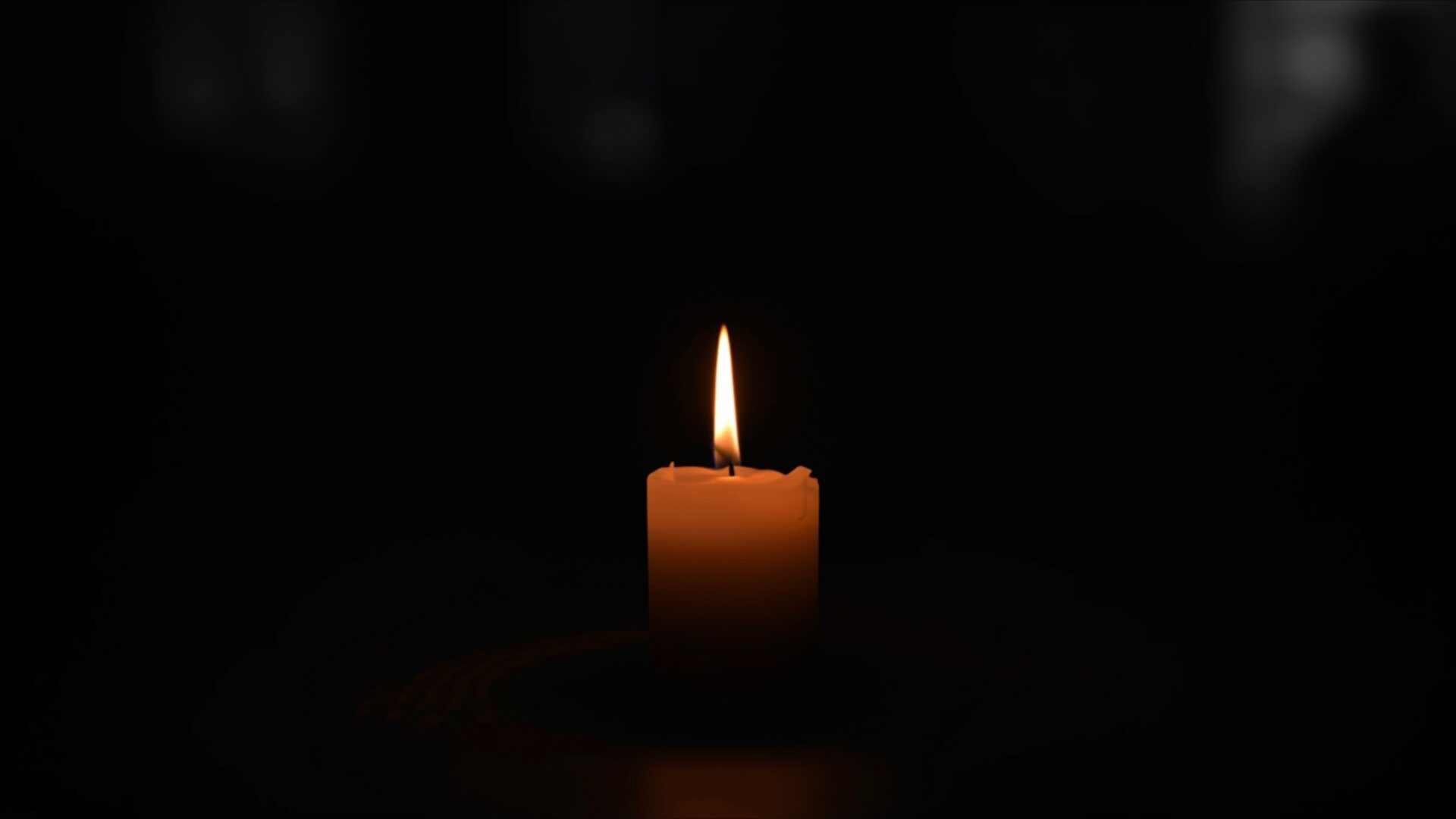
💔 Single Candle in Dark Room 4K UHD (3840x2160) Wallpaper

❤ Share this wallpaper:
WhatsApp Facebook Twitter / X Pinterest LinkedIn Copy Link for Instagram Telegram Reddit Email





💡 Below is relevant information on how to install wallpapers on different devices 👇


This 4K wallpaper is the best choice for testing your OLED professional display resolution. Compared to others, our high-performance tool provides a premium look for any high-end smartphone or desktop setup.




"Personalize this wallpaper or upload your own image to create the perfect mobile background 👇"
Customize Single Candle in Dark Room for Mobile Wallpapers
iPhone • Samsung • Xiaomi • Google Pixel • Android • Huawei • (Others)
720×1600 • 1080×1920 • 1080×2340 • 1080×2400 • 1284×2778 • 1440×3088Please use Portrait Mode for a better experience (Optional)
Overview – Single Candle in Dark Room
Single Candle in Dark Room captures a profound moment of quiet solitude, fitting for a Heartbreak visual theme. This 4k wallpaper presents a solitary candle, its flame casting a gentle, warm glow against an otherwise deep, enveloping darkness. The light from the flame is the sole source of illumination, creating a stark contrast that draws the viewer’s attention directly to the candle’s soft flame. The wax of the candle itself appears textured, with subtle drips suggesting the passage of time and the slow burning away of its substance.
The composition is minimalist, emphasizing the isolation and introspection often associated with heartbreak. The background is almost entirely black, allowing the small, bright point of light to dominate the scene. This deliberate use of negative space enhances the feeling of loneliness and contemplation. The color palette is restrained, consisting primarily of the warm oranges and yellows of the flame and the candle, set against the deep, velvety black of the surrounding environment. This limited color scheme contributes to the moody and emotional tone of the image.
The lighting is directional, emanating upwards from the flame and subtly illuminating the top portion of the candle. Shadows are deep and soft, further contributing to the intimate and somber atmosphere. There’s a sense of stillness, as if the entire scene is frozen in a moment of quiet reflection. This visual theme is perfect for anyone seeking to evoke a sense of inner peace or to acknowledge a period of emotional processing. The overall aesthetic layout is simple yet powerful, conveying a lot with very little.
This high-resolution image is ideal for your PC wallpaper, offering a subtle yet impactful addition to your desktop. The delicate interplay of light and shadow, the singular focus on the candle, and the pervasive darkness combine to create a deeply resonant visual experience. It’s a reminder of finding light even in the darkest of times, a quiet companion for moments of personal reflection. You can download wallpaper of this scene in its original 3840×2160 resolution, with 4K, 2K, and Full HD versions also readily available.
Wallpaper license: CC BY-NC-ND 4.0 · Credit: HDPeek.com
Remove Black Bars | Fit to Any Screen Size | CSS Fixer & Minifier | Compress Image Online | Image Converter Online | What Is My Screen Resolution? | Wallpaper Upscaler Online
Explore Categories
💡 How to Install Wallpaper on Different Devices
Windows PC:
Right-click on the wallpaper image. Select "Set as desktop background" or "Set as wallpaper". Adjust the fit (Fill, Fit, Stretch, Tile, Center) in Settings > Personalization > Background.Mac:
Right-click on the wallpaper image. Select "Set Desktop Picture". Alternatively, go to System Preferences > Desktop & Screen Saver and choose your image.iPhone / iPad (iOS):
Open the wallpaper image in Photos. Tap the Share button and select "Use as Wallpaper". Move and scale the image, then tap "Set" > Choose "Set Lock Screen", "Set Home Screen", or "Set Both".Android:
Open the wallpaper image in your Gallery app. Tap the Menu or Options button, then select "Set as wallpaper". Choose Home screen, Lock screen, or Both. Adjust the crop if needed and confirm.Linux (Ubuntu / others):
Right-click on the wallpaper image. Select "Set as Desktop Background" or "Set as Wallpaper". Adjust settings if your desktop environment allows multiple monitors.
Tips:
- For best quality, download the image in the resolution that matches your screen.
- Use 16:9 for widescreens, 1:1 for square displays.
- On mobile devices, choose "Set Both" for a consistent look on Home and Lock screens.
