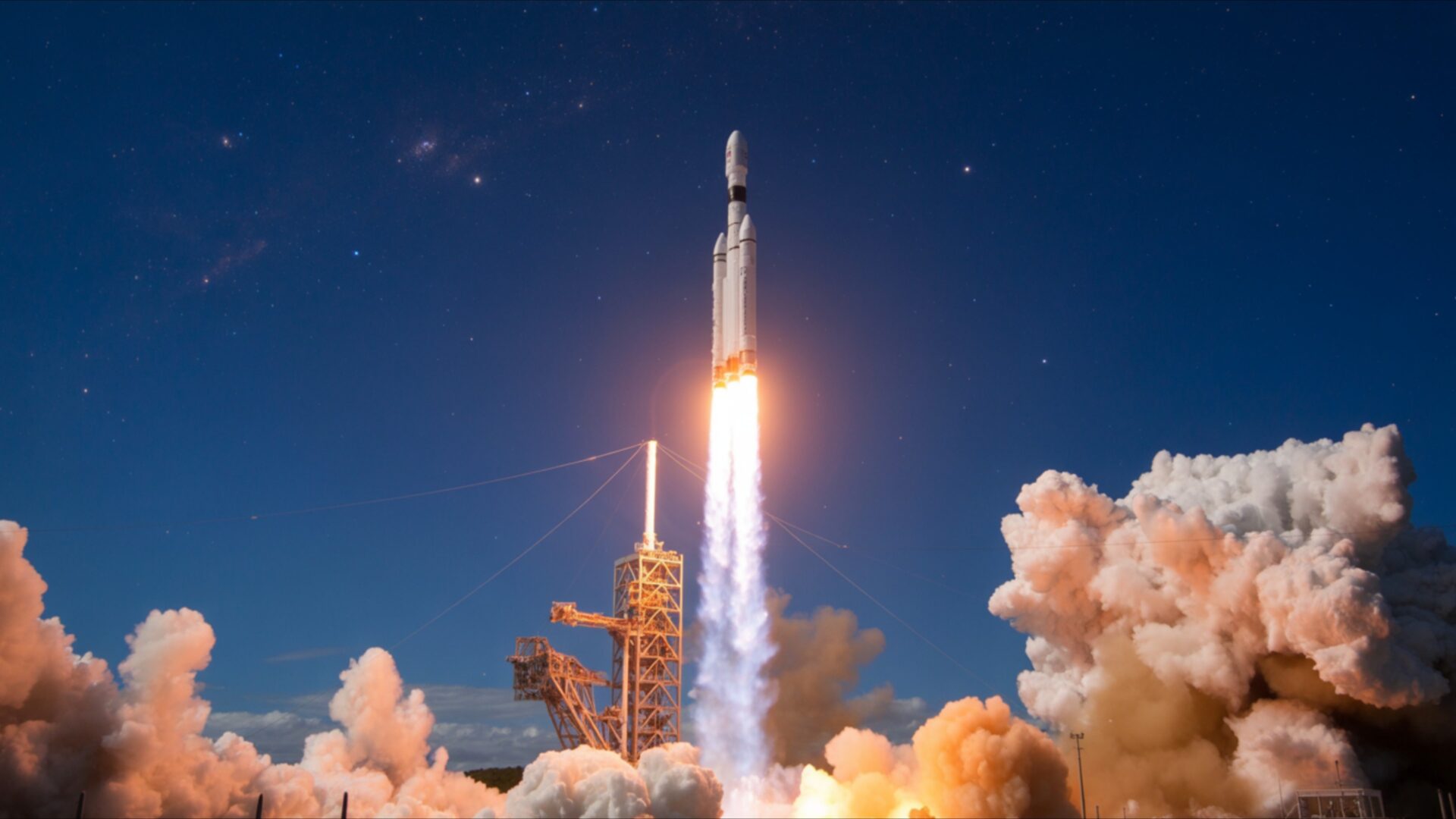
🚀 Rocket Launch Leaving Bright Flame Trail 4K UHD (3840x2160) Wallpaper


❤ Share this wallpaper:
WhatsApp Facebook Twitter / X Pinterest LinkedIn Copy Link for Instagram Telegram Reddit Email





💡 Below is relevant information on how to install wallpapers on different devices 👇




This 4K wallpaper is the best choice for testing your OLED professional display resolution. Compared to others, our high-performance tool provides a premium look for any high-end smartphone or desktop setup.




"Personalize this wallpaper or upload your own image to create the perfect mobile background 👇"
Customize Rocket Launch Leaving Bright Flame Trail for Mobile Wallpapers
iPhone • Samsung • Xiaomi • Google Pixel • Android • Huawei • (Others)
720×1600 • 1080×1920 • 1080×2340 • 1080×2400 • 1284×2778 • 1440×3088Please use Portrait Mode for a better experience (Optional)
Overview – Rocket Launch Leaving Bright Flame Trail
Rocket Launch Leaving Bright Flame Trail captures the drama of the Space & Science category with its vivid depiction of a nighttime liftoff. The composition emphasizes the contrast between the dark sky and the explosive glow of the rocket’s engine, creating a compelling visual experience. The upward trajectory of the flame trail dominates the scene composition, drawing the eye along the path of the rocket as it ascends.
This 4k wallpaper presents a dramatic liftoff scene, focusing on the intense light and energy released during a rocket launch. The dark expanse of the night sky serves as a stark canvas, highlighting the vibrant colors and textures within the flame trail. Notice how the light interacts with the surrounding atmosphere, creating subtle gradients and variations in color. The image captures a moment of raw power and technological achievement, rendered in stunning detail. It’s a stylish HD artwork that brings the excitement of space exploration directly to your computer screen background.
The visual theme centers around the interplay of light and shadow, with the rocket’s exhaust plume acting as the primary light source. This light illuminates the rocket itself and casts a warm glow on the surrounding areas, creating a sense of depth and dimension. The high-resolution detail allows you to appreciate the intricate textures of the rocket’s surface and the dynamic movement of the flames. The overall effect is both visually striking and intellectually stimulating, making it an ideal choice to personalize your desktop.
Consider the dynamic lines created by the rocket’s ascent and the expanding plume of exhaust. These lines contribute to the overall sense of motion and energy, conveying the sheer force required to escape Earth’s gravity. The color palette is dominated by warm tones of orange, yellow, and red, contrasted against the cool, dark tones of the night sky. This contrast further enhances the visual impact of the scene, drawing the viewer’s attention to the central point of action. You can download wallpaper and use it as a mobile background, bringing a piece of space exploration to your everyday life.
This digital canvas is available as a free wallpaper, allowing you to instantly transform your laptop wallpaper with this captivating image. The 3840×2160 resolution ensures that every detail is rendered with clarity and precision, even on large displays. Beyond the 4K version, this striking Rocket Launch Leaving Bright Flame Trail is also available in 2K and Full HD versions, ensuring optimal display quality across a range of devices.
Wallpaper license: CC BY-NC-ND 4.0 · Credit: HDPeek.com
Remove Black Bars | Fit to Any Screen Size | CSS Fixer & Minifier | Compress Image Online | Image Converter Online | What Is My Screen Resolution? | Wallpaper Upscaler Online
Explore Categories
💡 How to Install Wallpaper on Different Devices
Windows PC:
Right-click on the wallpaper image. Select "Set as desktop background" or "Set as wallpaper". Adjust the fit (Fill, Fit, Stretch, Tile, Center) in Settings > Personalization > Background.Mac:
Right-click on the wallpaper image. Select "Set Desktop Picture". Alternatively, go to System Preferences > Desktop & Screen Saver and choose your image.iPhone / iPad (iOS):
Open the wallpaper image in Photos. Tap the Share button and select "Use as Wallpaper". Move and scale the image, then tap "Set" > Choose "Set Lock Screen", "Set Home Screen", or "Set Both".Android:
Open the wallpaper image in your Gallery app. Tap the Menu or Options button, then select "Set as wallpaper". Choose Home screen, Lock screen, or Both. Adjust the crop if needed and confirm.Linux (Ubuntu / others):
Right-click on the wallpaper image. Select "Set as Desktop Background" or "Set as Wallpaper". Adjust settings if your desktop environment allows multiple monitors.
Tips:
- For best quality, download the image in the resolution that matches your screen.
- Use 16:9 for widescreens, 1:1 for square displays.
- On mobile devices, choose "Set Both" for a consistent look on Home and Lock screens.
