🚀 Futuristic City Skyline Flying Vehicles 4K UHD (3840x2160) Wallpaper


❤ Share this wallpaper:
WhatsApp Facebook Twitter / X Pinterest LinkedIn Copy Link for Instagram Telegram Reddit Email





💡 Below is relevant information on how to install wallpapers on different devices 👇




This 4K wallpaper is the best choice for testing your OLED professional display resolution. Compared to others, our high-performance tool provides a premium look for any high-end smartphone or desktop setup.





"Personalize this wallpaper or upload your own image to create the perfect mobile background 👇"
Customize Futuristic City Skyline Flying Vehicles for Mobile Wallpapers
iPhone • Samsung • Xiaomi • Google Pixel • Android • Huawei • (Others)
720×1600 • 1080×1920 • 1080×2340 • 1080×2400 • 1284×2778 • 1440×3088Please use Portrait Mode for a better experience (Optional)
Overview – Futuristic City Skyline Flying Vehicles
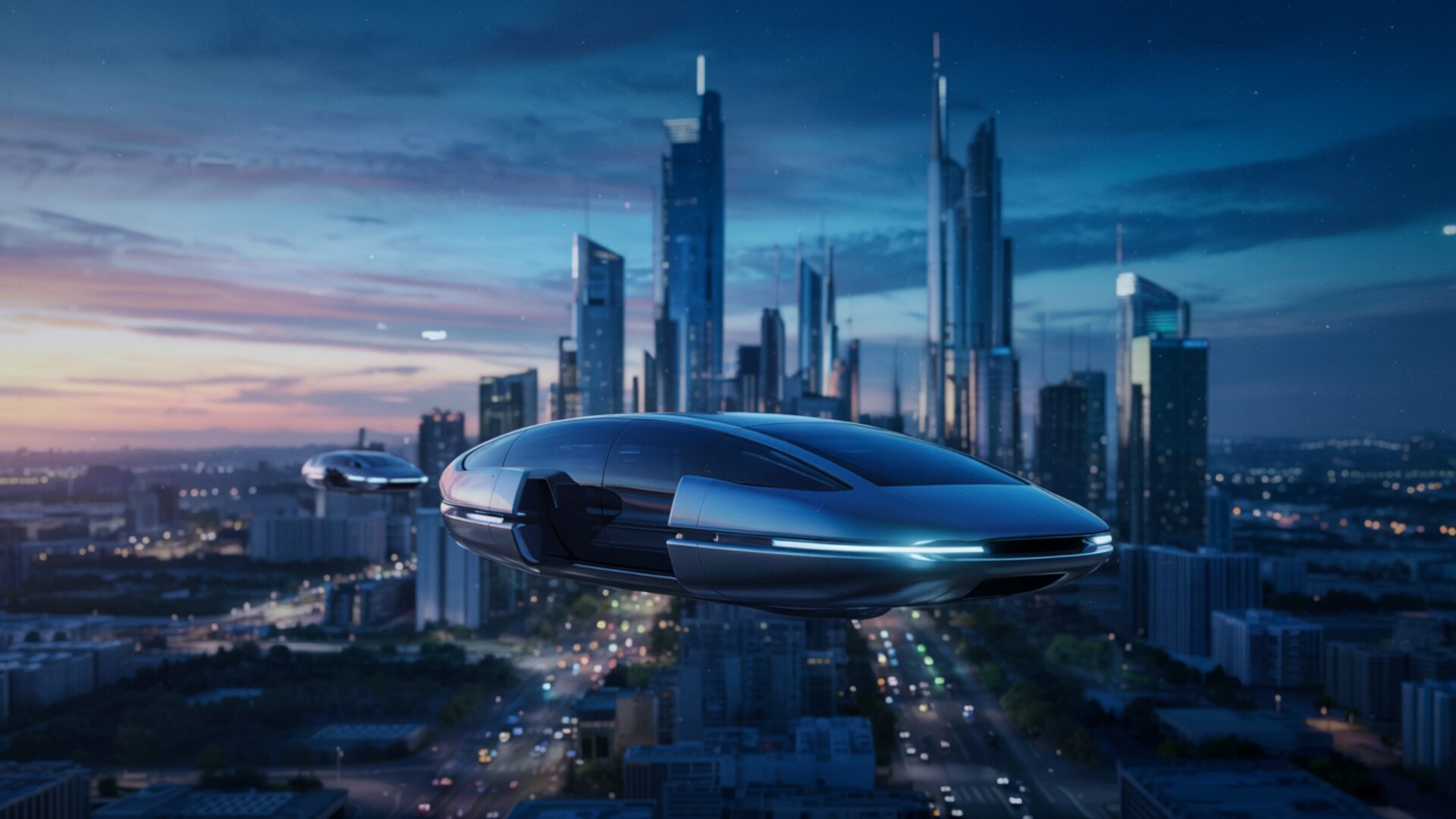
Futuristic City Skyline Flying Vehicles captures the essence of the Space & Science category, presenting a vision of tomorrow with sleek designs and innovative concepts. This desktop background showcases a sprawling metropolis where skyscrapers pierce the clouds and advanced flying vehicles navigate the aerial pathways. The scene composition emphasizes the verticality of the city, drawing the eye upward to appreciate the scale and ambition of this futuristic world.
The color palette is dominated by cool blues and grays, accented by vibrant streaks of neon light emanating from the buildings and vehicles. This contrast creates a sense of energy and dynamism, suggesting a city that never sleeps. Notice how the lighting plays a crucial role in defining the shapes and textures of the structures, highlighting the intricate details of the architectural design. The high-resolution image allows you to appreciate the subtle nuances of the scene, from the reflections on the glass surfaces to the intricate patterns of the city streets below.
The flying vehicles themselves are a testament to technological advancement, with streamlined bodies and glowing engines. They appear to effortlessly glide through the air, adding a sense of movement and life to the scene. The overall aesthetic layout conveys a sense of optimism and progress, inviting you to imagine the possibilities of a future where technology and urban living coexist in harmony. It’s a stylish HD artwork that can personalize your desktop, offering a glimpse into a world of innovation and imagination.
Consider the perspective; it offers a panoramic view of the city, allowing you to take in the full scope of its grandeur. The 3840×2160 resolution ensures that every detail is crisp and clear, making it an ideal choice for a computer screen background. If you are looking to download wallpaper that transports you to another world, this is a great choice. It’s a fantastic way to personalize your desktop with a unique and visually stunning scene.
This mobile background offers a captivating glimpse into a potential future, a world where technology seamlessly integrates with the urban landscape. It’s a quick download to get it now and transform your screen into a portal to a world of tomorrow. The Futuristic City Skyline Flying Vehicles visual theme is also available in various resolutions, including 2K and Full HD, ensuring a perfect fit for a wide range of devices.
Wallpaper license: CC BY-NC-ND 4.0 · Credit: HDPeek.com
Remove Black Bars | Fit to Any Screen Size | CSS Fixer & Minifier | Compress Image Online | Image Converter Online | What Is My Screen Resolution? | Wallpaper Upscaler Online
Explore Categories
💡 How to Install Wallpaper on Different Devices
Windows PC:
Right-click on the wallpaper image. Select "Set as desktop background" or "Set as wallpaper". Adjust the fit (Fill, Fit, Stretch, Tile, Center) in Settings > Personalization > Background.Mac:
Right-click on the wallpaper image. Select "Set Desktop Picture". Alternatively, go to System Preferences > Desktop & Screen Saver and choose your image.iPhone / iPad (iOS):
Open the wallpaper image in Photos. Tap the Share button and select "Use as Wallpaper". Move and scale the image, then tap "Set" > Choose "Set Lock Screen", "Set Home Screen", or "Set Both".Android:
Open the wallpaper image in your Gallery app. Tap the Menu or Options button, then select "Set as wallpaper". Choose Home screen, Lock screen, or Both. Adjust the crop if needed and confirm.Linux (Ubuntu / others):
Right-click on the wallpaper image. Select "Set as Desktop Background" or "Set as Wallpaper". Adjust settings if your desktop environment allows multiple monitors.
Tips:
- For best quality, download the image in the resolution that matches your screen.
- Use 16:9 for widescreens, 1:1 for square displays.
- On mobile devices, choose "Set Both" for a consistent look on Home and Lock screens.
