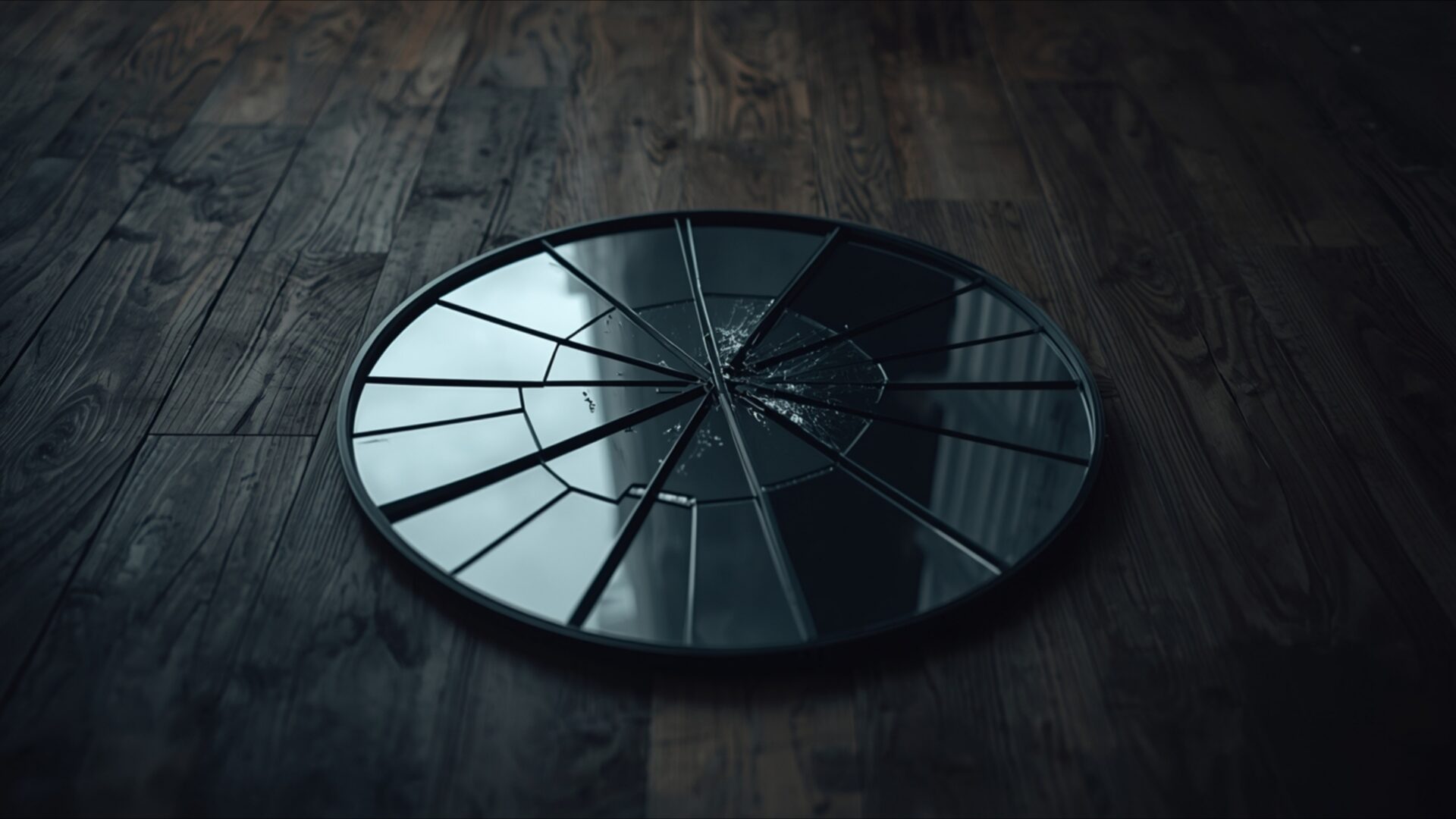
💔 Broken Mirror on Wooden Floor 4K UHD (3840x2160) Wallpaper


❤ Share this wallpaper:
WhatsApp Facebook Twitter / X Pinterest LinkedIn Copy Link for Instagram Telegram Reddit Email





💡 Below is relevant information on how to install wallpapers on different devices 👇





This 4K wallpaper is the best choice for testing your OLED professional display resolution. Compared to others, our high-performance tool provides a premium look for any high-end smartphone or desktop setup.





"Personalize this wallpaper or upload your own image to create the perfect mobile background 👇"
Customize Broken Mirror on Wooden Floor for Mobile Wallpapers
iPhone • Samsung • Xiaomi • Google Pixel • Android • Huawei • (Others)
720×1600 • 1080×1920 • 1080×2340 • 1080×2400 • 1284×2778 • 1440×3088Please use Portrait Mode for a better experience (Optional)
Overview – Broken Mirror on Wooden Floor
Broken Mirror on Wooden Floor captures a poignant moment within the Heartbreak category, presenting a scene steeped in quiet reflection and symbolic weight. The composition centers on a shattered mirror resting on aged wooden planks, the splinters and fragments creating a complex interplay of light and shadow. This visual theme evokes a sense of loss and fragmentation, the broken pieces reflecting distorted images of the surrounding space.
The moody tone is amplified by the subtle gradations of light across the scene composition. Dust motes seem to hang suspended in the air, illuminated by a soft, diffused light source that casts long, attenuated shadows. The wooden floor, with its visible grain and imperfections, adds a layer of texture and history to the image. Each splinter of glass catches the light differently, creating a mosaic of highlights and dark recesses. The overall effect is one of stillness and contemplation, inviting the viewer to consider the emotional narrative embedded within the scene.
The minimalist approach enhances the emotional impact. The absence of extraneous details focuses attention on the central symbol of the broken mirror, allowing its message of emotional distress to resonate more deeply. The careful arrangement of the shattered pieces suggests a deliberate artistic choice, transforming a simple scene into a powerful visual statement. The reflection pieces visible within the fragments offer glimpses of a distorted reality, hinting at the subjective experience of heartbreak and loss. This stylish HD artwork is perfect to personalize your desktop.
The high-resolution image, available as a 4k wallpaper, showcases the intricate details of the scene. Every crack and splinter is rendered with clarity, allowing the viewer to fully appreciate the texture and depth of the composition. This desktop background transforms your computer screen background into a canvas for contemplation, offering a visual reminder of the complexities of human emotion. It’s a powerful image to use as a notebook wallpaper.
This image is more than just a picture; it is an emotional symbol, a visual representation of a lost moment frozen in time. The quiet room setting adds to the sense of isolation and introspection, inviting viewers to connect with the underlying themes of heartbreak and resilience. Get it now as a 4k wallpaper for your PC wallpaper. The image is also available in 2K and Full HD versions, ensuring compatibility with a wide range of devices and screen resolutions. Experience the depth and detail of Broken Mirror on Wooden Floor as your next desktop background.
Wallpaper license: CC BY-NC-ND 4.0 · Credit: HDPeek.com
Remove Black Bars | Fit to Any Screen Size | CSS Fixer & Minifier | Compress Image Online | Image Converter Online | What Is My Screen Resolution? | Wallpaper Upscaler Online
Explore Categories
💡 How to Install Wallpaper on Different Devices
Windows PC:
Right-click on the wallpaper image. Select "Set as desktop background" or "Set as wallpaper". Adjust the fit (Fill, Fit, Stretch, Tile, Center) in Settings > Personalization > Background.Mac:
Right-click on the wallpaper image. Select "Set Desktop Picture". Alternatively, go to System Preferences > Desktop & Screen Saver and choose your image.iPhone / iPad (iOS):
Open the wallpaper image in Photos. Tap the Share button and select "Use as Wallpaper". Move and scale the image, then tap "Set" > Choose "Set Lock Screen", "Set Home Screen", or "Set Both".Android:
Open the wallpaper image in your Gallery app. Tap the Menu or Options button, then select "Set as wallpaper". Choose Home screen, Lock screen, or Both. Adjust the crop if needed and confirm.Linux (Ubuntu / others):
Right-click on the wallpaper image. Select "Set as Desktop Background" or "Set as Wallpaper". Adjust settings if your desktop environment allows multiple monitors.
Tips:
- For best quality, download the image in the resolution that matches your screen.
- Use 16:9 for widescreens, 1:1 for square displays.
- On mobile devices, choose "Set Both" for a consistent look on Home and Lock screens.
