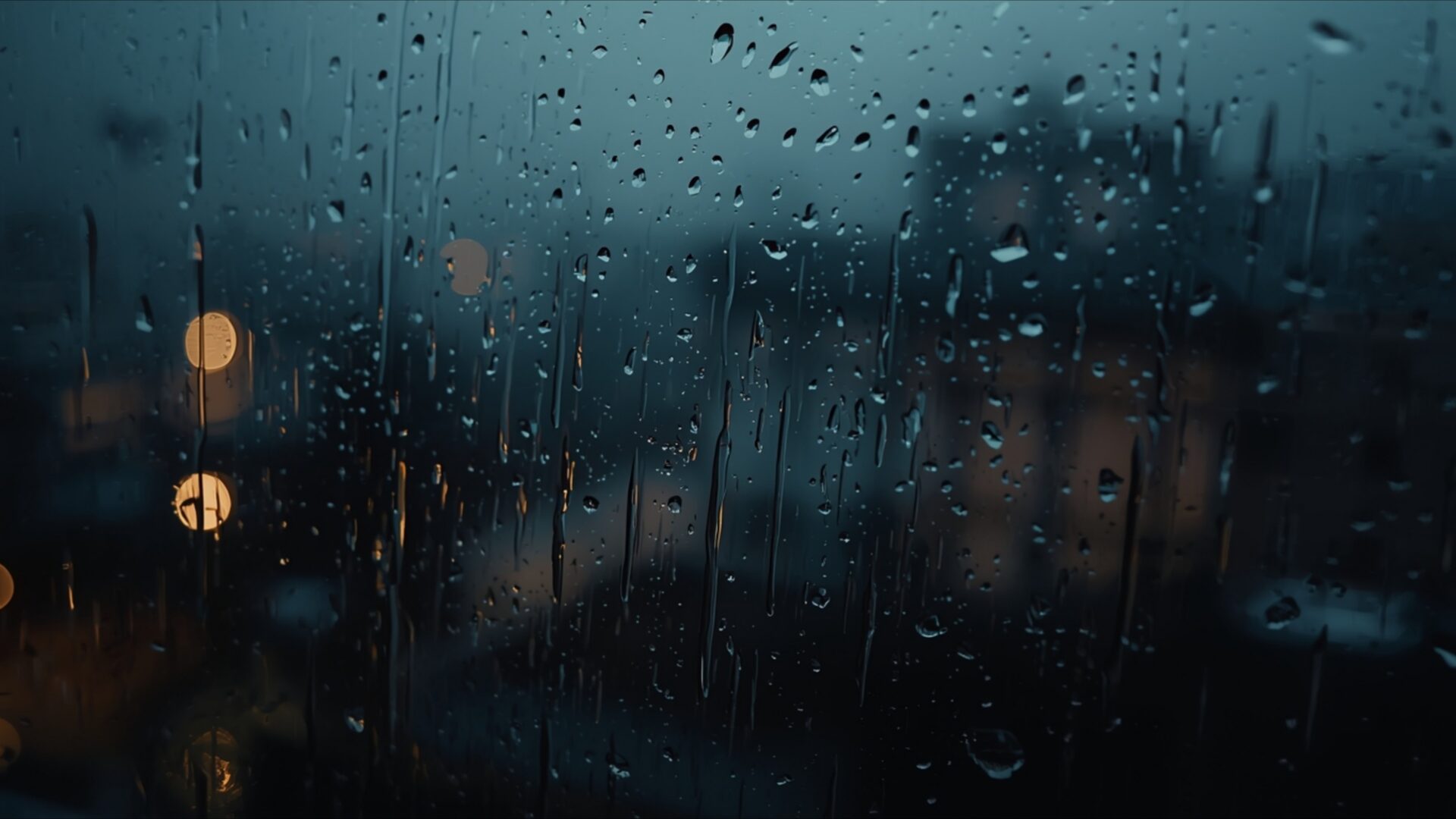
🌑 Rain Hitting Window at Night 4K UHD (3840x2160) Wallpaper


❤ Share this wallpaper:
WhatsApp Facebook Twitter / X Pinterest LinkedIn Copy Link for Instagram Telegram Reddit Email





💡 Below is relevant information on how to install wallpapers on different devices 👇





This 4K wallpaper is the best choice for testing your OLED professional display resolution. Compared to others, our high-performance tool provides a premium look for any high-end smartphone or desktop setup.





"Personalize this wallpaper or upload your own image to create the perfect mobile background 👇"
Customize Rain Hitting Window at Night for Mobile Wallpapers
iPhone • Samsung • Xiaomi • Google Pixel • Android • Huawei • (Others)
720×1600 • 1080×1920 • 1080×2340 • 1080×2400 • 1284×2778 • 1440×3088Please use Portrait Mode for a better experience (Optional)
Overview – Rain Hitting Window at Night
Rain Hitting Window at Night captures the essence of the Dark & Moody category, presenting a scene steeped in atmosphere and emotion. The composition centers on a rain-streaked window, blurring the outside world into a wash of diffused light and color. It’s a study in contrasts, where the sharp, defined edges of the raindrops meet the soft, indistinct glow of distant city lights. The overall effect evokes a sense of quiet contemplation, inviting the viewer to pause and reflect.
The image is a masterful example of using limited light to create depth and dimension. Notice how the varying intensities of the light sources outside play across the wet glass, creating highlights and shadows that suggest a world beyond the pane. The palette is restrained, dominated by cool blues and grays, punctuated by the occasional warm glow of a streetlight. This careful color selection reinforces the emotional tone of the scene, lending it a sense of melancholy and introspection. The 3840×2160 resolution ensures that every subtle nuance of light and texture is rendered with exceptional clarity, making it a captivating 4k wallpaper for your devices.
The arrangement of the raindrops on the glass is not random; they form patterns that guide the eye and add visual interest. Some are isolated, individual droplets, while others have merged into rivulets that trace meandering paths down the surface. This creates a dynamic interplay of lines and shapes, preventing the image from feeling static or monotonous. The soft blur of the background further enhances the sense of depth, drawing the viewer’s attention to the foreground details. This stylish HD artwork is perfect to personalize your desktop.
If you’re looking to personalize your desktop with a visual theme that evokes a sense of calm and introspection, this high-resolution image is an excellent choice. It’s a scene composition that speaks to the quiet moments in life, the times when we find ourselves alone with our thoughts, watching the world go by from a safe distance. It offers a unique desktop background that moves beyond the ordinary. It’s a scene that resonates with anyone who appreciates the beauty of a moody night and the emotional tone it sets.
This evocative scene is available as a free wallpaper, ready for instant download to transform your computer screen background. It’s ideally suited as a PC wallpaper, laptop wallpaper, or tablet background, bringing a touch of understated elegance to any device. Get it now and experience the subtle beauty of Rain Hitting Window at Night in stunning detail. In addition to the crisp 4K version, this image is also available in 2K and Full HD (FHD) versions to suit a variety of screens.
Wallpaper license: CC BY-NC-ND 4.0 · Credit: HDPeek.com
Remove Black Bars | Fit to Any Screen Size | CSS Fixer & Minifier | Compress Image Online | Image Converter Online | What Is My Screen Resolution? | Wallpaper Upscaler Online
Explore Categories
💡 How to Install Wallpaper on Different Devices
Windows PC:
Right-click on the wallpaper image. Select "Set as desktop background" or "Set as wallpaper". Adjust the fit (Fill, Fit, Stretch, Tile, Center) in Settings > Personalization > Background.Mac:
Right-click on the wallpaper image. Select "Set Desktop Picture". Alternatively, go to System Preferences > Desktop & Screen Saver and choose your image.iPhone / iPad (iOS):
Open the wallpaper image in Photos. Tap the Share button and select "Use as Wallpaper". Move and scale the image, then tap "Set" > Choose "Set Lock Screen", "Set Home Screen", or "Set Both".Android:
Open the wallpaper image in your Gallery app. Tap the Menu or Options button, then select "Set as wallpaper". Choose Home screen, Lock screen, or Both. Adjust the crop if needed and confirm.Linux (Ubuntu / others):
Right-click on the wallpaper image. Select "Set as Desktop Background" or "Set as Wallpaper". Adjust settings if your desktop environment allows multiple monitors.
Tips:
- For best quality, download the image in the resolution that matches your screen.
- Use 16:9 for widescreens, 1:1 for square displays.
- On mobile devices, choose "Set Both" for a consistent look on Home and Lock screens.
