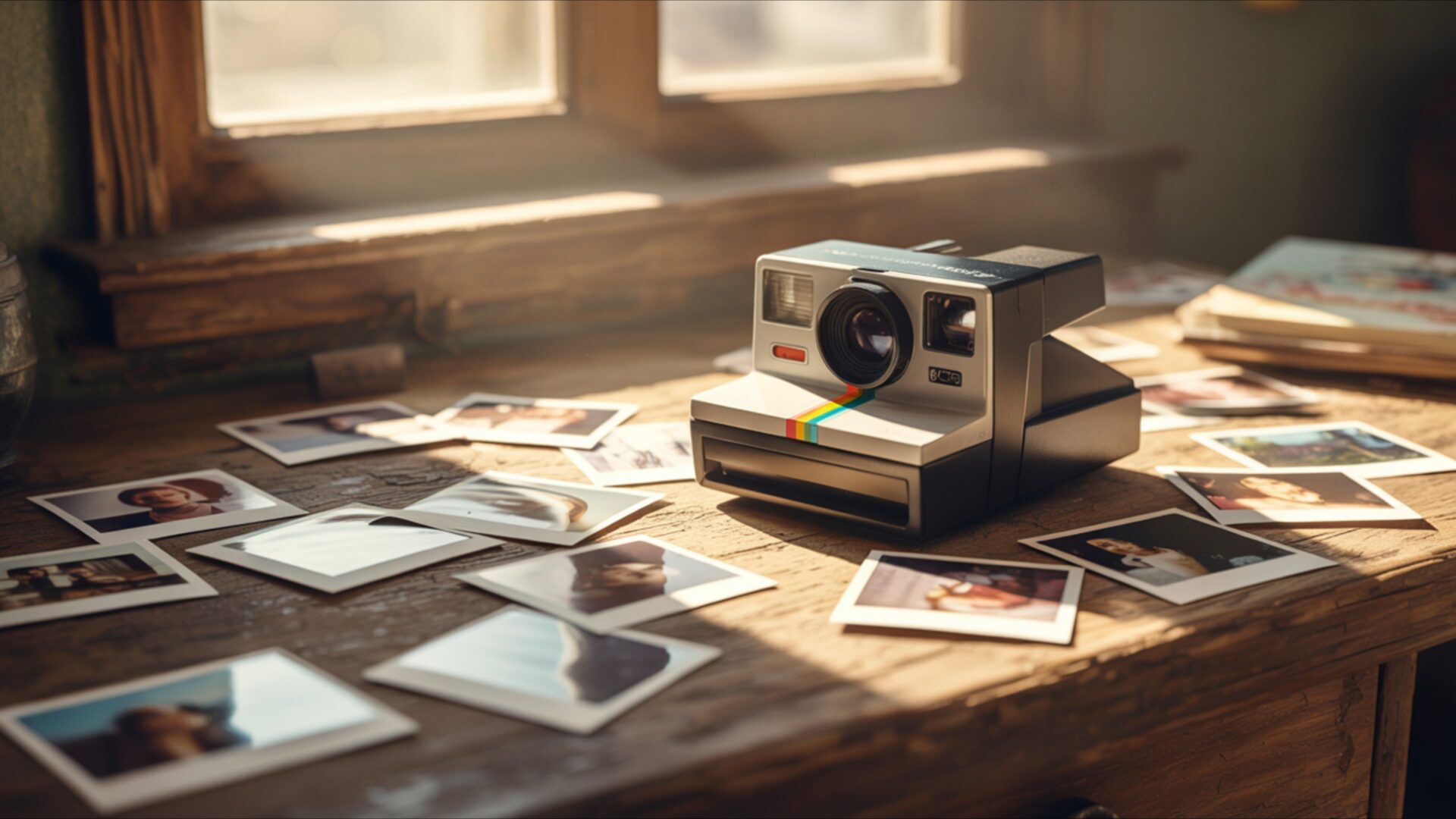
📼 Polaroid Camera With Printed Photos Spread Around 4K UHD (3840x2160) Wallpaper


❤ Share this wallpaper:
WhatsApp Facebook Twitter / X Pinterest LinkedIn Copy Link for Instagram Telegram Reddit Email




💡 Below is relevant information on how to install wallpapers on different devices 👇


This 4K wallpaper is the best choice for testing your OLED professional display resolution. Compared to others, our high-performance tool provides a premium look for any high-end smartphone or desktop setup.




"Personalize this wallpaper or upload your own image to create the perfect mobile background 👇"
Customize Polaroid Camera With Printed Photos Spread Around for Mobile Wallpapers
iPhone • Samsung • Xiaomi • Google Pixel • Android • Huawei • (Others)
720×1600 • 1080×1920 • 1080×2340 • 1080×2400 • 1284×2778 • 1440×3088Please use Portrait Mode for a better experience (Optional)
Overview – Polaroid Camera With Printed Photos Spread Around
Polaroid Camera With Printed Photos Spread Around captures the essence of the Retro category, presenting a scene steeped in nostalgia and tangible memories. The composition centers around a classic Polaroid camera, its iconic form immediately evoking a sense of bygone eras. Printed photos, scattered artfully around the camera, create a narrative of captured moments, each image hinting at stories and experiences. The arrangement suggests a deliberate curation, a personal collection of cherished memories brought to life.
Soft lighting plays a crucial role in setting the mood, casting gentle shadows that enhance the vintage feel. It illuminates the scene with a warm glow, highlighting the textures of the retro desk and the surfaces of the Polaroid prints. This diffused light adds depth and dimension, creating a visually appealing and inviting image. The focus is sharp on the camera and the immediate cluster of photos, while the surrounding elements are subtly blurred, drawing the viewer’s eye to the heart of the arrangement. The overall effect is one of intimacy and reflection, inviting the viewer to contemplate their own memories and experiences.
The visual theme emphasizes the tactile nature of instant film photography. Each photograph, with its unique border and slightly imperfect print quality, possesses a charm that digital images often lack. The arrangement of the photos suggests a timeline, a collection of moments frozen in time. The retro desk serves as a fitting stage for this display, its worn surface and classic design adding to the overall sense of nostalgia. The scene composition is carefully balanced, with the camera acting as the anchor and the photos radiating outwards, creating a sense of visual harmony. It’s a stylish HD artwork that evokes a sense of warmth and familiarity.
This desktop background offers a unique way to personalize your desktop with a touch of vintage charm. The high-resolution image ensures that every detail, from the texture of the Polaroid prints to the subtle grain of the retro desk, is rendered with clarity and precision. It’s a computer screen background that transforms your monitor into a window to the past, a reminder of simpler times and cherished memories. The 3840×2160 resolution delivers exceptional visual fidelity, making it an ideal choice for those who appreciate fine detail and aesthetic layout.
This 4k wallpaper is available for quick download, allowing you to instantly infuse your digital space with a nostalgic vibe. It’s a perfect choice for a laptop wallpaper or tablet background, bringing a touch of personality and style to your everyday devices. Get it now and enjoy this beautiful Polaroid Camera With Printed Photos Spread Around image in stunning detail. In addition to the highest quality 4K version, this visual theme is also available in 2K and Full HD versions, ensuring compatibility with a wide range of screens and devices.
Wallpaper license: CC BY-NC-ND 4.0 · Credit: HDPeek.com
Remove Black Bars | Fit to Any Screen Size | CSS Fixer & Minifier | Compress Image Online | Image Converter Online | What Is My Screen Resolution? | Wallpaper Upscaler Online
Explore Categories
💡 How to Install Wallpaper on Different Devices
Windows PC:
Right-click on the wallpaper image. Select "Set as desktop background" or "Set as wallpaper". Adjust the fit (Fill, Fit, Stretch, Tile, Center) in Settings > Personalization > Background.Mac:
Right-click on the wallpaper image. Select "Set Desktop Picture". Alternatively, go to System Preferences > Desktop & Screen Saver and choose your image.iPhone / iPad (iOS):
Open the wallpaper image in Photos. Tap the Share button and select "Use as Wallpaper". Move and scale the image, then tap "Set" > Choose "Set Lock Screen", "Set Home Screen", or "Set Both".Android:
Open the wallpaper image in your Gallery app. Tap the Menu or Options button, then select "Set as wallpaper". Choose Home screen, Lock screen, or Both. Adjust the crop if needed and confirm.Linux (Ubuntu / others):
Right-click on the wallpaper image. Select "Set as Desktop Background" or "Set as Wallpaper". Adjust settings if your desktop environment allows multiple monitors.
Tips:
- For best quality, download the image in the resolution that matches your screen.
- Use 16:9 for widescreens, 1:1 for square displays.
- On mobile devices, choose "Set Both" for a consistent look on Home and Lock screens.
