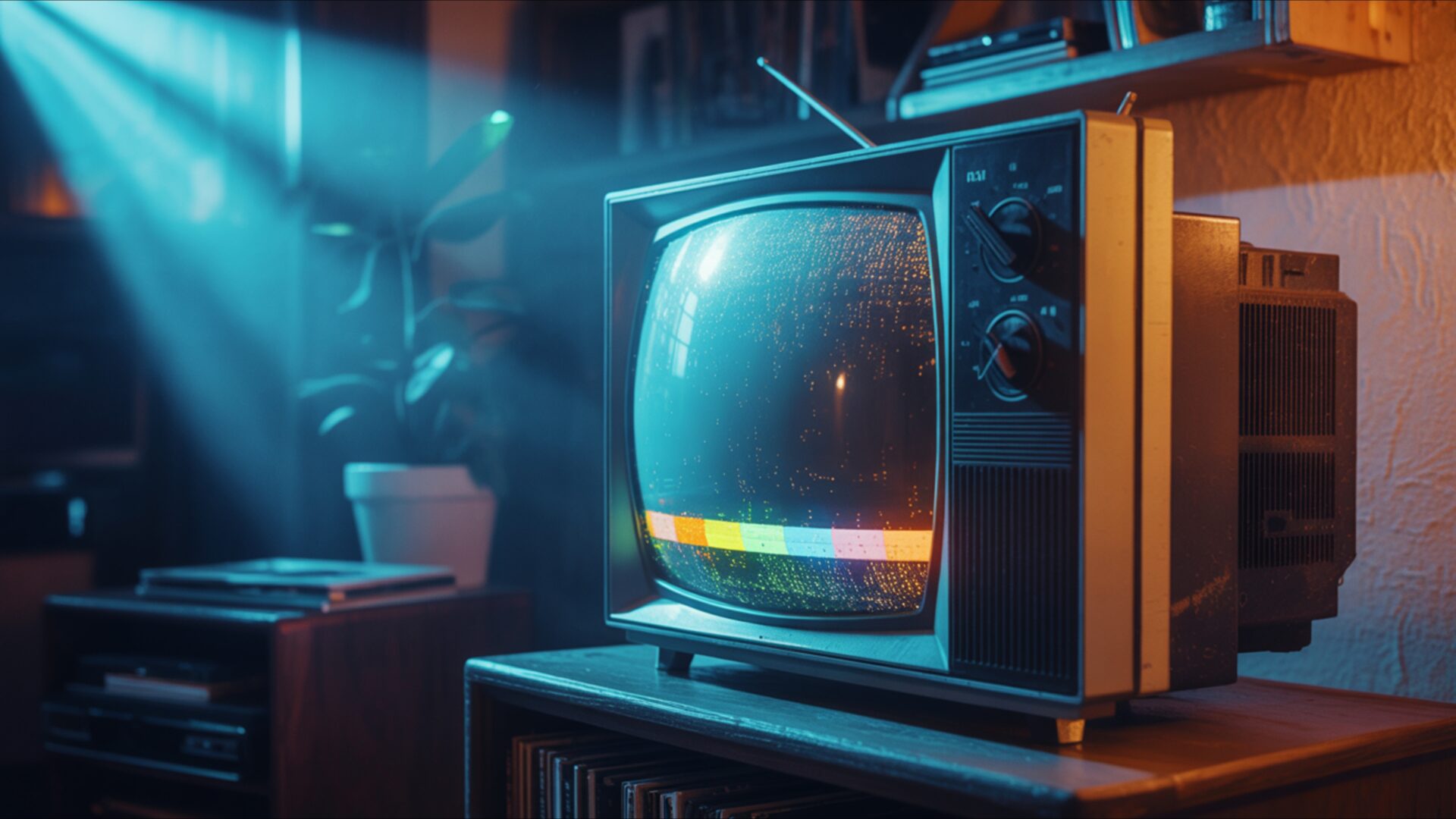
📼 Old CRT TV Glowing in Dark Room 4K UHD (3840x2160) Wallpaper
 Vintage Cassette Tapes Scattered on Wooden Desk
 Retro Game Console on Carpet With Two Controllers
❤ Share this wallpaper:
WhatsApp Facebook Twitter / X Pinterest LinkedIn Copy Link for Instagram Telegram Reddit Email





💡 Below is relevant information on how to install wallpapers on different devices 👇



This 4K wallpaper is the best choice for testing your OLED professional display resolution. Compared to others, our high-performance tool provides a premium look for any high-end smartphone or desktop setup.






"Personalize this wallpaper or upload your own image to create the perfect mobile background 👇"
Customize Old CRT TV Glowing in Dark Room for Mobile Wallpapers
iPhone • Samsung • Xiaomi • Google Pixel • Android • Huawei • (Others)
720×1600 • 1080×1920 • 1080×2340 • 1080×2400 • 1284×2778 • 1440×3088Please use Portrait Mode for a better experience (Optional)
Overview – Old CRT TV Glowing in Dark Room
Old CRT TV Glowing in Dark Room captures the essence of the Retro category, presenting a scene steeped in nostalgia and technological history. The image focuses on the soft, radiant glow emanating from an old cathode-ray tube television set, positioned within the confines of a dimly lit room. The composition emphasizes the contrast between the bright screen and the surrounding darkness, creating a focal point that draws the viewer’s eye.
The lighting is a key element, casting subtle neon tints across the surfaces and hinting at the presence of other unseen objects within the space. It evokes a sense of mystery and invites contemplation about the stories the screen might tell. The visual theme is strongly influenced by 80s style, apparent in the design of the television itself and the overall aesthetic layout. The scene composition suggests a moment frozen in time, a snapshot of vintage tech in its natural habitat.
This stylish HD artwork is more than just a picture; it’s a portal to a bygone era. The dark room glow adds depth and dimension, enhancing the sense of realism and immersion. The high-resolution detail, especially in the 3840×2160 version, allows you to appreciate the subtle textures and imperfections of the vintage tech, from the slightly worn casing of the television to the faint scan lines visible on the retro screen.
Consider this digital canvas as a way to personalize your desktop with a touch of retro charm. It serves as a unique desktop background, offering a visual escape to a time when technology was simpler, yet full of promise. The nostalgic vibe is palpable, making it a perfect choice for those who appreciate the aesthetics of the past. You can use it as a PC wallpaper to bring a unique atmosphere to your workspace.
This computer screen background is designed to be visually appealing without being distracting, providing a subtle yet stylish addition to your digital environment. It also works well as a laptop wallpaper or tablet background, allowing you to carry a piece of the past with you wherever you go. Get it now as a free wallpaper and instantly transform your device’s display.
The scene is carefully crafted to evoke a specific mood, blending elements of darkness, light, and technological history into a cohesive and compelling visual experience. It’s a celebration of a time when CRT TVs were the centerpiece of home entertainment, and the glow of the screen was a familiar sight in many households. This Old CRT TV Glowing in Dark Room is also available in 2K and Full HD versions, ensuring compatibility with a wide range of devices and screen resolutions.
Wallpaper license: CC BY-NC-ND 4.0 · Credit: HDPeek.com
Remove Black Bars | Fit to Any Screen Size | CSS Fixer & Minifier | Compress Image Online | Image Converter Online | What Is My Screen Resolution? | Wallpaper Upscaler Online
Explore Categories
💡 How to Install Wallpaper on Different Devices
Windows PC:
Right-click on the wallpaper image. Select "Set as desktop background" or "Set as wallpaper". Adjust the fit (Fill, Fit, Stretch, Tile, Center) in Settings > Personalization > Background.Mac:
Right-click on the wallpaper image. Select "Set Desktop Picture". Alternatively, go to System Preferences > Desktop & Screen Saver and choose your image.iPhone / iPad (iOS):
Open the wallpaper image in Photos. Tap the Share button and select "Use as Wallpaper". Move and scale the image, then tap "Set" > Choose "Set Lock Screen", "Set Home Screen", or "Set Both".Android:
Open the wallpaper image in your Gallery app. Tap the Menu or Options button, then select "Set as wallpaper". Choose Home screen, Lock screen, or Both. Adjust the crop if needed and confirm.Linux (Ubuntu / others):
Right-click on the wallpaper image. Select "Set as Desktop Background" or "Set as Wallpaper". Adjust settings if your desktop environment allows multiple monitors.
Tips:
- For best quality, download the image in the resolution that matches your screen.
- Use 16:9 for widescreens, 1:1 for square displays.
- On mobile devices, choose "Set Both" for a consistent look on Home and Lock screens.
