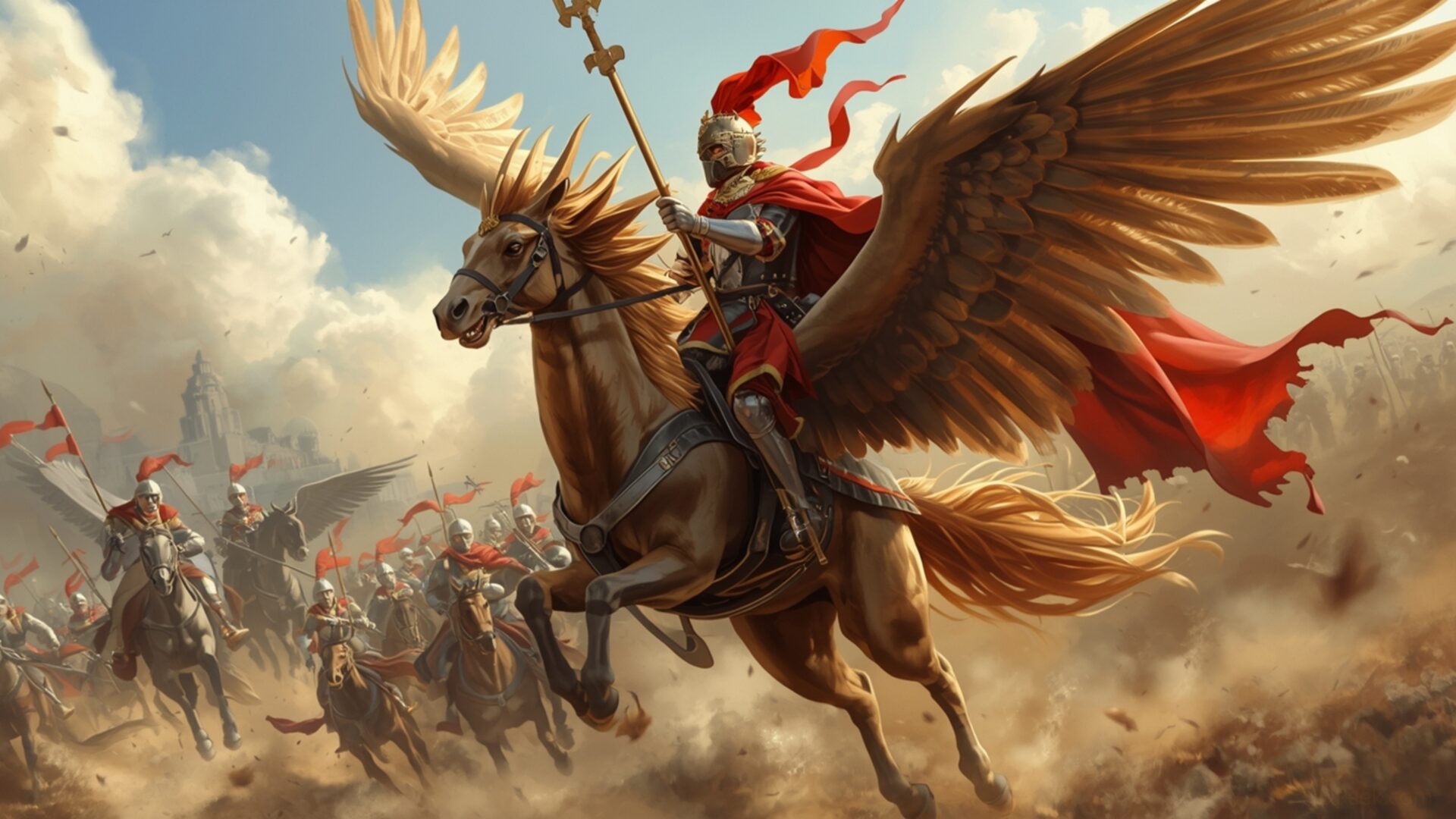
🐉 Gryphon Rider Air Cavalry Charge 4K UHD (3840x2160) Wallpaper

❤ Share this wallpaper:
WhatsApp Facebook Twitter / X Pinterest LinkedIn Copy Link for Instagram Telegram Reddit Email


💡 Below is relevant information on how to install wallpapers on different devices 👇

This 4K wallpaper is the best choice for testing your OLED professional display resolution. Compared to others, our high-performance tool provides a premium look for any high-end smartphone or desktop setup.



"Personalize this wallpaper or upload your own image to create the perfect mobile background 👇"
Customize Gryphon Rider Air Cavalry Charge for Mobile Wallpapers
iPhone • Samsung • Xiaomi • Google Pixel • Android • Huawei • (Others)
720×1600 • 1080×1920 • 1080×2340 • 1080×2400 • 1284×2778 • 1440×3088Please use Portrait Mode for a better experience (Optional)
Overview – Gryphon Rider Air Cavalry Charge
Gryphon Rider Air Cavalry Charge captures the intensity of the Fantasy category, presenting a scene of aerial combat with a medieval flair. The composition immediately draws the eye to the dynamic arrangement of gryphon riders, each figure meticulously rendered to convey a sense of motion and purpose. The lighting plays a crucial role, casting long shadows that accentuate the depth of the scene and highlight the textures of the gryphons’ feathers and the riders’ armor. This high-resolution image showcases a dramatic battle unfolding in the skies.
The visual style evokes classic fantasy artwork, blending realism with imaginative elements. Notice how the artist uses perspective to create a sense of vastness, making the air cavalry charge feel truly epic. Color choices are deliberate, with warm tones dominating the foreground to emphasize the heat of battle, while cooler hues in the background suggest the limitless expanse of the sky. It is a stylish HD artwork.
Consider the details: the intricate designs on the riders’ shields, the powerful musculature of the gryphons, and the subtle expressions on the characters’ faces. All these elements contribute to a rich and immersive experience. The air-force aspect is subtly conveyed through the coordinated movements of the gryphon riders, suggesting a disciplined and well-trained fighting force. The overall effect is one of controlled chaos, a moment frozen in time that invites the viewer to imagine the events leading up to and following this dramatic encounter.
This 4k wallpaper is perfect as a desktop background for anyone who appreciates fantasy art or enjoys the thrill of aerial combat. It transforms your computer screen background into a window onto another world, offering a daily dose of inspiration and adventure. The image background is carefully crafted to be visually engaging without being distracting, making it ideal for both work and leisure. It is a great way to personalize your desktop.
If you are looking to get it now, this PC wallpaper is available for quick download and is free of charge. It is also suitable as a laptop wallpaper, notebook wallpaper, or even a mobile background for your smartphone wallpaper or tablet background. The 3840×2160 resolution ensures that every detail is crisp and clear, even on large screens. Versions in 2K and Full HD are also available, ensuring optimal display quality across a range of devices. Experience the thrill of Gryphon Rider Air Cavalry Charge on your screen today.
Wallpaper license: CC BY-NC-ND 4.0 · Credit: HDPeek.com
Remove Black Bars | Fit to Any Screen Size | CSS Fixer & Minifier | Compress Image Online | Image Converter Online | What Is My Screen Resolution? | Wallpaper Upscaler Online
Explore Categories
💡 How to Install Wallpaper on Different Devices
Windows PC:
Right-click on the wallpaper image. Select "Set as desktop background" or "Set as wallpaper". Adjust the fit (Fill, Fit, Stretch, Tile, Center) in Settings > Personalization > Background.Mac:
Right-click on the wallpaper image. Select "Set Desktop Picture". Alternatively, go to System Preferences > Desktop & Screen Saver and choose your image.iPhone / iPad (iOS):
Open the wallpaper image in Photos. Tap the Share button and select "Use as Wallpaper". Move and scale the image, then tap "Set" > Choose "Set Lock Screen", "Set Home Screen", or "Set Both".Android:
Open the wallpaper image in your Gallery app. Tap the Menu or Options button, then select "Set as wallpaper". Choose Home screen, Lock screen, or Both. Adjust the crop if needed and confirm.Linux (Ubuntu / others):
Right-click on the wallpaper image. Select "Set as Desktop Background" or "Set as Wallpaper". Adjust settings if your desktop environment allows multiple monitors.
Tips:
- For best quality, download the image in the resolution that matches your screen.
- Use 16:9 for widescreens, 1:1 for square displays.
- On mobile devices, choose "Set Both" for a consistent look on Home and Lock screens.
