🏎️ A Stealth Bomber Flying Low Over a Mountain Range 4K UHD (3840x2160) Wallpaper


❤ Share this wallpaper:
WhatsApp Facebook Twitter / X Pinterest LinkedIn Copy Link for Instagram Telegram Reddit Email





💡 Below is relevant information on how to install wallpapers on different devices 👇





This 4K wallpaper is the best choice for testing your OLED professional display resolution. Compared to others, our high-performance tool provides a premium look for any high-end smartphone or desktop setup.

"Personalize this wallpaper or upload your own image to create the perfect mobile background 👇"
Customize A Stealth Bomber Flying Low Over a Mountain Range for Mobile Wallpapers
iPhone • Samsung • Xiaomi • Google Pixel • Android • Huawei • (Others)
720×1600 • 1080×1920 • 1080×2340 • 1080×2400 • 1284×2778 • 1440×3088Please use Portrait Mode for a better experience (Optional)
Overview – A Stealth Bomber Flying Low Over a Mountain Range
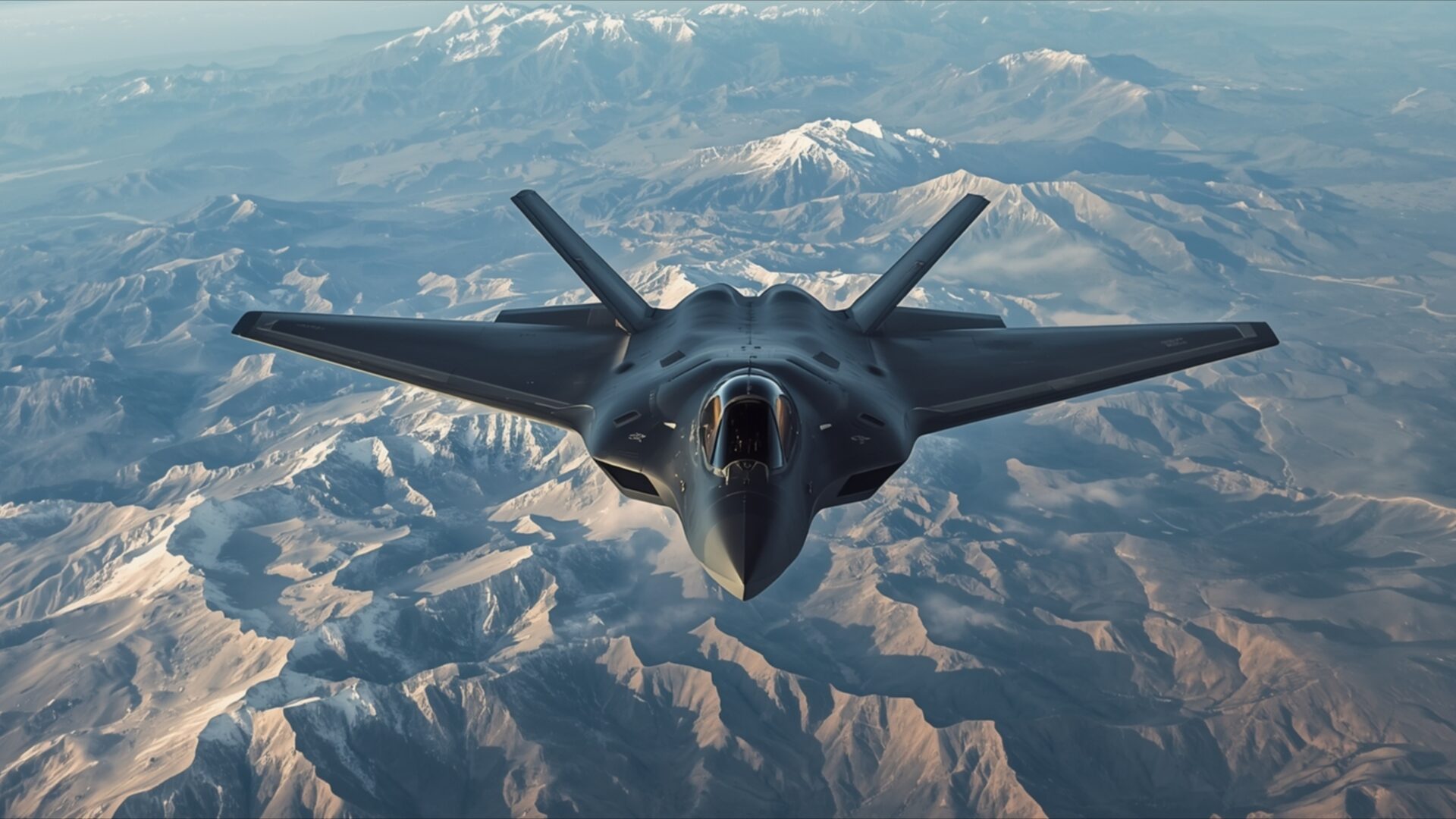
A Stealth Bomber Flying Low Over a Mountain Range sets the scene for this striking Cars & Vehicles visual theme. The image captures a formidable stealth bomber in a low-altitude flight path, its dark, angular silhouette stark against the rugged terrain below. The lighting suggests a clear day, with sunlight illuminating the peaks and valleys of the mountain range, casting subtle shadows that define the landscape’s texture. The color palette is dominated by earthy tones of brown, tan, and grey for the mountains, contrasted by the muted blues and whites of the sky and distant clouds.
The composition places the aircraft prominently in the foreground, its advanced design hinting at its purpose. The perspective is from slightly above and in front of the bomber, giving a sense of its imposing presence as it navigates the mountainous expanse. The details of the aircraft’s stealth features are subtly rendered, emphasizing its sleek and aerodynamic form. The surrounding environment appears arid and remote, enhancing the feeling of a solitary mission. This scene composition evokes a sense of power and precision in flight.
The overall mood is one of quiet intensity and focused action. There is a sense of the aircraft moving with purpose through a vast and challenging environment. The image’s clarity and detail are exceptional, making it a compelling choice for any enthusiast of aviation or dramatic landscapes. This particular visual theme is ideal for enhancing your desktop background with a touch of military might and natural grandeur.
You can download this 3840×2160 resolution image to bring this powerful scene to your screen. We offer this 4k wallpaper and other high-resolution options, including 2K and Full HD, for your viewing pleasure.
Wallpaper license: CC BY-NC-ND 4.0 · Credit: HDPeek.com
Remove Black Bars | Fit to Any Screen Size | CSS Fixer & Minifier | Compress Image Online | Image Converter Online | What Is My Screen Resolution? | Wallpaper Upscaler Online
Explore Categories
💡 How to Install Wallpaper on Different Devices
Windows PC:
Right-click on the wallpaper image. Select "Set as desktop background" or "Set as wallpaper". Adjust the fit (Fill, Fit, Stretch, Tile, Center) in Settings > Personalization > Background.Mac:
Right-click on the wallpaper image. Select "Set Desktop Picture". Alternatively, go to System Preferences > Desktop & Screen Saver and choose your image.iPhone / iPad (iOS):
Open the wallpaper image in Photos. Tap the Share button and select "Use as Wallpaper". Move and scale the image, then tap "Set" > Choose "Set Lock Screen", "Set Home Screen", or "Set Both".Android:
Open the wallpaper image in your Gallery app. Tap the Menu or Options button, then select "Set as wallpaper". Choose Home screen, Lock screen, or Both. Adjust the crop if needed and confirm.Linux (Ubuntu / others):
Right-click on the wallpaper image. Select "Set as Desktop Background" or "Set as Wallpaper". Adjust settings if your desktop environment allows multiple monitors.
Tips:
- For best quality, download the image in the resolution that matches your screen.
- Use 16:9 for widescreens, 1:1 for square displays.
- On mobile devices, choose "Set Both" for a consistent look on Home and Lock screens.
