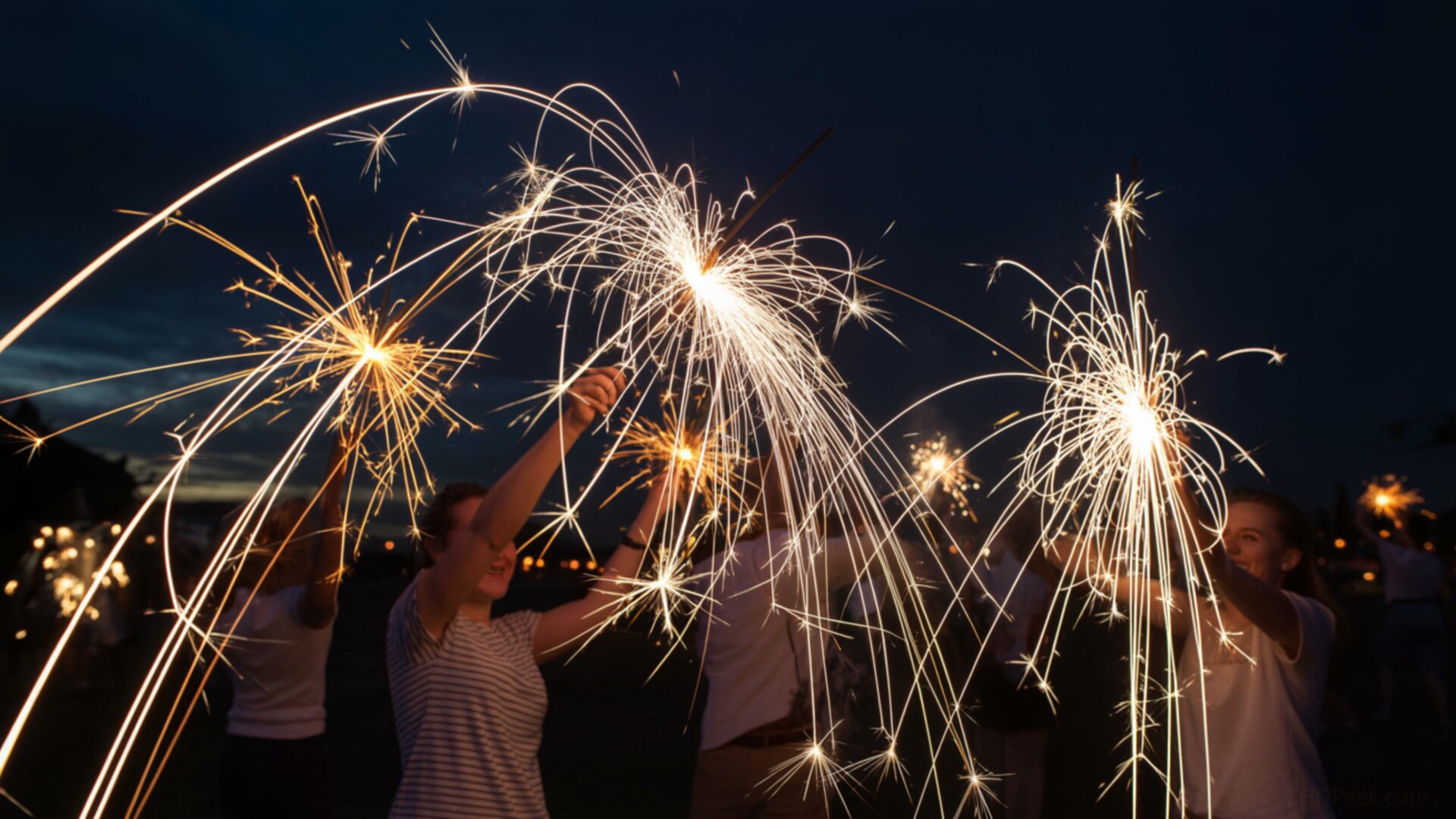
🎉️ 4th of July Sparklers Light Trails Night 4K UHD (3840x2160) Wallpaper


❤ Share this wallpaper:
WhatsApp Facebook Twitter / X Pinterest LinkedIn Copy Link for Instagram Telegram Reddit Email





💡 Below is relevant information on how to install wallpapers on different devices 👇





This 4K wallpaper is the best choice for testing your OLED professional display resolution. Compared to others, our high-performance tool provides a premium look for any high-end smartphone or desktop setup.






"Personalize this wallpaper or upload your own image to create the perfect mobile background 👇"
Customize 4th of July Sparklers Light Trails Night for Mobile Wallpapers
iPhone • Samsung • Xiaomi • Google Pixel • Android • Huawei • (Others)
720×1600 • 1080×1920 • 1080×2340 • 1080×2400 • 1284×2778 • 1440×3088Please use Portrait Mode for a better experience (Optional)
Overview – 4th of July Sparklers Light Trails Night
“4th of July Sparklers Light Trails Night” captures the spirit of the Seasonal & Events category with its vibrant display of light and movement against a dark canvas. This desktop background presents a captivating scene, transforming simple sparklers into a dynamic spectacle of light trails. The composition focuses on the swirling patterns created by the sparklers, offering a sense of celebratory energy and movement frozen in time. It’s a stylish HD artwork that brings the excitement of a nighttime celebration directly to your computer screen.
The high-resolution image emphasizes the contrast between the bright, fiery trails and the deep, enveloping darkness of the night. Each sparkler’s path is rendered with clarity, showcasing the intricate details of the light’s intensity and color variations. The overall effect is a mesmerizing dance of light, creating a visually stimulating and festive atmosphere. The choice of a nighttime setting enhances the drama, allowing the sparklers to truly shine and command attention.
Consider the way this wallpaper for pc can personalize your desktop, adding a touch of celebratory flair. The dynamic nature of the light trails creates a sense of depth and dimension, drawing the viewer into the scene. It’s more than just a picture; it’s an experience, evoking the joy and excitement associated with 4th of July celebrations. The careful balance of light and shadow contributes to a visually appealing and engaging computer screen background.
The “4th of July” theme is subtly woven into the design through the use of sparklers, a quintessential element of Independence Day festivities. However, the abstract nature of the light trails allows this image background to be appreciated year-round, not just during the holiday season. It serves as a reminder of joyful celebrations and the beauty of light in motion. This 3840×2160 resolution ensures that every detail is crisp and clear, making it a stunning addition to any laptop wallpaper or tablet background.
You can download wallpaper and instantly transform your screen into a vibrant display of light and color. This free wallpaper offers a quick download and an easy way to refresh your visual experience. Beyond the 4K version, this digital background is also available in 2K and Full HD versions, ensuring compatibility with a wide range of devices and screen resolutions. Experience the captivating beauty of “4th of July Sparklers Light Trails Night” on your device.
Wallpaper license: CC BY-NC-ND 4.0 · Credit: HDPeek.com
Remove Black Bars | Fit to Any Screen Size | CSS Fixer & Minifier | Compress Image Online | Image Converter Online | What Is My Screen Resolution? | Wallpaper Upscaler Online
Explore Categories
💡 How to Install Wallpaper on Different Devices
Windows PC:
Right-click on the wallpaper image. Select "Set as desktop background" or "Set as wallpaper". Adjust the fit (Fill, Fit, Stretch, Tile, Center) in Settings > Personalization > Background.Mac:
Right-click on the wallpaper image. Select "Set Desktop Picture". Alternatively, go to System Preferences > Desktop & Screen Saver and choose your image.iPhone / iPad (iOS):
Open the wallpaper image in Photos. Tap the Share button and select "Use as Wallpaper". Move and scale the image, then tap "Set" > Choose "Set Lock Screen", "Set Home Screen", or "Set Both".Android:
Open the wallpaper image in your Gallery app. Tap the Menu or Options button, then select "Set as wallpaper". Choose Home screen, Lock screen, or Both. Adjust the crop if needed and confirm.Linux (Ubuntu / others):
Right-click on the wallpaper image. Select "Set as Desktop Background" or "Set as Wallpaper". Adjust settings if your desktop environment allows multiple monitors.
Tips:
- For best quality, download the image in the resolution that matches your screen.
- Use 16:9 for widescreens, 1:1 for square displays.
- On mobile devices, choose "Set Both" for a consistent look on Home and Lock screens.
