💔 Old Photo Lying on Floor 4K UHD (3840x2160) Wallpaper


❤ Share this wallpaper:
WhatsApp Facebook Twitter / X Pinterest LinkedIn Copy Link for Instagram Telegram Reddit Email





💡 Below is relevant information on how to install wallpapers on different devices 👇




This 4K wallpaper is the best choice for testing your OLED professional display resolution. Compared to others, our high-performance tool provides a premium look for any high-end smartphone or desktop setup.





"Personalize this wallpaper or upload your own image to create the perfect mobile background 👇"
Customize Old Photo Lying on Floor for Mobile Wallpapers
iPhone • Samsung • Xiaomi • Google Pixel • Android • Huawei • (Others)
720×1600 • 1080×1920 • 1080×2340 • 1080×2400 • 1284×2778 • 1440×3088Please use Portrait Mode for a better experience (Optional)
Overview – Old Photo Lying on Floor
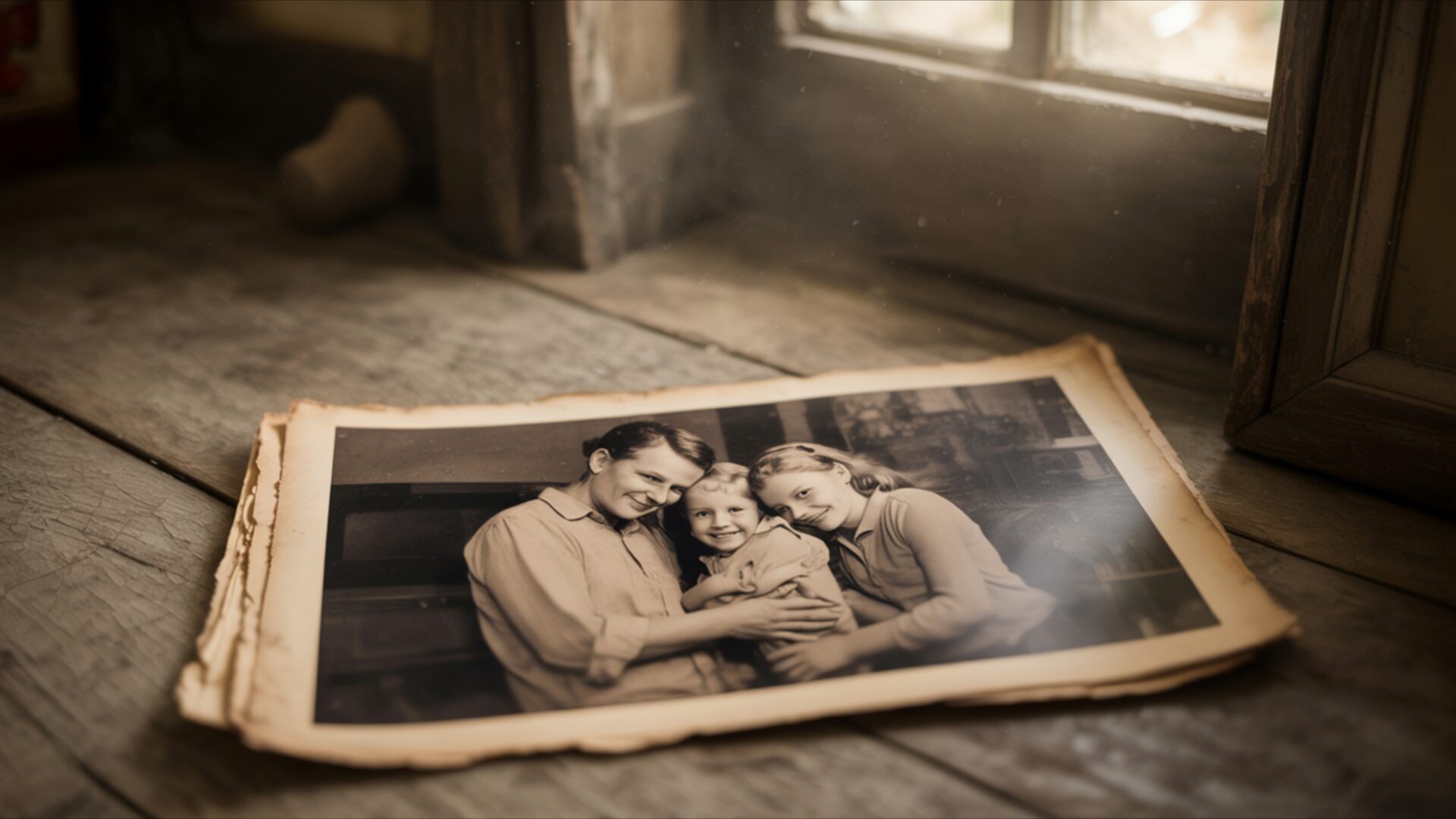
Old Photo Lying on Floor captures a poignant moment within the Heartbreak category, presenting a visual theme that speaks volumes about lost connections and cherished memories. The image showcases a sepia-toned photograph, slightly worn and creased, resting on a rustic wooden floor. Light filters in from an unseen window to the right, casting a soft glow across the scene and highlighting the textures of the aged paper and the rough-hewn planks beneath. The composition draws the eye directly to the family portrait, a tender depiction of three individuals, their faces turned towards each other in a moment of shared affection.
The lighting is subdued, creating a moody atmosphere that enhances the nostalgic tone of the image. Shadows play a significant role, obscuring details in the background and focusing attention on the central subject. This deliberate use of light and shadow contributes to the emotional weight of the scene, suggesting a quiet room where time has stood still. The color palette is dominated by warm browns and muted yellows, characteristic of old photographs, further reinforcing the sense of a bygone era. The overall aesthetic layout is simple yet powerful, relying on the inherent emotional resonance of the subject matter.
This particular visual theme evokes a deep sense of longing and reflection, making it a fitting choice for anyone exploring themes of remembrance and the passage of time. The image invites contemplation, allowing viewers to project their own experiences and emotions onto the scene. It’s a quiet narrative, told through the simple act of an old photograph lying forgotten, yet still holding its power to stir the heart. The detailed textures, from the grain of the wood to the subtle imperfections on the photograph’s surface, add a layer of realism that grounds the emotional impact.
The image is presented in stunning 3840×2160 resolution, ensuring every detail is rendered with clarity. You can download this wallpaper for your PC wallpaper, and we also offer 4K, 2K, and Full HD versions for your convenience. This free wallpaper is available for instant download. Old Photo Lying on Floor.
Wallpaper license: CC BY-NC-ND 4.0 · Credit: HDPeek.com
Remove Black Bars | Fit to Any Screen Size | CSS Fixer & Minifier | Compress Image Online | Image Converter Online | What Is My Screen Resolution? | Wallpaper Upscaler Online
Explore Categories
💡 How to Install Wallpaper on Different Devices
Windows PC:
Right-click on the wallpaper image. Select "Set as desktop background" or "Set as wallpaper". Adjust the fit (Fill, Fit, Stretch, Tile, Center) in Settings > Personalization > Background.Mac:
Right-click on the wallpaper image. Select "Set Desktop Picture". Alternatively, go to System Preferences > Desktop & Screen Saver and choose your image.iPhone / iPad (iOS):
Open the wallpaper image in Photos. Tap the Share button and select "Use as Wallpaper". Move and scale the image, then tap "Set" > Choose "Set Lock Screen", "Set Home Screen", or "Set Both".Android:
Open the wallpaper image in your Gallery app. Tap the Menu or Options button, then select "Set as wallpaper". Choose Home screen, Lock screen, or Both. Adjust the crop if needed and confirm.Linux (Ubuntu / others):
Right-click on the wallpaper image. Select "Set as Desktop Background" or "Set as Wallpaper". Adjust settings if your desktop environment allows multiple monitors.
Tips:
- For best quality, download the image in the resolution that matches your screen.
- Use 16:9 for widescreens, 1:1 for square displays.
- On mobile devices, choose "Set Both" for a consistent look on Home and Lock screens.
